EasyManua.ls Logo

GW Instek APS-1102A - Setting Superimposed AC Waveform

GW Instek APS-1102A
285 pages
Print Icon
To Next Page IconTo Next Page
To Previous Page IconTo Previous Page
Loading...
APS-1102A User Manual
APS-1102A
4-10
4.1.6 Setting superimposed AC waveform
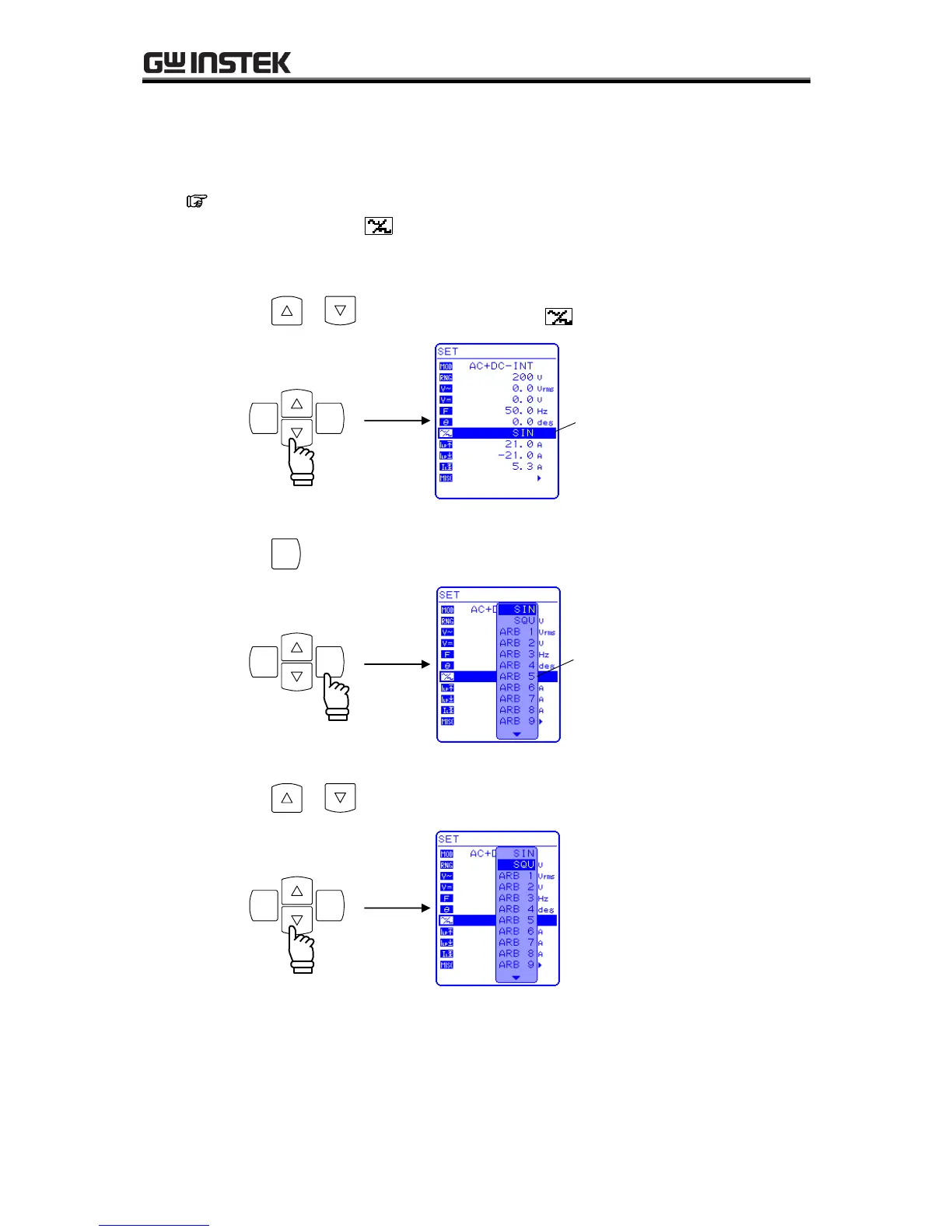
Selects among 16 types of sine waves (SIN), square waves (SQU), and arbitrary waveforms (ARB).
Arbitrary waveforms are generated using data transfers via the USB interface.
See “4.6 Output of Arbitrary Waveforms, for details of arbitrary waveforms.
To select a waveform, select in the SET menu.
Operation steps
1. Press the or key to move the cursor to the icon.

ENTERCANCEL
Cursor
2. Press the
ENTER
key to display the selection box.
ENTERCANCEL
Selection box
3. Press the or key to move the cursor to the waveform to be output.
ENTERCANCEL

Table of Contents

Related product manuals