EasyManua.ls Logo

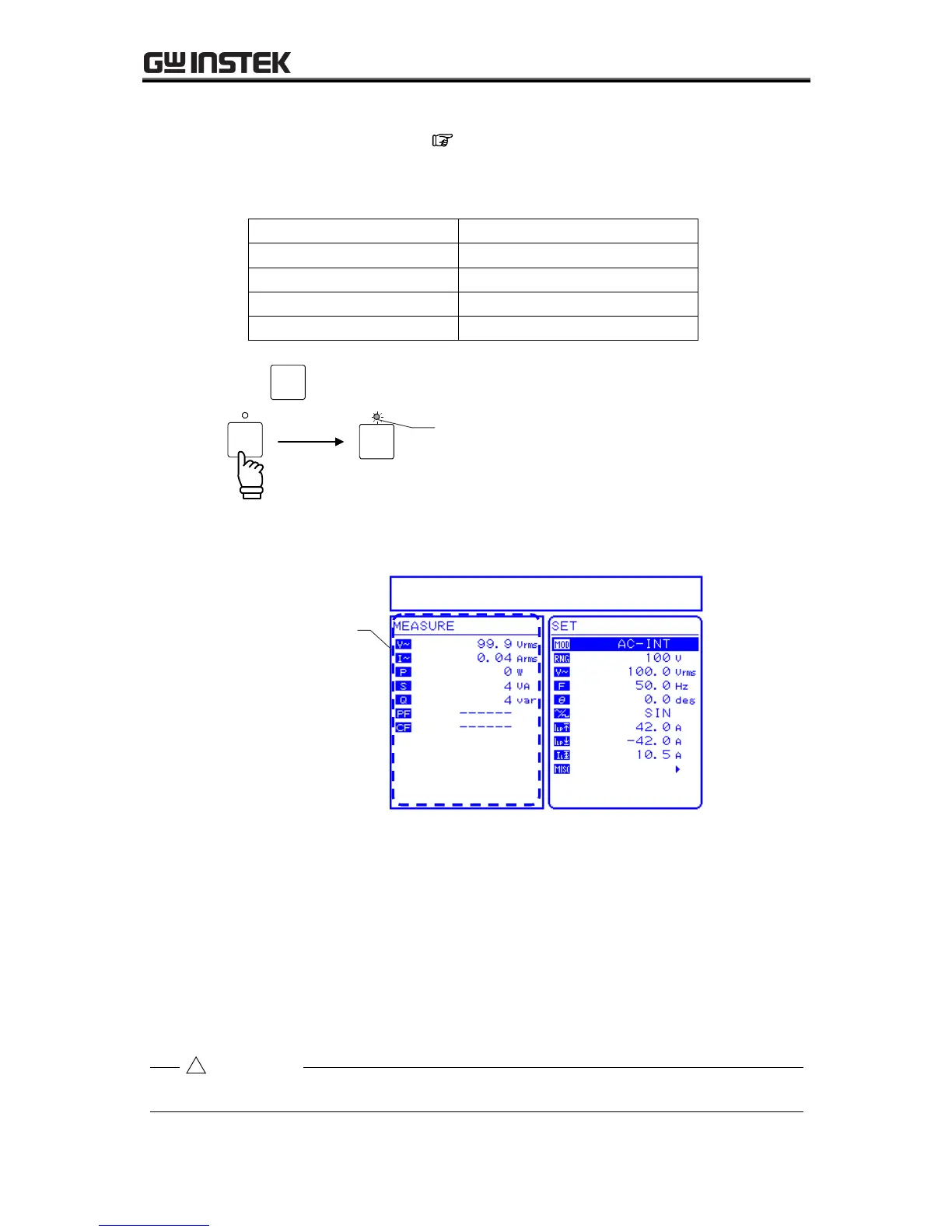
GW Instek APS-1102A - Figure 2-3. Operation Check; Table2-1. Panel Settings for Operation Check

GW Instek APS-1102A
285 pages
Print Icon
To Next Page IconTo Next Page
To Previous Page IconTo Previous Page
Loading...
2 PREPARATIONS BEFORE USE
APS-1102A
2-9
2. Panel settings
Set the APS-1102A as shown below. See 3.4 Main Operation Example, for descriptors
of the settings methods.
Table2-1. Panel Settings for Operation Check
Item
Setting
Output mode
AC-INT mode
Output voltage range
100 V
AC output voltage
100 Vrms
Selected measurement display
RMS
3. Press the
OUTPUT
key to turn on output.
OUTPUT
OUTPUT
Output is off.
Output is on.
Check that the control panel MEASURE screen shows 100 Vrms as the AC output voltage.
Figure 2-3. Operation Check
If the normal values are not displayed, it may be due to an operation fault. Contact GW Instek or
our agent.
4. When you turn off the power, check the OUTPUT on/off LED is off. Then press the power
switch to the bottom () position. This shuts off the power supply and turns off the power
source unit.

Before turning off the power, make sure that the output on/off LED is off.
Output on/off LED is on.
Check display.
CAUTION

Table of Contents

Related product manuals