EasyManua.ls Logo

GW Instek APS-1102A - Checking the Version Number

GW Instek APS-1102A
285 pages
Print Icon
To Next Page IconTo Next Page
To Previous Page IconTo Previous Page
Loading...
8 MAINTENANCE
APS-1102A
8-5
8.4 Checking the Version Number
The APS-1102A firmware version is displayed in the bottom right of the screen for a few seconds after
power-on.
At other times, the version information can be checked via the control panel system information screen, as
described below.
Operation steps
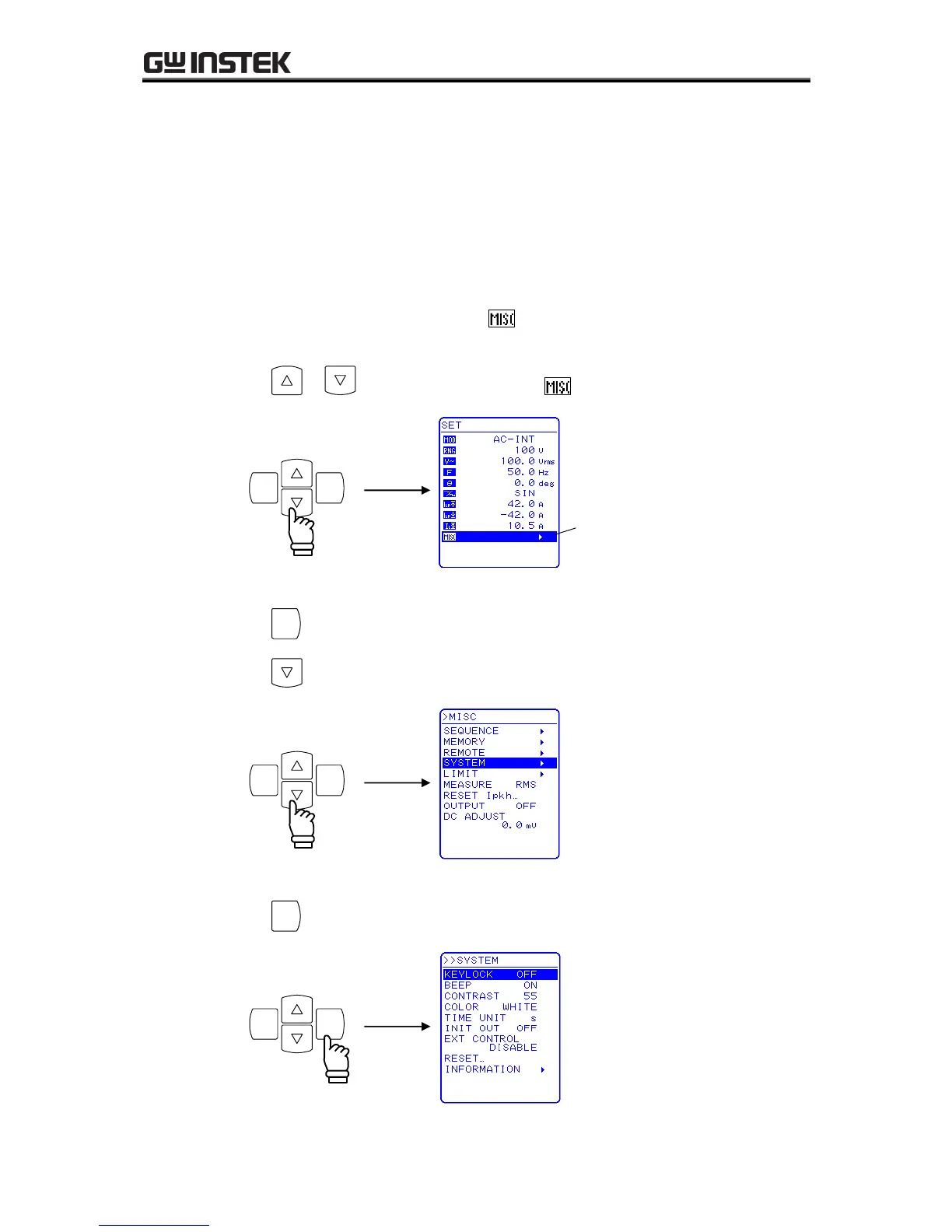
Select the SYSTEM menu from the MISC menu
,
then select “INFORMATION.
1. Press the or key to move the cursor to the icon.

ENTERCANCEL
Cursor
2. Press the
ENTER
key to display the MISC menu.
Press the key to move the cursor to “SYSTEM” .
ENTERCANCEL
3. Press the
ENTER
key to display the SYSTEM screen .
ENTERCANCEL

Table of Contents

Related product manuals