EasyManua.ls Logo

GW Instek APS-1102A - Page 63

GW Instek APS-1102A
285 pages
Print Icon
To Next Page IconTo Next Page
To Previous Page IconTo Previous Page
Loading...
3 PANEL AND BASIC OPERATIONS
APS-1102A
3-29
Operation steps
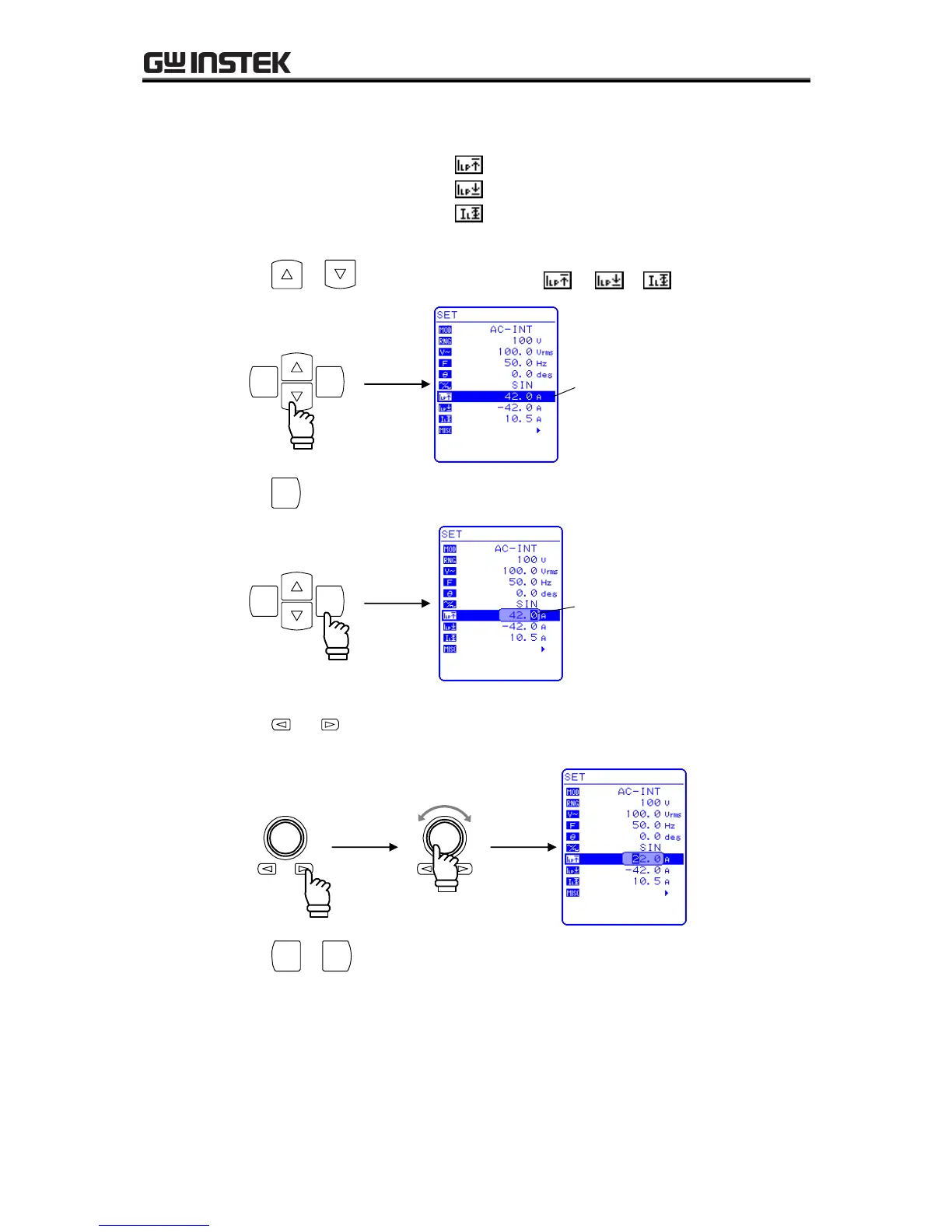
Select the icon in the SET menu corresponding to the desired setting, then set a numerical value.
Peak current limiter (positive):
Peak current limiter (negative):
RMS current limiter:
1. Press the or key to move the cursor to the
,or or
icon.
ENTERCANCEL
Cursor
2. Press the
ENTER
key to display the modification box.
ENTERCANCEL
Modification box
3. Press the and keys to move the cursor to the digit to be changed, turn the MODIFY dial
and set a numerical value. The set value will be reflected in output immediately.
Increase
Decrease
4. Press the
CANCEL
or
ENTER
key to close the modification box.

Table of Contents

Related product manuals