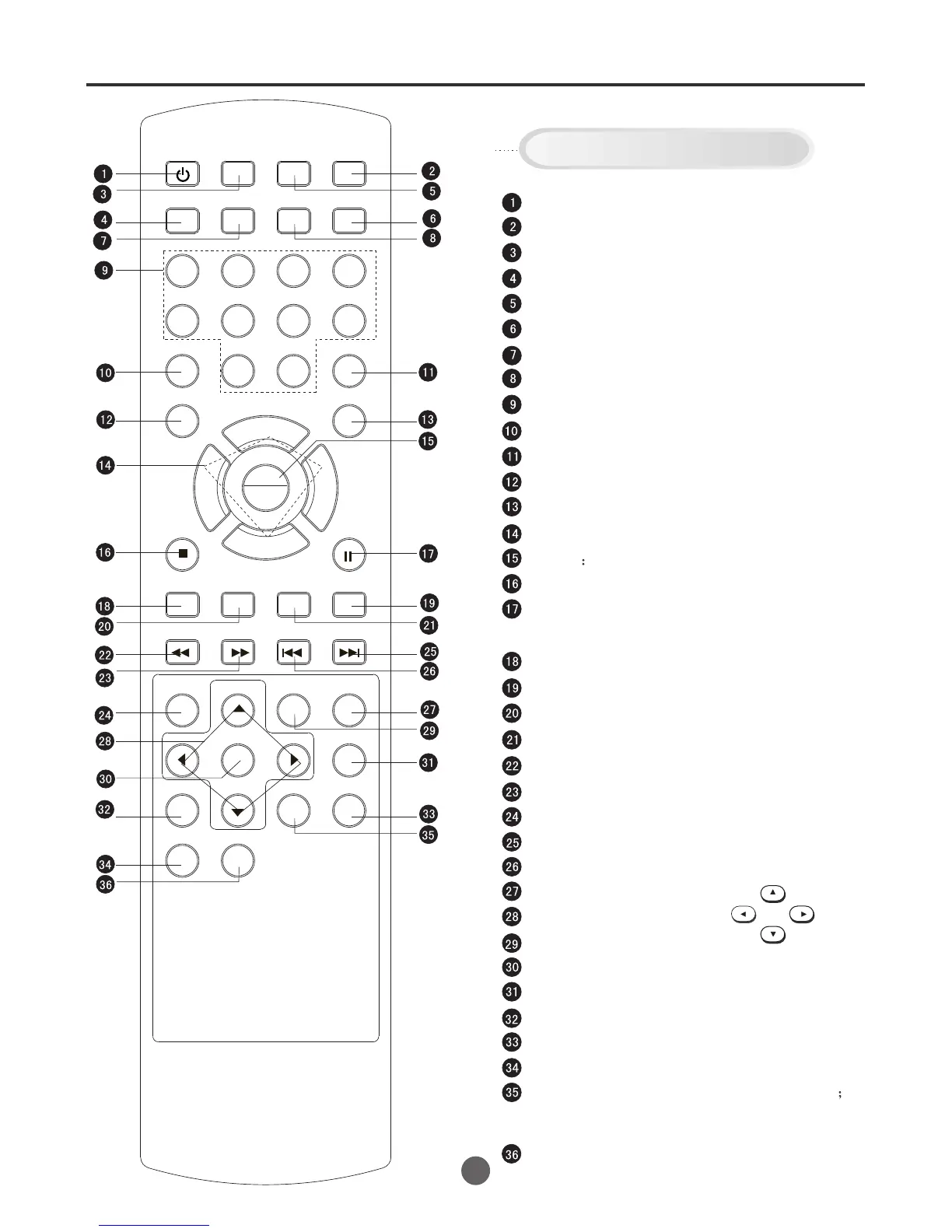
Remote control
7
SEARCH
PICT
OPEN/CLOSEPOWER DVD/TV
CLEAR
SLEEP
DISPLAY SP/SLP
1 2 3
765
9 0
8
CH+
CH-
V- V+
MUTE
10+ REC
PAUSE/STEP
STOP
INPUT
D.MENU REPEAT
TITLE/PBC
MENU
ZOOM
SETUP
ANGLE
SLOW
A-B
AUDIO
SUBTITLEPROGRAM
D.CALL
REV FWD
PREV NEXT
4
POWER: Power on/off
OPEN/CLOSE: Open or Close the tray
DVD/TV mode select
DISPLAY: Call Screen Display
MUTE: Switch off the sound
CLEAR: VCR time clear
SP/SLP select
SLEEP: Sleep timer
Program Number
Picture Menu
Input select
10+
REC: Recording/OTR
Volume/Channel Selection
MENU call the menu up
DVD/VCR STOP
DVD/VCR PAUSE/STEP
D.CALL: DVD screen diaplay
DVD SEARCH
DVD SETUP: Display DVD menu of setup
DVD Zoom
REV: Rewind/Review playback
FWD: Fast Forward/Forward search playback
D.MENU: DVD MENU
NEXT
PREVIOUS
DVD A-B REPEAT
Cursor Move button
REPEAT
PLAY/ENTER
SLOW: Slow-motion playback
ANGLE: Change playback angle of DVD disc
DVD TITLE
PROGRAM: Confirm the timer program
AUDIO: Switches sound between mono and stereo
Change sound track language of DVD; Select
VCR sound between HiFi, INIX and LINEAR.
SUBTITLE: Set Subtitle of a DVD disc
Buttons on the remote control
UP
DOWN
LEFT
RIGHT
Still picture/Recording pause on/off
PLAY
ENTER



 To Next Page