English _85
live viewer
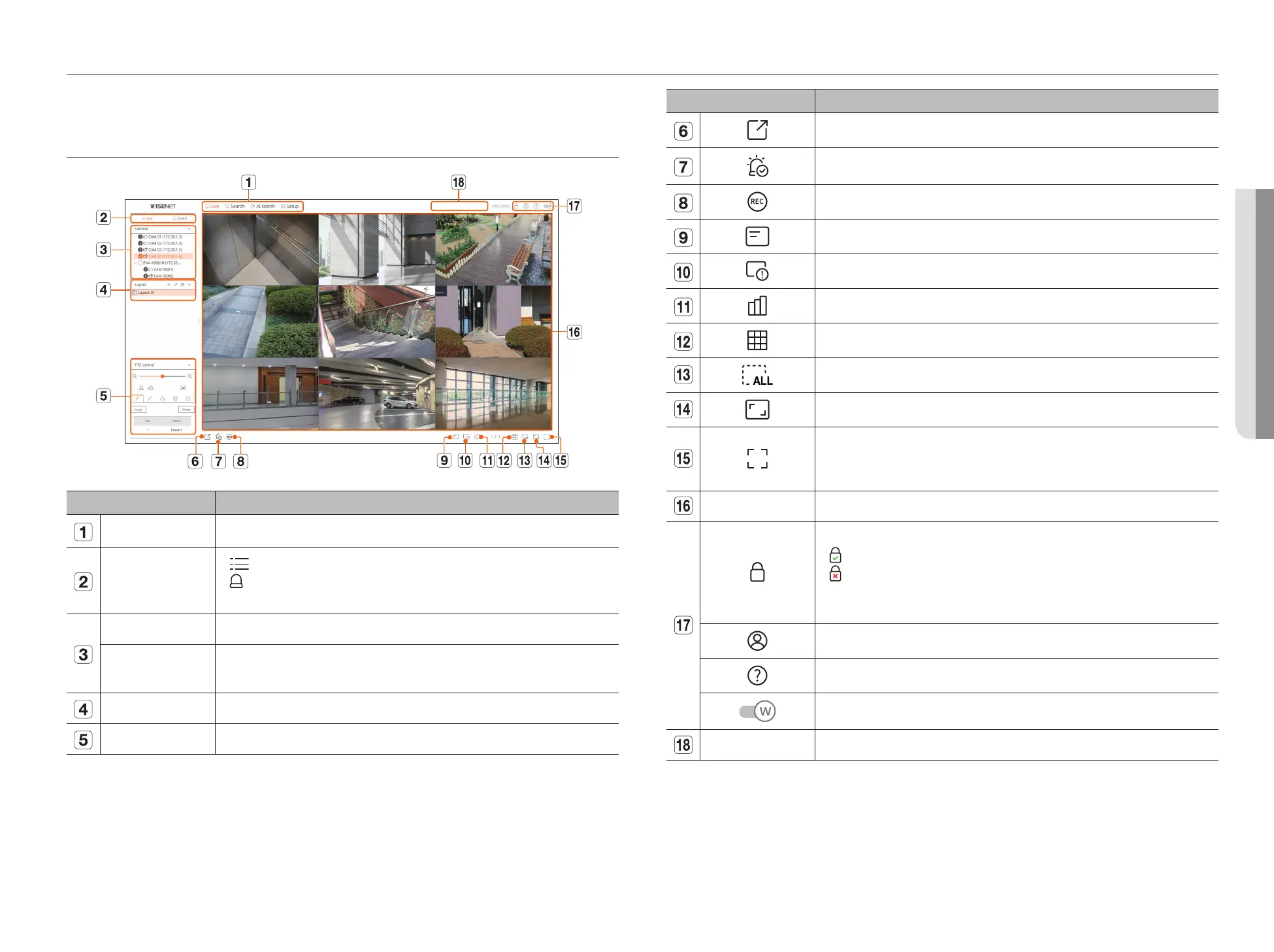
Menu Description
Saves the video saved in the set time of the selected channel in PC in AVI format.
Clears the alarm in the event list and stops the alarm/beep sound for the system status when it is emitted.
Enables the Manual recording function of the recorder.
Displays the information on the OSD screen in the video window.
Shows the selected Channel Information.
Shows the status of all cameras connected to the recorder.
Sets the split screen of the video window.
Removes all screens from the video window.
Shows the video in actual proportions.
It changes to full screen from the current Split Mode.
To exit full screen, press the ESC key on your keyboard.
■
MAC Safari does not support full screen.
Video window Shows the video of the camera connected to the recorder.
Displays the IP address and mutual authentication status of the viewer receiving the video from the recorder.
●
: Mutual authentication connection using WISENET device certificates
●
: Mutual authentication connection without WISENET device certificate
●
– : Connection without mutual authentication
●
No viewer connected : Displayed when there is no viewer connected to the recorder.
The ID of the connected user is displayed.
You are directly connected to the Hanwha Vision homepage (www.HanwhaVision.com).
Changes the color theme of Web Viewer.
System status display Displays the status of the system, hard disk, and network.
• LIVE VIEWER
You can check the video from camera registered in the Recorder connected from a remote PC. Also, you can adjust the
camera and check the network transfer status.
SCREEN LAYOUT OF THE LIVE VIEWER
Menu Description
Menu Click each menu to go to the corresponding menu screen.
List/Event
●
List
: Select to check the camera list.
●
Event
: Select to check the event list.
■
This function is not supported in some models.
Camera list The list of cameras registered in the recorder is displayed.
Event list
Shows a list of events that occurred on the camera.
■
This function is not supported in some models.
Layout list Displays the default layout and a list of created layouts.
PTZ Control Controls the connected PTZ camera.



 To Next Page