Wiring The Unit
Sultan Acoustic Wave Series
7
Sultan Panel Mount Units
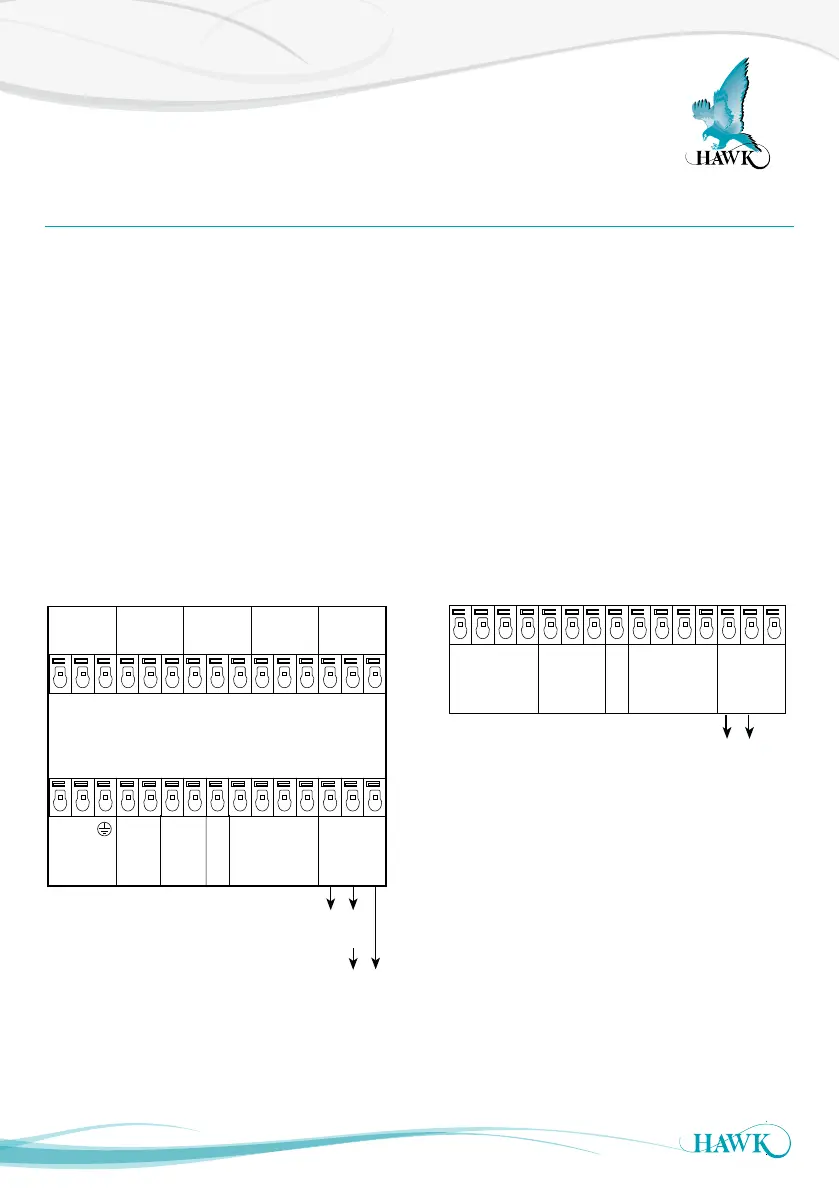
The Sultan Panel Mount has wiring information printed on the back of the unit.
Terminal blocks can be removed during installation
to allow easier wire connection. Take care to return
them to the correct position.
Ensure your power source is deactivated before
handling power wires.
Ensure terminals are open by screwing counter
clockwise with a flat head screwdriver. Place the
exposed wires into the open terminals and tighten
until firm.
The transducer terminals are labeled by colour on the
back panel.
If you are connecting HawkLink communications,
connect the blue wire to B and the white wire to A.
The black wire can be connected to the DC- or GND
terminal next to A.
+
–
A
1L
+
–
N
B
RED
BLACK
BLUE
WHITE
Test In
Is
TRANSDUCERDC-InAC-In 4-20mA
COMMS
RELAY 1
NC
COM
NO
RELAY 2
NC
COM
NO
RELAY 3
NC
COM
NO
RELAY 4
NC
COM
NO
RELAY 5
NC
COM
NO
COMMS
A
B
+
–
Test In
4-20mA
N/C
–
RED
BLACK
BLUE
WHITE
TRANSDUCER
N/C
N/C
N/C
N/C
Sourcing 4-20mA
from Sultan
Sinking 4-20mA
from user device
OR
Sinking 4-20mA
from user device
234 wire version 2 wire version



 To Next Page