Operating Instructions • AT2000 CPK • 07-2019 • v03 • 106-29004
HT Data Management
18
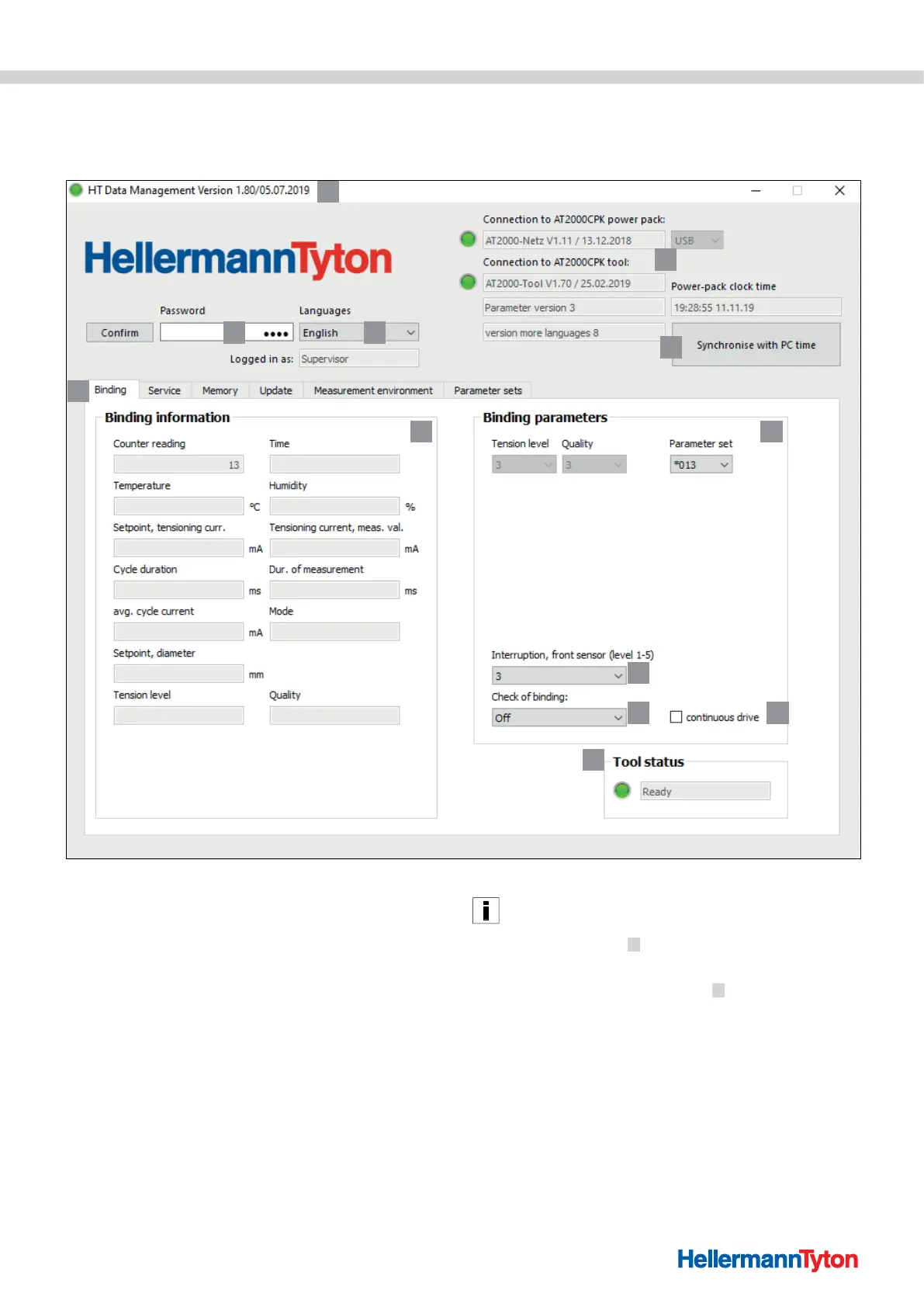
9.3 Binding menu
The Binding menu appears on the display when you
launch the software.
1
2 3
4
5
6
7 8
9
10 11
12
1 Version information and date of publication of the software
2 Entry box for password for access level
3 Language setting
4 Connection states and software versions
5 Time and date synchronisation
6 Menus
7 Display binding information
8 Select parameter set
9 Select interruption front sensor
10 Switch binding check on or off
11 Consecutive trigger
12 Status of the AT2000 CPK
9.3.1 Entering password
The password consists of four characters and the default
setting is 0000.
f Enter the password 2 .
f Click on Confirm.
; What you see in the “Menus” tab
6 depends on your
access rights, à"Access levels" on page17.
; Certain fields can be greyed, hidden or active, depending
on the access level.
9.3.2 Select a language
f Select the display language in the Language drop-down
menu.
; The setting immediately changes to the language you
selected.



 To Next Page