Operating Instructions • AT2000 CPK • 07-2019 • v03 • 106-29004
HT Data Management
27
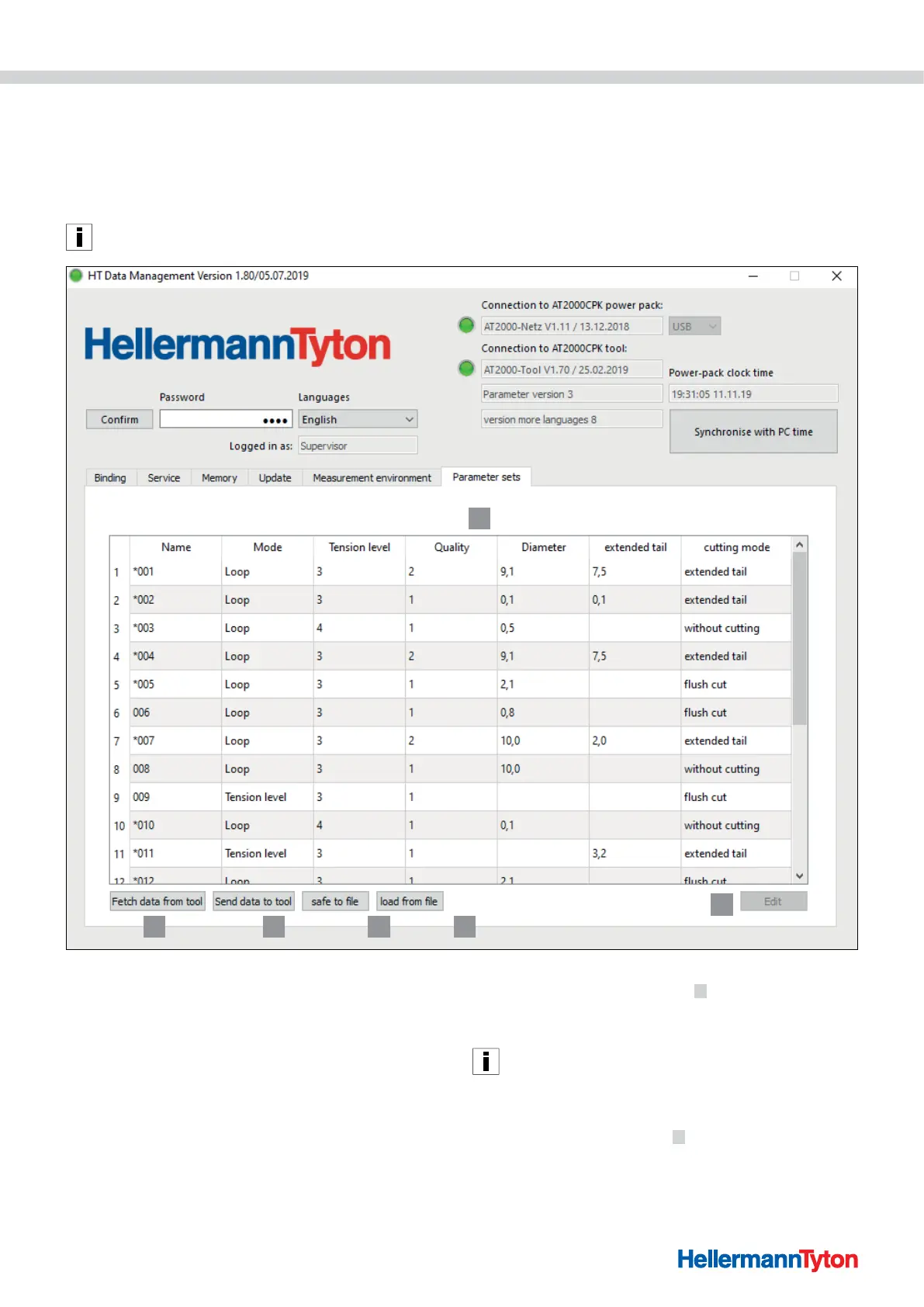
9.8 Parameter set menu
The settings for a binding process (e.g. force level,
quality, diameter and projecting cable-tie ends) are
grouped in the Parameter sets menu and can thus be
accessed and managed as a setting.
The Parameter set menu appears only if the user has logged
on with the setup specialist's password.
1
2 3 4 5
6
1 Overview of the parameter sets
2 Data synchronisation with the AT2000 CPK
3 Send configured parameter sets to the AT2000 CPK
4 Save parameter sets
5 Load parameter sets
9.8.1 Synchronise parameter sets
f Click on Fetch data from tool
2 .
; The parameter sets of the AT2000 CPK are loaded and
displayed.
Data changed in the AT2000 CPK is indicated with an *.
f Edit the parameter sets, à"Edit parameter sets" on
page28.
f Click on Send data to tool
3 .
; The parameter sets are transmitted to the AT2000 CPK.



 To Next Page