Operating Instructions • AT2000 CPK • 07-2019 • v03 • 106-29004
Troubleshooting
30
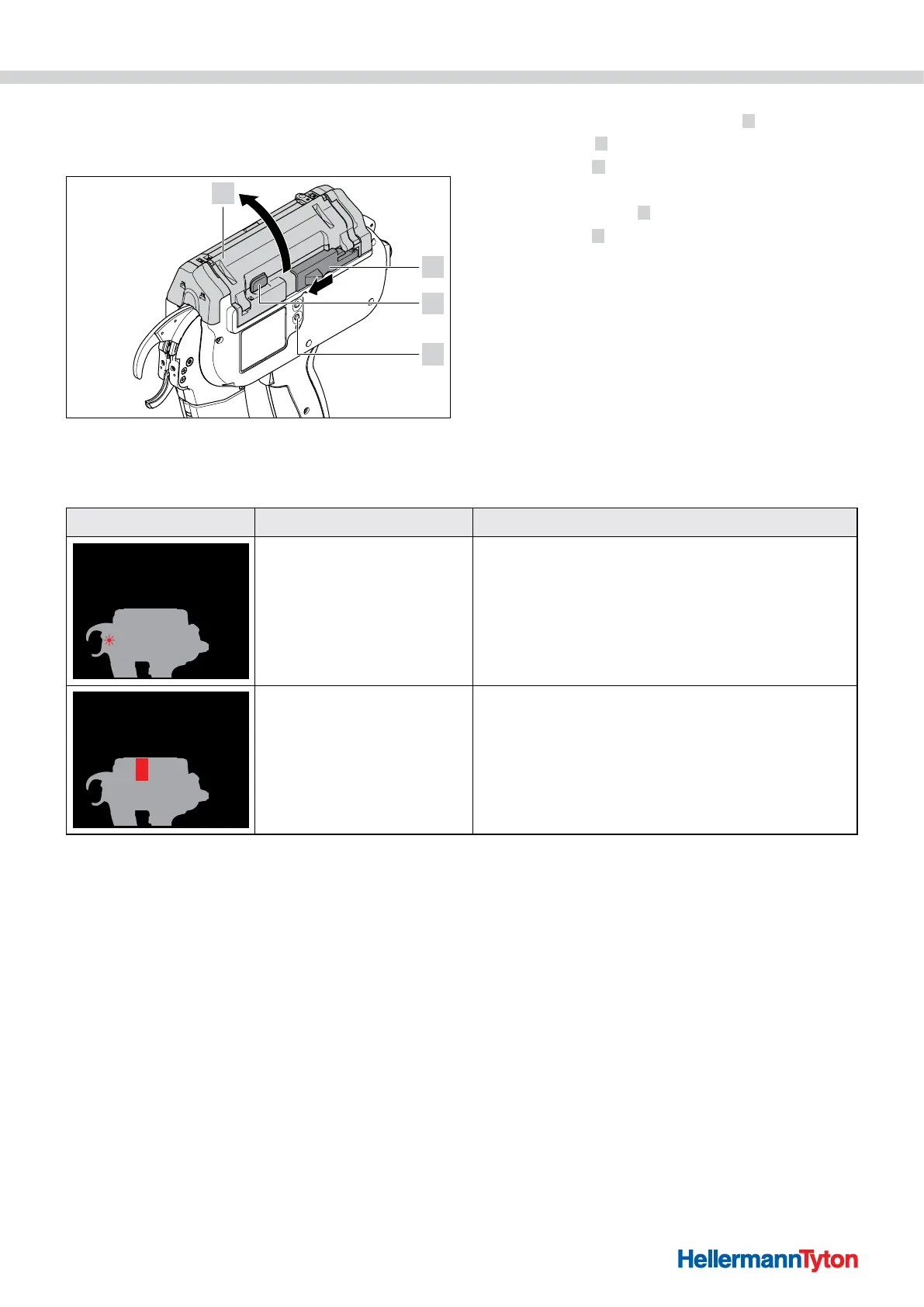
10.2 Performing a reset
A reset of the AT2000 CPK always has to be performed
before repair work is undertaken.
1
2
3
4
f Switch on the AT2000 CPK.
f Push the actuator for bandoleer cutter 2 to the left.
f Press the catch
3 .
f Open the gate
1 .
f Remove cable-tie residues where necessary.
f Press the reset button
4 .
f Close the gate
1 .
10.3 Display messages
DISPLAY MESSAGE POSSIBLE CAUSE SOLUTION
Remove cable-tie residues
Error, front cap
• There are residues of cable
ties trapped behind the front
cap.
• The level sensor is busy.
f Clean the front sensor.
f If applicable, carefully remove the cable-tie residues.
Close gate
Error, gate
• Drum is not in the correct
position.
• The gate is open.
f Open the gate and turn the drum to the correct
position.
f Close the gate.



 To Next Page