Operating Instructions • AT2000 CPK • 07-2019 • v03 • 106-29004
HT Data Management
28
9.8.2 Save parameter sets
The parameter sets are saved with the file ending
“cpkpreset”.
f Click on Save in file
4 .
f Define the storage location for the files.
f In the window opened by the operating system, click on
the Save button.
9.8.3 Load parameter sets
f Click on Load from file.
f Select the file with the file ending “cpkpreset”.
f In the window opened by the operating system, click on
the Open button.
; The parameter sets are displayed in the overview
1 .
9.8.4 Edit parameter sets
f Select the parameter set in the overview and click on
Edit 6 .
1
2
3
4
5
6
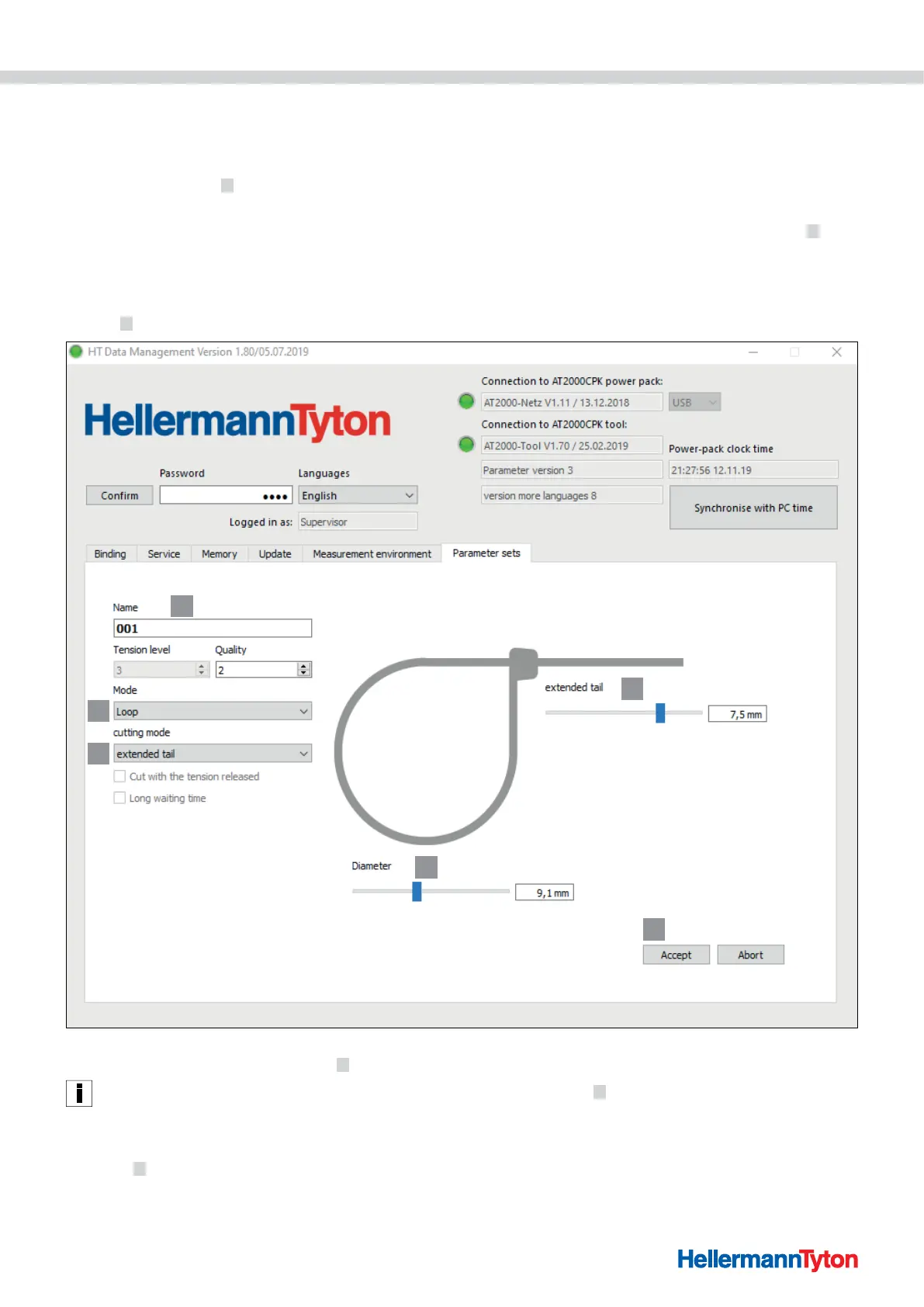
f Allocate a three-digit designation, e.g. “016” to the
parameter set in the field Designation 1 .
The same designation cannot be allocated twice.
f Select the desired Force level and Quality.
f Select the type of binding mode in the drop-down menu
Mode
2 . The following settings are available:
• Force level
• Loop
f Select the type of cutting mode in the drop-down menu
Cutting mode
3 . The following settings are available:
• Cut flush
• Cut with projecting cable-tie end
• No cutting
f For delicate bundles, activate the option Tension-free
cutting.



 To Next Page