EasyManua.ls Logo

Hitachi VM-E110E - Power Sources.10

Hitachi VM-E110E
40 pages
Print Icon
To Next Page IconTo Next Page
To Previous Page IconTo Previous Page
Loading...
POWER
SOURCES
NOTE:
Be
sure
to
turn
off
power
of
the
camera/recorder
when
attaching
or
detaching
a
power
sup¬
ply
(battery,
AC
adapter/charger,
etc.)
to
the
camera/recorder.
WHEN
USING
WITH
THE
BATTERY
(provided)
NOTE:
The
battery
must
be
charged
before
it
can
be
used
for
the
first
time.
Refer
to
"CHARGING
THE
BATTERY"
on
page
14.
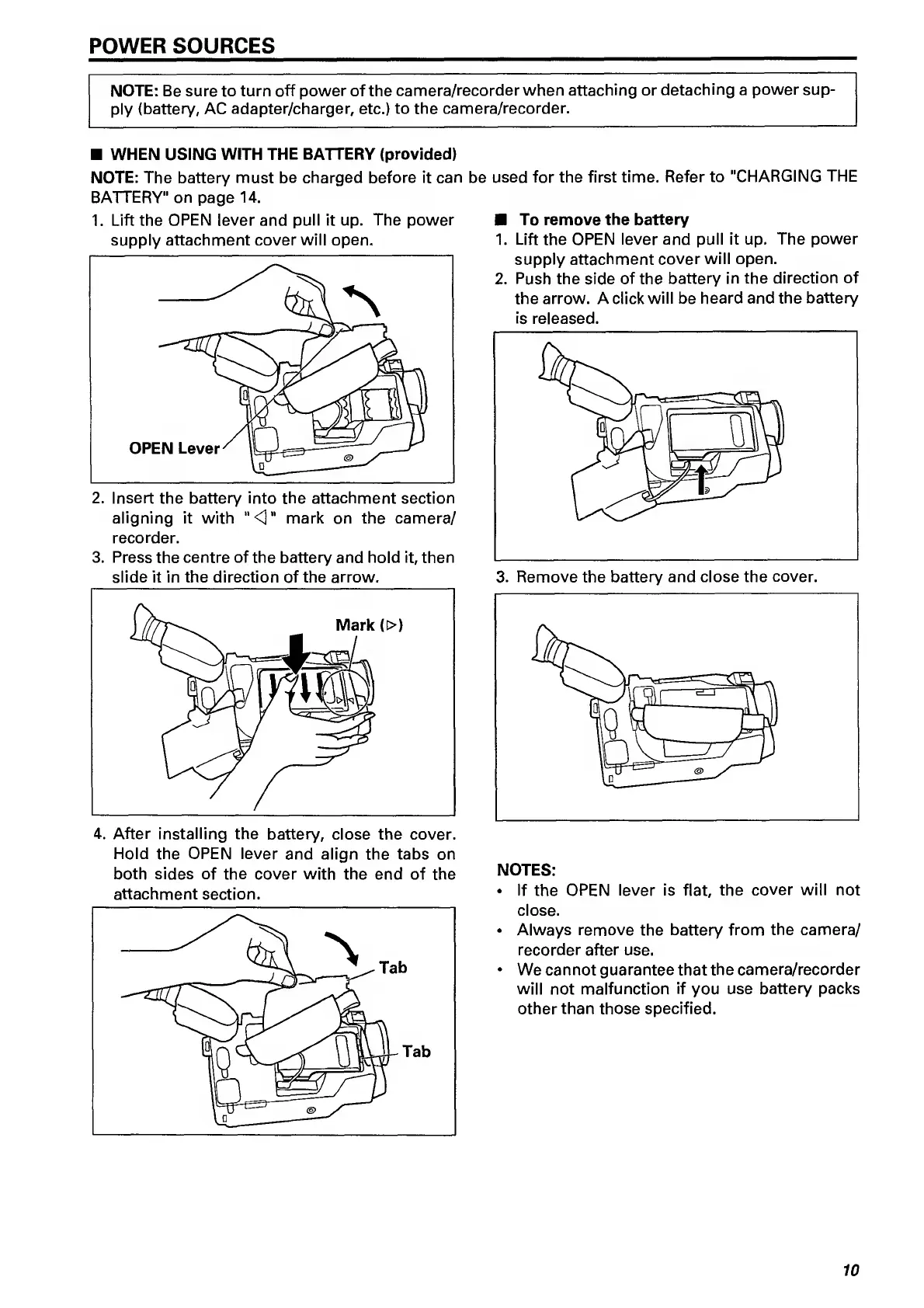
1.
Lift
the
OPEN
lever
and
pull
it
up.
The
power
supply
attachment
cover
will
open.
2.
Insert
the
battery
into
the
attachment
section
aligning
it
with
"O"
mark
on
the
camera/
recorder.
3.
Press
the
centre
of
the
battery
and
hold
it,
then
slide
it
in
the
direction
of
the
arrow.
4.
After
installing
the
battery,
close
the
cover.
Hold
the
OPEN
lever
and
align
the
tabs
on
both
sides
of
the
cover
with
the
end
of
the
To
remove
the
battery
1.
Lift
the
OPEN
lever
and
pull
it
up.
The
power
supply
attachment
cover
will
open.
2.
Push
the
side
of
the
battery
in
the
direction
of
the
arrow.
A
click
will
be
heard
and
the
battery
is
released.
3.
Remove
the
battery
and
close
the
cover.
NOTES:
If
the
OPEN
lever
is
flat,
the
cover
will
not
close.
Always
remove
the
battery
from
the
camera/
recorder
after
use.
We
cannot
guarantee
that
the
camera/recorder
will
not
malfunction
if
you
use
battery
packs
other
than
those
specified.
10

Related product manuals