EasyManua.ls Logo

Hitachi VM-E110E - Video Channel Setting.29

Hitachi VM-E110E
40 pages
Print Icon
To Next Page IconTo Next Page
To Previous Page IconTo Previous Page
Loading...
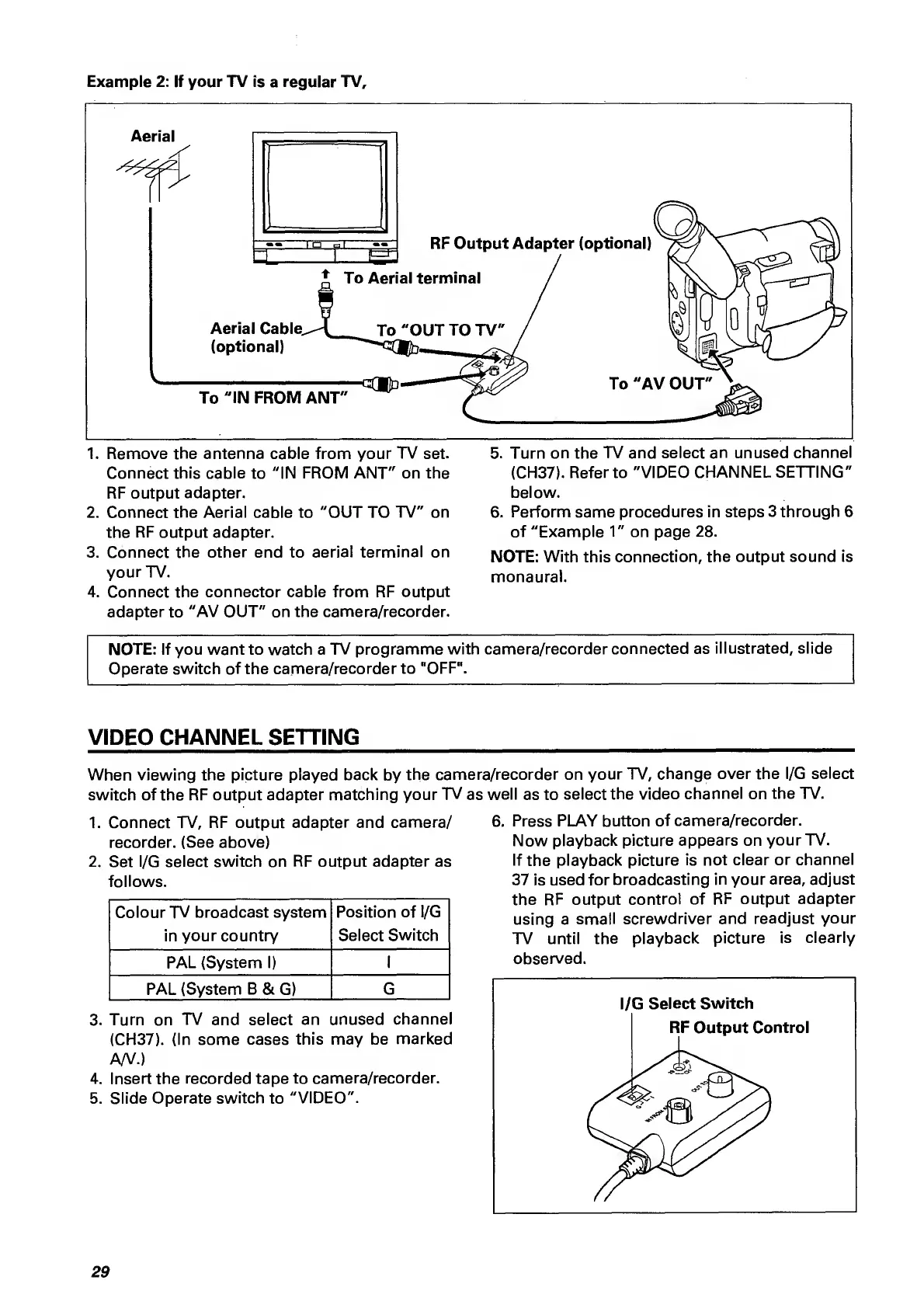
1.
Remove
the
antenna
cable
from
your
TV
set.
5.
Turn
on
the
TV
and
select
an
unused
channel
Connect
this
cable
to
"IN
FROM
ANT"
on
the
(CH37).
Refer
to
"VIDEO
CHANNEL
SETTING"
RF
output
adapter.
below.
2.
Connect
the
Aerial
cable
to
"OUT
TO
TV"
on
6.
Perform
same
procedures
in
steps
3
through
6
the
RF
output
adapter.
of
"Example
1"
on
page
28.
3.
Connect
the
other
end
to
aerial
terminal
on
NOTE:
With
this
connection,
the
output
sound
is
your
TV.
monaural.
4.
Connect
the
connector
cable
from
RF
output
adapter
to
"AV
OUT"
on
the
camera/recorder.
NOTE:
If
you
want
to
watch
a
TV
programme
with
camera/recorder
connected
as
illustrated,
slide
Operate
switch
of
the
camera/recorder
to
"OFF".
VIDEO
CHANNEL
SETTING
_
When
viewing
the
picture
played
back
by
the
camera/recorder
on
your
TV,
change
over
the
l/G
select
switch
of
the
RF
output
adapter
matching
your
TV
as
well
as
to
select
the
video
channel
on
the
TV.
1.
Connect
TV,
RF
output
adapter
and
camera/
recorder.
(See
above)
2.
Set
l/G
select
switch
on
RF
output
adapter
as
follows.
Colour
TV
broadcast
system
in
your
country
Position
of
l/G
Select
Switch
PAL
(System
1)
1
3.
Turn
on
TV
and
select
an
unused
channel
(CH37).
(In
some
cases
this
may
be
marked
A/V.)
4.
Insert
the
recorded
tape
to
camera/recorder.
5.
Slide
Operate
switch
to
"VIDEO".
6.
P
ress
PLAY
button
of
camera/recorder.
Now
playback
picture
appears
on
your
TV.
If
the
playback
picture
is
not
clear
or
channel
37
is
used
for
broadcasting
in
your
area,
adjust
the
RF
output
control
of
RF
output
adapter
using
a
small
screwdriver
and
readjust
your
TV
until
the
playback
picture
is
clearly
observed.
PAL
(System
B
&
G)
G
29

Related product manuals