EasyManua.ls Logo

Hitachi VM-E110E - Camera;Recorder to VCR Dubbing

Hitachi VM-E110E
40 pages
Print Icon
To Next Page IconTo Next Page
To Previous Page IconTo Previous Page
Loading...
CAMERA/RECORDER
TO
VCR
DUBBING
NOTE:
If
the
recording
VCR
has
an
EDIT
IN
jack,
you
can
use
the
synchro
edit
function.
Refer
to
page
32
for
details.
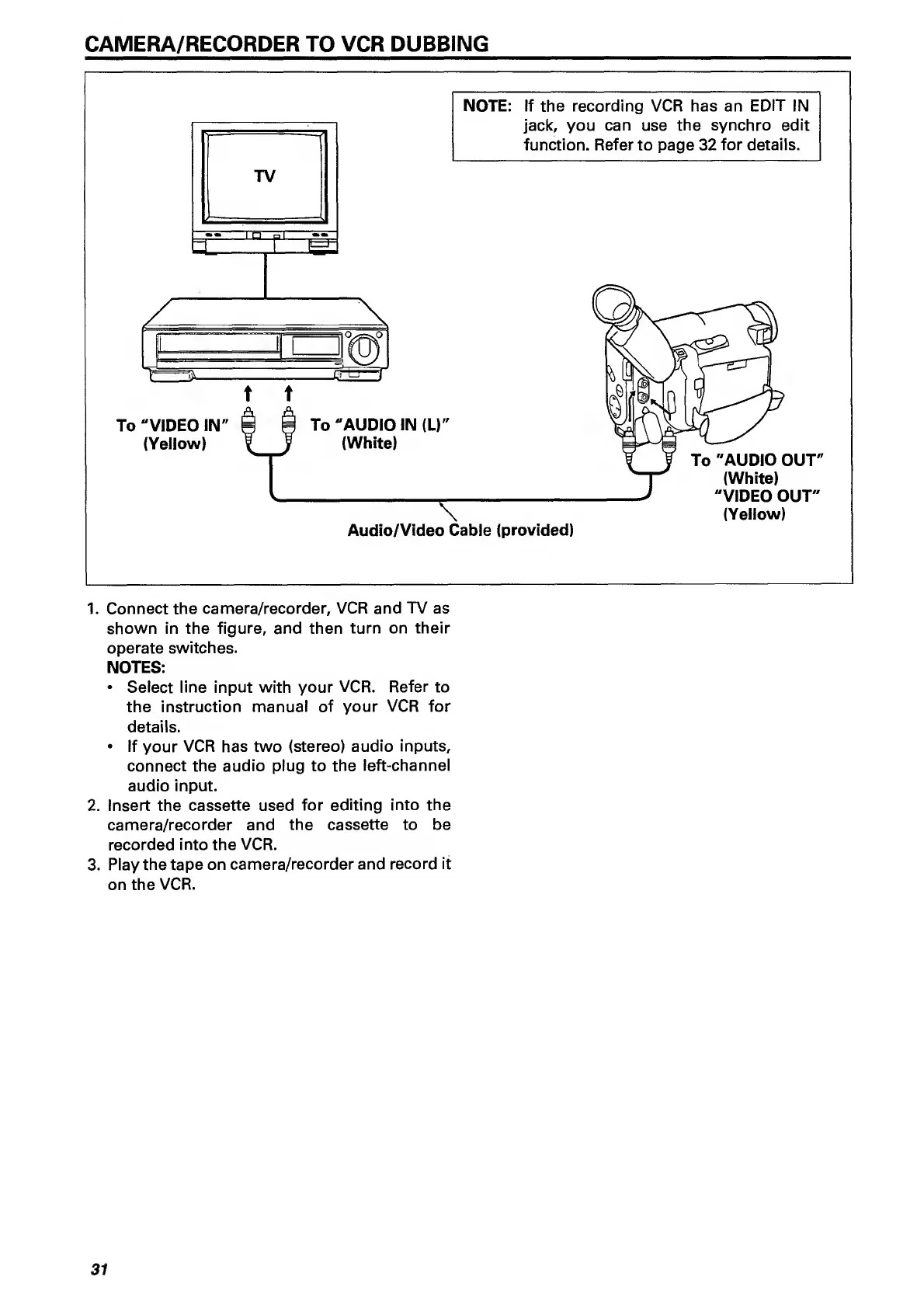
To
"VIDEO
IN"
(Yellow)
Audio/Video
Cable
(provided)
1.
Connect
the
camera/recorder,
VCR
and
TV
as
shown
in
the
figure,
and
then
turn
on
their
operate
switches.
NOTES:
Select
line
input
with
your
VCR.
Refer
to
the
instruction
manual
of
your
VCR
for
details.
If
your
VCR
has
two
(stereo)
audio
inputs,
connect
the
audio
plug
to
the
left-channel
audio
input.
2.
Insert
the
cassette
used
for
editing
into
the
camera/recorder
and
the
cassette
to
be
recorded
into
the
VCR.
3.
Play
the
tape
on
camera/recorder
and
record
it
on
the
VCR.
31

Related product manuals