EasyManua.ls Logo

Hitachi VM-E110E - Controls and Functions

Hitachi VM-E110E
40 pages
Print Icon
To Next Page IconTo Next Page
To Previous Page IconTo Previous Page
Loading...
CONTROLS
AND
FUNCTIONS
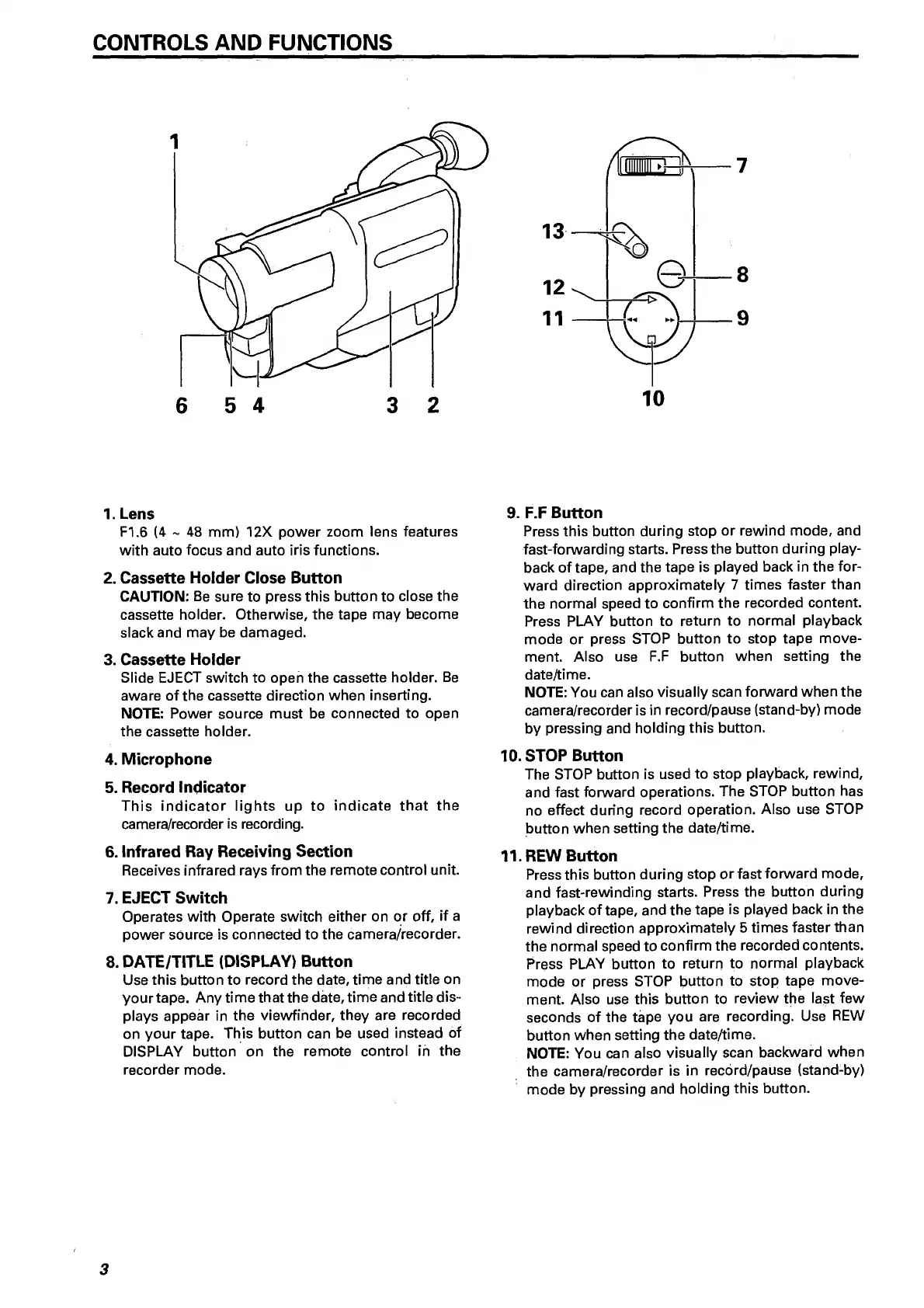
6
5
4
3
2
7
8
9
1.
L
ens
FI.6
(4
~
48
mm)
12X
power
zoom
lens
features
with
auto
focus
and
auto
iris
functions.
2.
Cassette
Holder
Close
Button
CAUTION:
Be
sure
to
press
this
button
to
close
the
cassette
holder.
Otherwise,
the
tape
may
become
slack
and
may
be
damaged.
3.
Cassette
Holder
Slide
EJECT
switch
to
open
the
cassette
holder.
Be
aware
of
the
cassette
direction
when
inserting.
NOTE:
Power
source
must
be
connected
to
open
the
cassette
holder.
4.
Microphone
5.
Record
Indicator
This
indicator
lights
up
to
indicate
that
the
camera/recorder
is
recording.
6.
Infrared
Ray
Receiving
Section
Receives
infrared
rays
from
the
remote
control
unit.
7.
EJECT
Switch
Operates
with
Operate
switch
either
on
or
off,
if
a
power
source
is
connected
to
the
camera/recorder.
8.
DATE/TITLE
(DISPLAY)
Button
Use
this
button
to
record
the
date,
time
and
title
on
your
tape.
Any
time
that
the
date,
time
and
title
dis¬
plays
appear
in
the
viewfinder,
they
are
recorded
on
your
tape.
This
button
can
be
used
instead
of
DISPLAY
button
on
the
remote
control
in
the
recorder
mode.
9.
F
.F
Button
Press
this
button
during
stop
or
rewind
mode,
and
fast-forwarding
starts.
Press
the
button
during
play¬
back
of
tape,
and
the
tape
is
played
back
in
the
for¬
ward
direction
approximately
7
times
faster
than
the
normal
speed
to
confirm
the
recorded
content.
Press
PLAY
button
to
return
to
normal
playback
mode
or
press
STOP
button
to
stop
tape
move¬
ment.
Also
use
F.F
button
when
setting
the
date/time.
NOTE:
You
can
also
visually
scan
forward
when
the
camera/recorder
is
in
record/pause
(stand-by)
mode
by
pressing
and
holding
this
button.
10.
STOP
Button
The
STOP
button
is
used
to
stop
playback,
rewind,
and
fast
forward
operations.
The
STOP
button
has
no
effect
during
record
operation.
Also
use
STOP
button
when
setting
the
date/time.
11.
REW
Button
Press
this
button
during
stop
or
fast
forward
mode,
and
fast-rewinding
starts.
Press
the
button
during
playback
of
tape,
and
the
tape
is
played
back
in
the
rewind
direction
approximately
5
times
faster
than
the
normal
speed
to
confirm
the
recorded
contents.
Press
PLAY
button
to
return
to
normal
playback
mode
or
press
STOP
button
to
stop
tape
move¬
ment.
Also
use
this
button
to
review
the
last
few
seconds
of
the
tape
you
are
recording.
Use
REW
button
when
setting
the
date/time.
NOTE:
You
can
also
visually
scan
backward
when
the
camera/recorder
is
in
recbrd/pause
(stand-by)
mode
by
pressing
and
holding
this
button.
3

Related product manuals