EasyManua.ls Logo

Hitachi VM-E110E - Troubleshooting

Hitachi VM-E110E
40 pages
Print Icon
To Next Page IconTo Next Page
To Previous Page IconTo Previous Page
Loading...
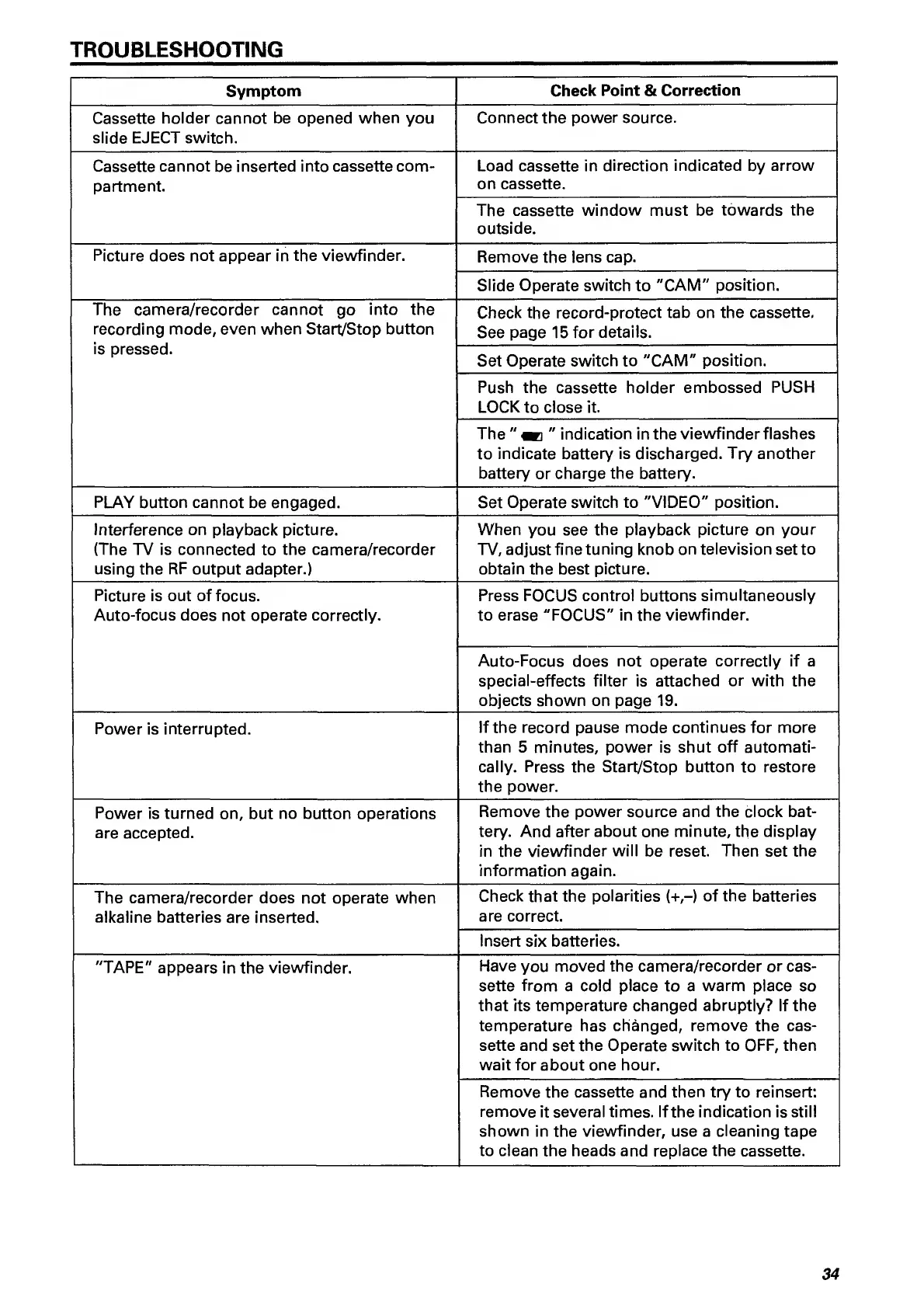
TROUBLESHOOTING
Symptom
Check
Point
&
Correction
Cassette
holder
cannot
be
opened
when
you
slide
EJECT
switch.
Connect
the
power
source.
Cassette
cannot
be
inserted
into
cassette
com¬
partment.
Load
cassette
in
direction
indicated
by
arrow
on
cassette.
The
cassette
window
must
be
towards
the
outside.
Picture
does
not
appear
in
the
viewfinder.
Remove
the
lens
cap.
Slide
Operate
switch
to
"CAM"
position.
The
camera/recorder
cannot
go
into
the
recording
mode,
even
when
Start/Stop
button
Check
the
record-protect
tab
on
the
cassette.
See
page
15
for
details.
is
pressed.
Set
Operate
switch
to
"CAM"
position.
Push
the
cassette
holder
embossed
PUSH
LOCK
to
close
it.
The
"
indication
in
the
viewfinder
flashes
to
indicate
battery
is
discharged.
Try
another
battery
or
charge
the
battery.
PLAY
button
cannot
be
engaged.
Set
Operate
switch
to
"VIDEO"
position.
Interference
on
playback
picture.
(The
TV
is
connected
to
the
camera/recorder
using
the
RF
output
adapter.)
When
you
see
the
playback
picture
on
your
TV,
adjust
fine
tuning
knob on
television
set
to
obtain
the
best
picture.
Picture
is
out
of
focus.
Auto-focus
does
not
operate
correctly.
Press
FOCUS
control
buttons
simultaneously
to
erase
"FOCUS"
in
the
viewfinder.
Auto-Focus
does
not
operate
correctly
if
a
special-effects
filter
is
attached
or
with
the
objects
shown
on
page
19.
Power
is
interrupted.
If
the
record
pause
mode
continues
for
more
than
5
minutes,
power
is
shut
off
automati¬
cally.
Press
the
Start/Stop
button
to
restore
the
power.
Power
is
turned
on,
but
no
button
operations
are
accepted.
Remove
the
power
source
and
the
clock
bat¬
tery.
And
after
about
one
minute,
the
display
in
the
viewfinder
will
be
reset.
Then
set
the
information
again.
The
camera/recorder
does
not
operate
when
alkaline
batteries
are
inserted.
Check
that
the
polarities
(+,-)
of
the
batteries
are
correct.
Insert
six
batteries.
"TAPE"
appears
in
the
viewfinder.
Have
you
moved
the
camera/recorder
or
cas¬
sette
from
a
cold
place
to
a
warm
place
so
that
its
temperature
changed
abruptly?
If
the
temperature
has
changed,
remove
the
cas¬
sette
and
set
the
Operate
switch
to
OFF,
then
wait
for
about
one
hour.
Remove
the
cassette
and
then
try
to
reinsert:
remove
it
several
times.
If
the
indication
is
still
shown
in
the
viewfinder,
use
a
cleaning
tape
to
clean
the
heads
and
replace
the
cassette.
34

Related product manuals