EasyManua.ls Logo

Hitachi VM-E110E - Automatic Date Recording.18; Automatic Title Recording.18

Hitachi VM-E110E
40 pages
Print Icon
To Next Page IconTo Next Page
To Previous Page IconTo Previous Page
Loading...
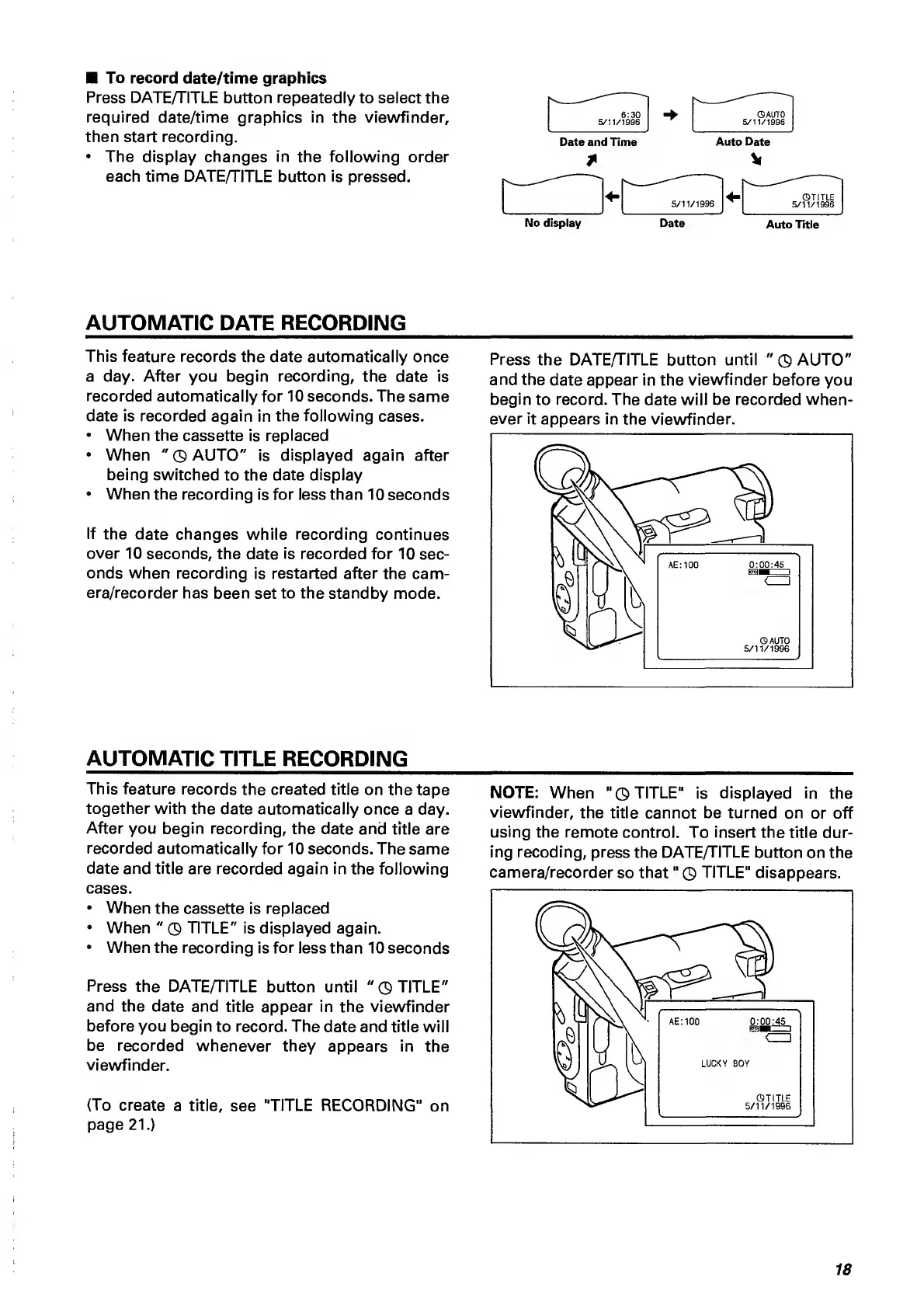
To
record
date/time
graphics
Press
DATE/TITLE
button
repeatedly
to
select
the
required
date/time
graphics
in
the
viewfinder,
then
start
recording.
The
display
changes
in
the
following
order
each
time
DATE/TITLE
button
is
pressed.
6:30
©AUTO
5/11/1996
5/11/1996
Date
and
Time
Auto
Date
No
display
Date
Auto
Title
AUTOMATIC
DATE
RECORDING
This
feature
records
the
date
automatically
once
a
day.
After
you
begin
recording,
the
date
is
recorded
automatically
for
10
seconds.
The
same
date
is
recorded
again
in
the
following
cases.
When
the
cassette
is
replaced
When
"
©
AUTO"
is
displayed
again
after
being
switched
to
the
date
display
When
the
recording
is
for
less
than
10
seconds
If
the
date
changes
while
recording
continues
over
10
seconds,
the
date
is
recorded
for
10
sec¬
onds
wherr
recording
is
restarted
after
the
cam¬
era/recorder
has
been
set
to
the
standby
mode.
Press
the
DATE/TITLE
button
until
"
©
AUTO"
and
the
date
appear
in
the
viewfinder
before
you
begin
to
record.
The
date
will
be
recorded
when-
AUTOMATIC
TITLE
RECORDING
This
feature
records
the
created
title
on
the
tape
together
with
the
date
automatically
once
a
day.
After
you
begin
recording,
the
date
and
title
are
recorded
automatically
for
10
seconds.
The
same
date
and
title
are
recorded
again
in
the
following
cases.
When
the
cassette
is
replaced
When
"
©
TITLE"
is
displayed
again.
When
the
recording
is
for
less
than
10
seconds
Press
the
DATEATITLE
button
until
"
©
TITLE"
and
the
date
and
title
appear
in
the
viewfinder
before
you
begin
to
record.
The
date
and
title
will
be
recorded
whenever
they
appears
in
the
viewfinder.
(To
create
a
title,
see
"TITLE
RECORDING"
on
page
21.)
NOTE:
When
"
©
TITLE"
is
displayed
in
the
viewfinder,
the
title
cannot
be
turned
on
or
off
using
the
remote
control.
To
insert
the
title
dur¬
ing
recoding,
press
the
DATE/TITLE
button
on
the
camera/recorder
so
that"
©
TITLE"
disappears.
18

Related product manuals