EasyManua.ls Logo

Hitachi VM-E110E - Camera Recording.16

Hitachi VM-E110E
40 pages
Print Icon
To Next Page IconTo Next Page
To Previous Page IconTo Previous Page
Loading...
CAMERA
RECORDING
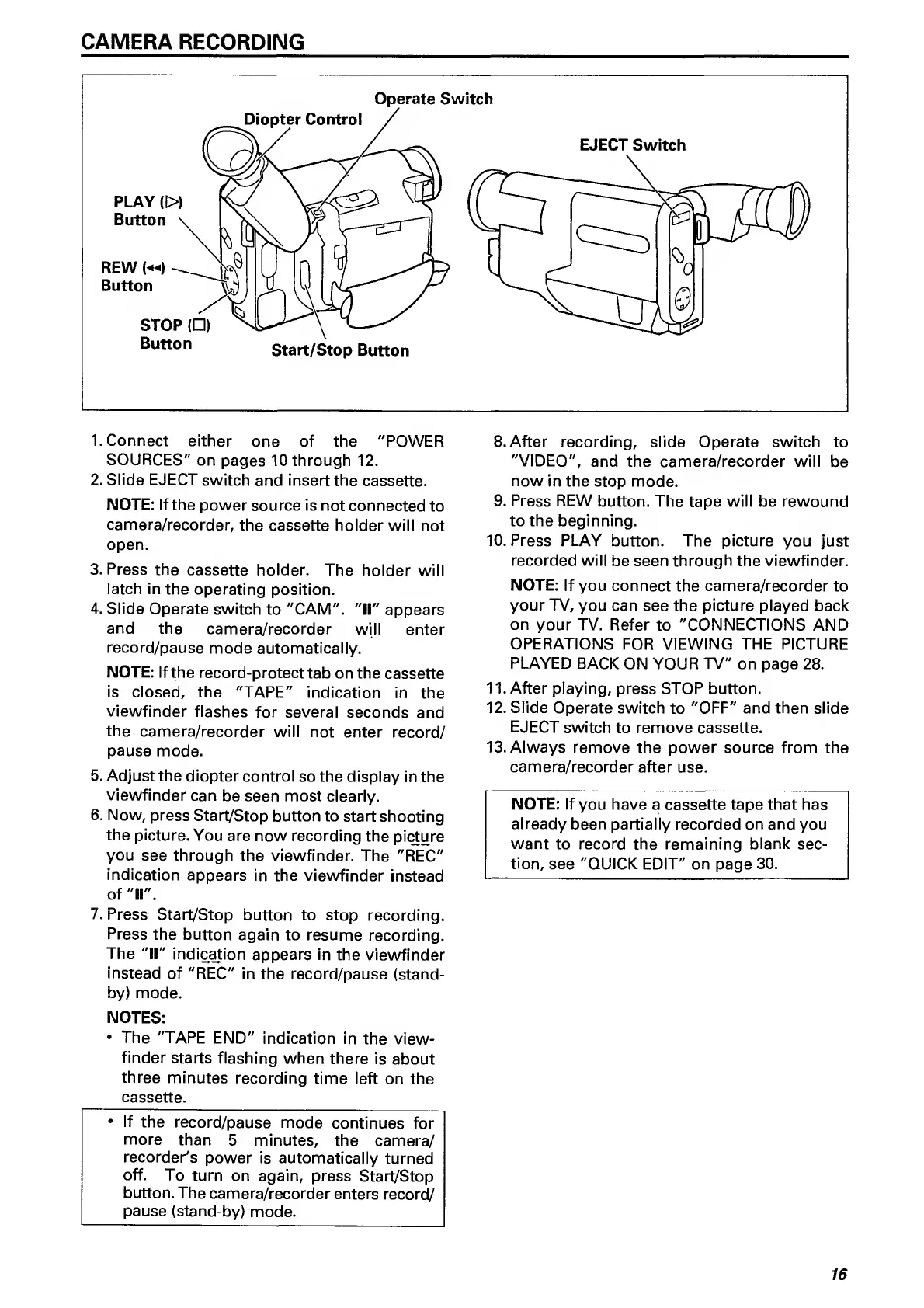
Operate
Switch
EJECT
Switch
1.
Connect
either
one
of
the
"POWER
SOURCES"
on
pages
10
through
12.
2.
Slide
EJECT
switch
and
insert
the
cassette.
NOTE:
If
the
power
source
is
not
connected
to
camera/recorder,
the
cassette
holder
will
not
open.
3.
Press
the
cassette
holder.
The
holder
will
latch
in
the
operating
position.
4.
Slide
Operate
switch
to
"CAM".
"H"
appears
and
the
camera/recorder
will
enter
record/pause
mode
automatically.
NOTE:
If
the
record-protect
tab
on
the
cassette
is
closed,
the
"TAPE"
indication
in
the
viewfinder
flashes
for
several
seconds
and
the
camera/recorder
will
not
enter
record/
pause
mode.
5.
Adjust
the
diopter
control
so
the
display
in
the
viewfinder
can
be
seen
most
clearly.
6.
Now,
press
Start/Stop
button
to
start
shooting
the
picture.
You
are
now
recording
the
picture
you
see
through
the
viewfinder.
The
"REC"
indication
appears
in
the
viewfinder
instead
of
"
11
".
7.
Press
Start/Stop
button
to
stop
recording.
Press
the
button
again
to
resume
recording.
The
"II"
indic^ion
appears
in
the
viewfinder
instead
of
"REC"
in
the
record/pause
(stand¬
by)
mode.
NOTES:
The
"TAPE
END"
indication
in
the
view¬
finder
starts
flashing
when
there
is
about
three
minutes
recording
time
left
on
the
cassette.
If
the
record/pause
mode
continues
for
more
than
5
minutes,
the
camera/
recorder's
power
is
automatically
turned
off.
To
turn
on
again,
press
Start/Stop
button.
The
camera/recorder
enters
record/
pause
(stand-by)
mode.
8.
After
recording,
slide
Operate
switch
to
"VIDEO",
and
the
camera/recorder
will
be
now
in
the
stop
mode.
9.
Press
REW
button.
The
tape
will
be
rewound
to
the
beginning.
10.
Press
PLAY
button.
The
picture
you
just
recorded
will
be
seen
through
the
viewfinder.
NOTE:
If
you
connect
the
camera/recorder
to
your
TV,
you
can
see
the
picture
played
back
on
your
TV.
Refer
to
"CONNECTIONS
AND
OPERATIONS
FOR
VIEWING
THE
PICTURE
PLAYED
BACK
ON
YOUR
TV"
on
page
28.
11.
After
playing,
press
STOP
button.
12.
Slide
Operate
switch
to
"OFF"
and
then
slide
EJECT
switch
to
remove
cassette.
13.
Always
remove
the
power
source
from
the
camera/recorder
after
use.
NOTE:
If
you
have
a
cassette
tape
that
has
already
been
partially
recorded
on
and
you
want
to
record
the
remaining
blank
sec¬
tion,
see
"QUICK
EDIT"
on
page
30.
16

Related product manuals