EasyManua.ls Logo

Hitachi VM-E110E - Attaching the Optional DC Camera Light.33

Hitachi VM-E110E
40 pages
Print Icon
To Next Page IconTo Next Page
To Previous Page IconTo Previous Page
Loading...
ATTACHING
THE
OPTIONAL
DC
CAMERA
LIGHT
Use
the
DC
camera
light
if
you
wish
to
shoot
objects
in
dark
places.
NOTES:
When
the
DC
camera
light
is
used,
the
op¬
eration
time
of
the
camera/recorder
becomes
short
even
if
a
fully-charged
battery
pack
is
attached.
When
the
camera/recorder
is
turned
on,
a
volt¬
age
is
always
generated
at
the
installation
ter¬
minal
of
the
DC
camera
light.
Never
touch
this
terminal.
1.
Make
sure
that
a
fully
charged
battery
pack
or
AC
adapter/charger
is
attached.
2.
Check
that
the
camera/recorder
is
turned
off.
3.
Attach
the
DC
camera
light
to
the
camera
tight
shoe.
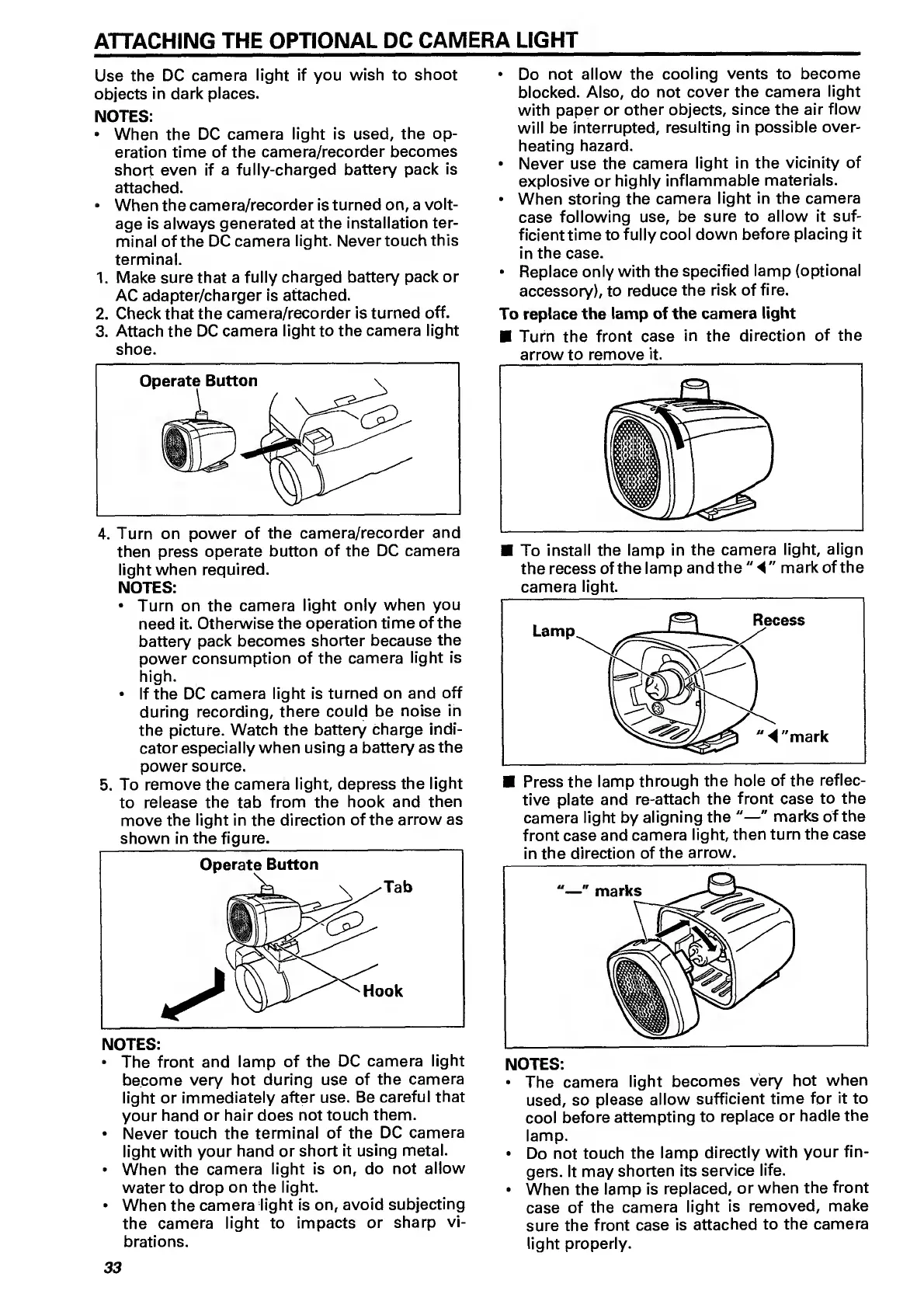
4.
Turn
on
power
of
the
camera/recorder
and
then
press
operate
button
of
the
DC
camera
light
when
required.
NOTES:
Turn
on
the
camera
light
only
when
you
need
it.
Otherwise
the
operation
time
of
the
battery
pack
becomes
shorter
because
the
power
consumption
of
the
camera
light
is
high.
If
the
DC
camera
light
is
turned
on
and
off
during
recording,
there
could
be
noise
in
the
picture.
Watch
the
battery
charge
indi¬
cator
especially
when
using
a
battery
as
the
power
source.
5.
To
remove
the
camera
light,
depress
the
light
to
release
the
tab
from
the
hook
and
then
move
the
light
in
the
direction
of
the
arrow
as
shown
in
the
figure.
NOTES:
The
front
and
lamp
of
the
DC
camera
light
become
very
hot
during
use
of
the
camera
light
or
immediately
after
use.
Be
careful
that
your
hand
or
hair
does
not
touch
them.
Never
touch
the
terminal
of
the
DC
camera
light
with
your
hand
or
short
it
using
metal.
When
the
camera
light
is
on,
do
not
allow
water
to
drop
on
the
light.
When
the
camera
light
is
on,
avoid
subjecting
the
camera
light
to
impacts
or
sharp
vi¬
brations.
Do
not
allow
the
cooling
vents
to
become
blocked.
Also,
do
not
cover
the
camera
light
with
paper
or
other
objects,
since
the
air
flow
will
be
interrupted,
resulting
in
possible
over¬
heating
hazard.
Never
use
the
camera
light
in
the
vicinity
of
explosive
or
highly
inflammable
materials.
When
storing
the
camera
light
in
the
camera
case
following
use,
be
sure
to
allow
it
suf¬
ficient
time
to
fully
cool
down
before
placing
it
in
the
case.
Replace
only
with
the
specified
lamp
(optional
accessory),
to
reduce
the
risk
of
fire.
To
replace
the
lamp
of
the
camera
light
Turn
the
front
case
in
the
direction
of
the
arrow
to
remove
it.
To
install
the
lamp
in
the
camera
light,
align
the
recess
of
the
lamp
and
the
"
mark
of
the
camera
light.
tive
plate
and
re-attach
the
front
case
to
the
camera
light
by
aligning
the
"—"
marks
of
the
front
case
and
camera
light,
then
turn
the
case
in
the
direction
of
the
arrow.
NOTES:
The
camera
light
becomes
very
hot
when
used,
so
please
allow
sufficient
time
for
it
to
cool
before
attempting
to
replace
or
hadle
the
lamp.
Do
not
touch
the
lamp
directly
with
your
fin¬
gers.
It
may
shorten
its
service
life.
When
the
lamp
is
replaced,
or
when
the
front
case
of
the
camera
light
is
removed,
make
sure
the
front
case
is
attached
to
the
camera
light
properly.
33

Related product manuals