EasyManua.ls Logo

Hitachi VM-E110E - Wireless Remote Control.26

Hitachi VM-E110E
40 pages
Print Icon
To Next Page IconTo Next Page
To Previous Page IconTo Previous Page
Loading...
WIRELESS
REMOTE
CONTROL
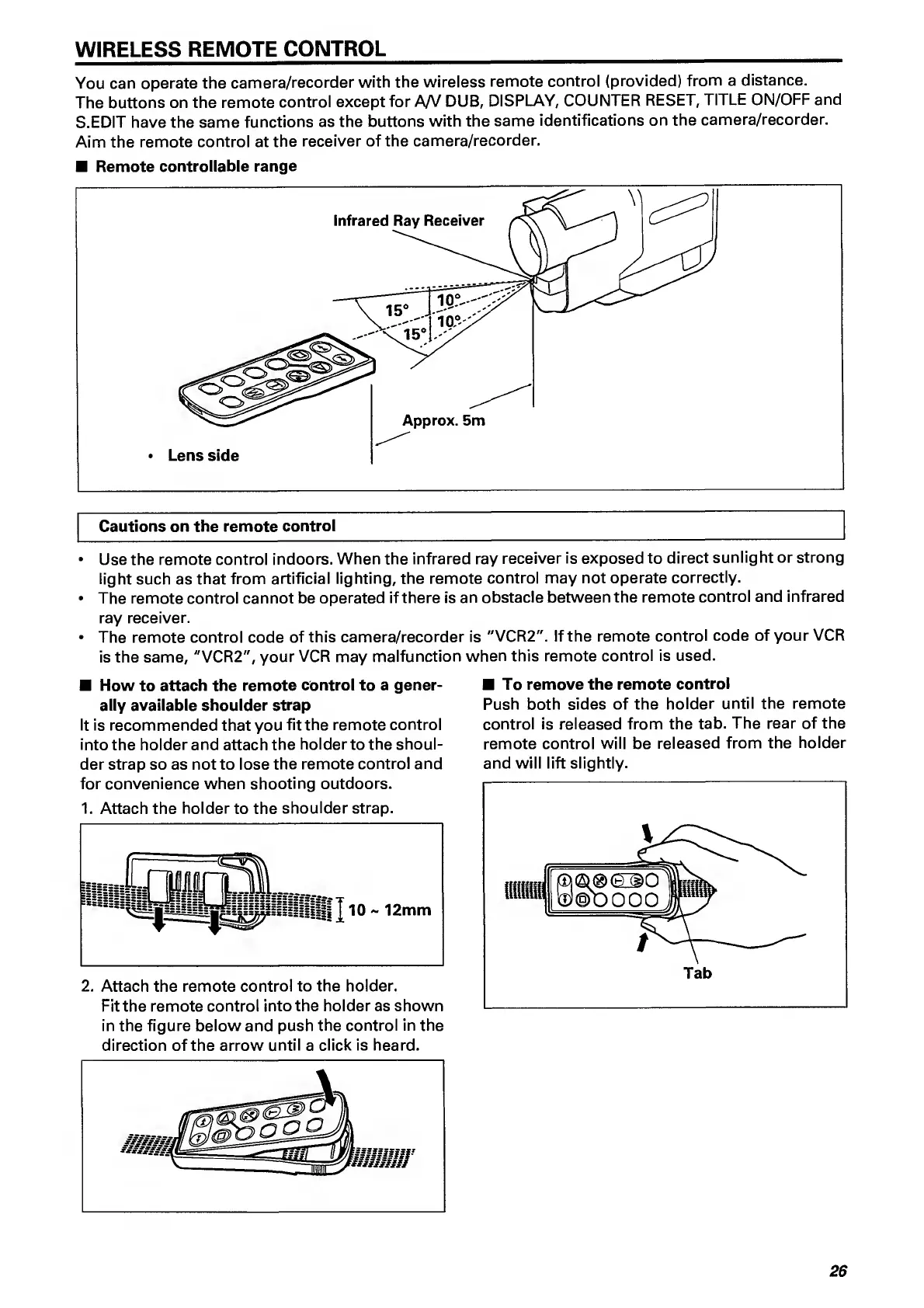
You
can
operate
the
camera/recorder
with
the
wireless
remote
control
(provided)
from
a
distance.
The
buttons
on
the
remote
control
except
for
A/V
DUB,
DISPLAY,
COUNTER
RESET,
TITLE
ON/OFF
and
S.EDIT
have
the
same
functions
as
the
buttons
with
the
same
identifications
on
the
camera/recorder.
Aim
the
remote
control
at
the
receiver
of
the
camera/recorder.
Remote
controllable
range
Cautions
on
the
remote
control
Use
the
remote
control
indoors.
When
the
infrared
ray
receiver
is
exposed
to
direct
sunlight
or
strong
light
such
as
that
from
artificial
lighting,
the
remote
control
may
not
operate
correctly.
The
remote
control
cannot
be
operated
if
there
is
an
obstacle
between
the
remote
control
and
infrared
ray
receiver.
The
remote
control
code
of
this
camera/recorder
is
"VCR2".
If
the
remote
control
code
of
your
VCR
is
the
same,
"VCR2",
your
VCR
may
malfunction
when
this
remote
control
is
used.
How
to
attach
the
remote
control
to
a
gener¬
ally
available
shoulder
strap
It
is
recommended
that
you
fit
the
remote
control
into
the
holder
and
attach
the
holder
to
the
shoul¬
der
strap
so
as
not
to
lose
the
remote
control
and
for
convenience
when
shooting
outdoors.
1.
Attach
the
holder
to
the
shoulder
strap.
2.
Attach
the
remote
control
to
the
holder.
Fit
the
remote
control
into
the
holder
as
shown
in
the
figure
below
and
push
the
control
in
the
direction
of
the
arrow
until
a
click
is
heard.
To
remove
the
remote
control
Push
both
sides
of
the
holder
until
the
remote
control
is
released
from
the
tab.
The
rear
of
the
remote
control
will
be
released
from
the
holder
and
will
lift
slightly.
26

Related product manuals