EasyManua.ls Logo

Hitachi VM-E110E - Connections and Operations for Viewing the Picture Played Back on Your TV

Hitachi VM-E110E
40 pages
Print Icon
To Next Page IconTo Next Page
To Previous Page IconTo Previous Page
Loading...
CONNECTIONS
AND
OPERATIONS
FOR
VIEWING
THE
PICTURE
PLAYED
BACK
ON
YOUR
TV
_
To
play
back
a
tape
recorded
on
your
camera/recorder
and
view
it
on
your
TV
receiver,
you
must
con¬
nect
the
camera/recorder
to
the
TV
receiver
using
either
audio/video
cable
or
RF
output
adapter.
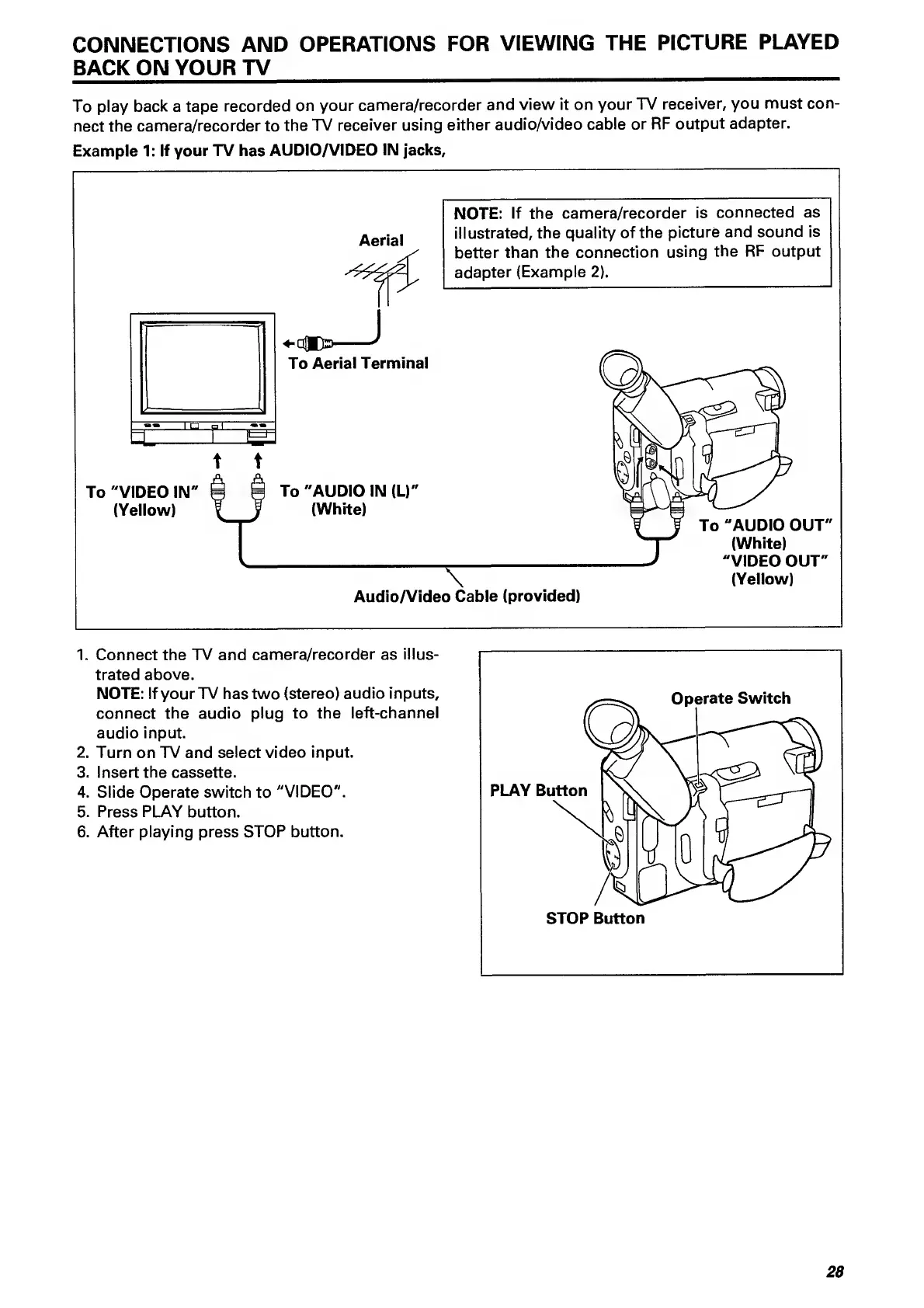
Example
1:
If
your
TV
has
AUDIO/VIDEO
IN
jacks.
1.
Connect
the
TV
and
camera/recorder
as
illus¬
trated
above.
NOTE:
If
your
TV
has
two
(stereo)
audio
inputs,
connect
the
audio
plug
to
the
left-channel
audio
input.
2.
Turn
on
TV
and
select
video
input.
3.
Insert
the
cassette.
4.
Slide
Operate
switch
to
"VIDEO".
5.
Press
PLAY
button.
6.
After
playing
press
STOP
button.
28

Related product manuals