EasyManua.ls Logo

Hitachi VM-E110E - Audio;Video Dubbing.27

Hitachi VM-E110E
40 pages
Print Icon
To Next Page IconTo Next Page
To Previous Page IconTo Previous Page
Loading...
AUDIO/VIDEO
DUBBING
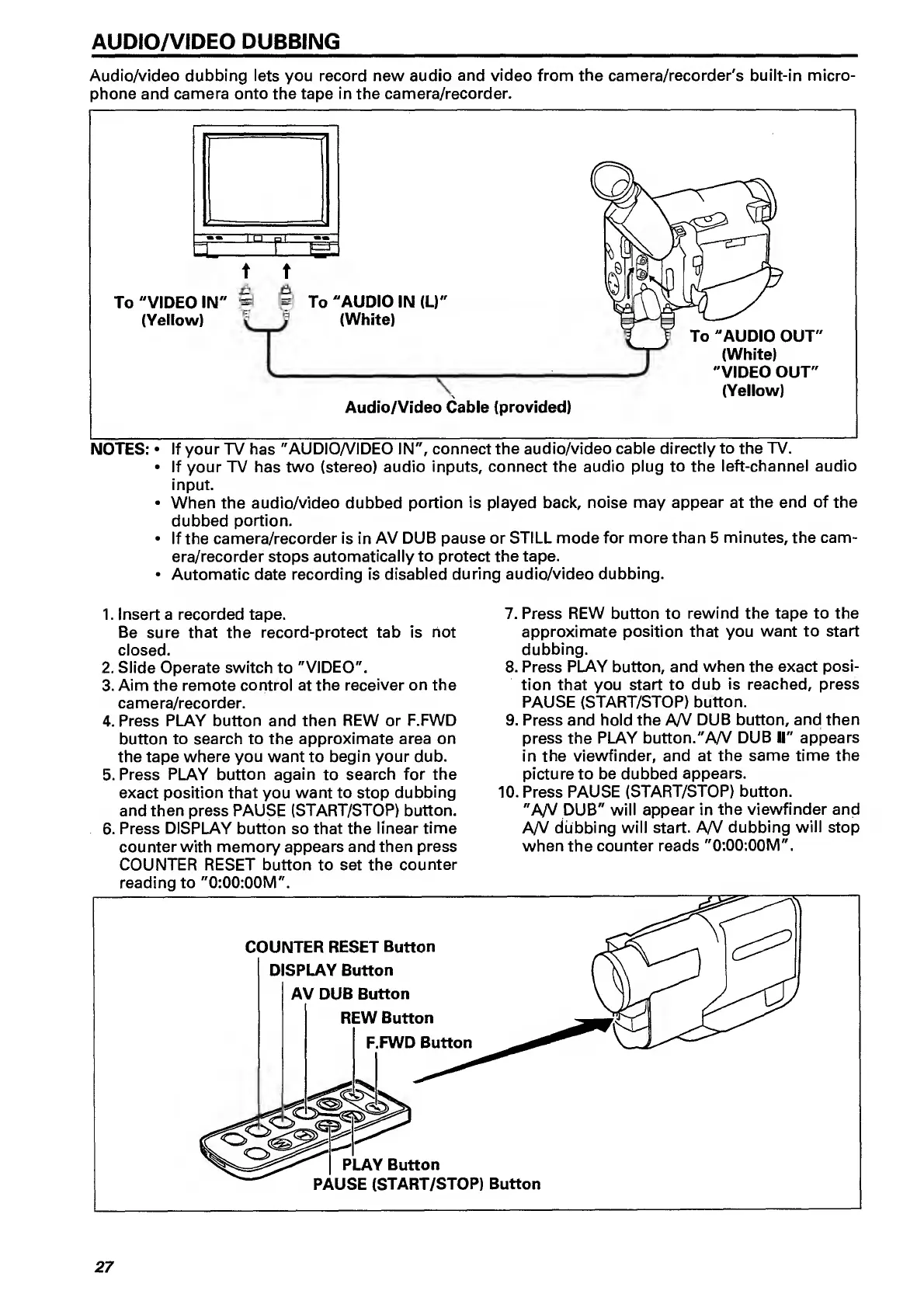
Audio/video
dubbing
lets
you
record
new
audio
and
video
from
the
camera/recorder's
built-in
micro¬
phone
and
camera
onto
the
tape
in
the
camera/recorder.
NOTES:
If
your
TV
has
"AUDIO/VIDEO
IN",
connect
the
audio/video
cable
directly
to
the
TV.
If
your
TV
has
two
(stereo)
audio
inputs,
connect
the
audio
plug
to
the
left-channel
audio
input.
When
the
audio/video
dubbed
portion
is
played
back,
noise
may
appear
at
the
end
of
the
dubbed
portion.
If
the
camera/recorder
is
in
AV
DUB
pause
or
STILL
mode
for
more
than
5
minutes,
the
cam¬
era/recorder
stops
automatically
to
protect
the
tape.
Automatic
date
recording
is
disabled
during
audio/video
dubbing.
1.
Insert
a
recorded
tape.
Be
sure
that
the
record-protect
tab
is
not
closed.
2.
Slide
Operate
switch
to
"VIDEO".
3.
Aim
the
remote
control
at
the
receiver
on
the
camera/recorder.
4.
Press
PLAY
button
and
then
REW
or
F.FWD
button
to
search
to
the
approximate
area
on
the
tape
where
you
want
to
begin
your
dub.
5.
Press
PLAY
button
again
to
search
for
the
exact
position
that
you
want
to
stop
dubbing
and
then
press
PAUSE
(START/STOP)
button.
6.
Press
DISPLAY
button
so
that
the
linear
time
counter
with
memory
appears
and
then
press
COUNTER
RESET
button
to
set
the
counter
7.
Press
REW
button
to
rewind
the
tape
to
the
approximate
position
that
you
want
to
start
dubbing.
8.
Press
PLAY
button,
and
when
the
exact
posi¬
tion
that
you
start
to
dub
is
reached,
press
PAUSE
(START/STOP)
button.
9.
Press
and
hold
the
A/y
DUB
button,
and
then
press
the
PLAY
button."AA/
DUB
II"
appears
in
the
viewfinder,
and
at
the
same
time
the
picture
to
be
dubbed
appears.
10.
P
ress
PAUSE
(START/STOP)
button.
"A/V
DUB"
will
appear
in
the
viewfinder
and
A/V
dubbing
will
start.
A/V
dubbing
will
stop
when
the
counter
reads
"0;00:00M".
27

Related product manuals