EasyManua.ls Logo

Hitachi VM-E110E - Date;Time Setting.17

Hitachi VM-E110E
40 pages
Print Icon
To Next Page IconTo Next Page
To Previous Page IconTo Previous Page
Loading...
DATE/TIME
SETTING
The
date
and
time
can
be
recorded
on
your
tapes
to
act
as
a
handy
reference
when
viewing
them
at
a
later
time.
Use
the
following
procedure
to
set
up
this
display
for
the
current
date
and
time.
Make
sure
that
the
current
time
is
displayed
correctly
before
you
start
recording.
NOTE:
Be
sure
to
insert
the
clock
battery
before
setting
the
date
and
time.
Although
the
date
and
time
can
be
set
without
the
clock
battery
inserted,
they
will
disappear
when
the
battery
providing
power
to
the
camera/recorder
is
removed.
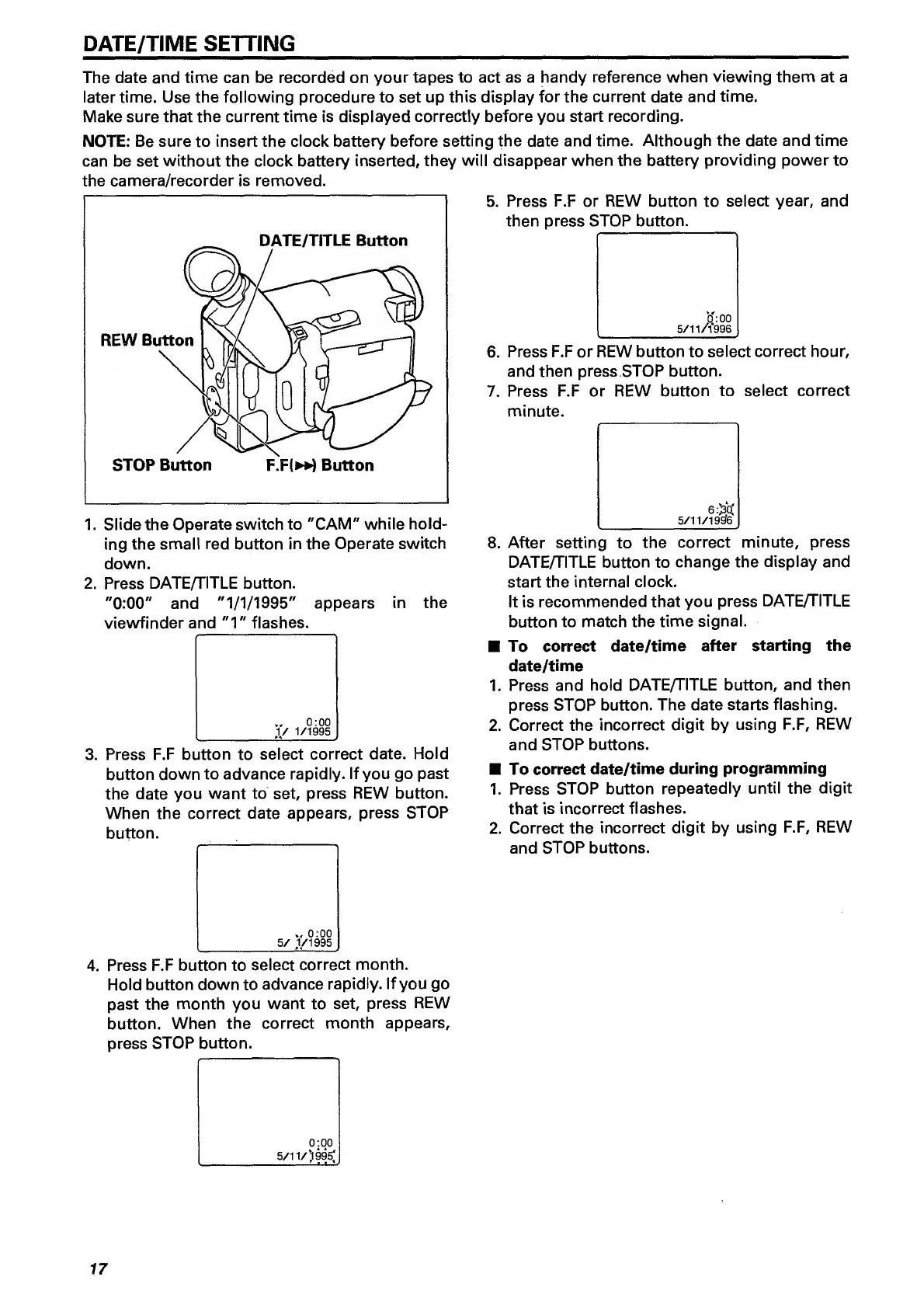
1.
Slide
the
Operate
switch
to
"CAM"
while
hold¬
ing
the
small
red
button
in
the
Operate
switch
down.
2.
Press
DATE/TITLE
button.
"0:00"
and
"1/1/1995"
appears
in
the
viewfinder
and
"1"
flashes.
w
0:00
_
,1/
1/1995
3.
P
ress
F.F
button
to
select
correct
date.
Hold
button
down
to
advance
rapidly.
If
you
go
past
the
date
you
want
to
set,
press
REW
button.
When
the
correct
date
appears,
press
STOP
button.
0:00
_
5/
1/1995
4.
P
ress
F.F
button
to
select
correct
month.
Hold
button
down
to
advance
rapidly.
If
you
go
past
the
month
you
want
to
set,
press
REW
button.
When
the
correct
month
appears,
press
STOP
button.
Press
F.F
or
REW
button
to
select
year,
and
then
press
STOP
button.
o':
00
5/11/1996
6.
Press
F.F
or
REW
button
to
select
correct
hour,
and
then
press
STOP
button.
7.
Press
F.F
or
REW
button
to
select
correct
minute.
6:^Q:
_
5/11/19£f6
8.
A
fter
setting
to
the
correct
minute,
press
DATE/TITLE
button
to
change
the
display
and
start
the
internal
clock.
It
is
recommended
that
you
press
DATE/TITLE
button
to
match
the
time
signal.
To
correct
date/time
after
starting
the
date/time
1.
Press
and
hold
DATE/TITLE
button,
and
then
press
STOP
button.
The
date
starts
flashing.
2.
Correct
the
incorrect
digit
by
using
F.F,
REW
and
STOP
buttons.
To
correct
date/time
during
programming
1.
Press
STOP
button
repeatedly
until
the
digit
that
is
incorrect
flashes.
2.
Correct
the
incorrect
digit
by
using
F.F,
REW
and
STOP
buttons.
0:00
5/^^/'^99g
'
'
17

Related product manuals