EasyManua.ls Logo

Hitachi VM-E110E - Instant Zoom.21; Remaining Tape.21; Title Recording

Hitachi VM-E110E
40 pages
Print Icon
To Next Page IconTo Next Page
To Previous Page IconTo Previous Page
Loading...
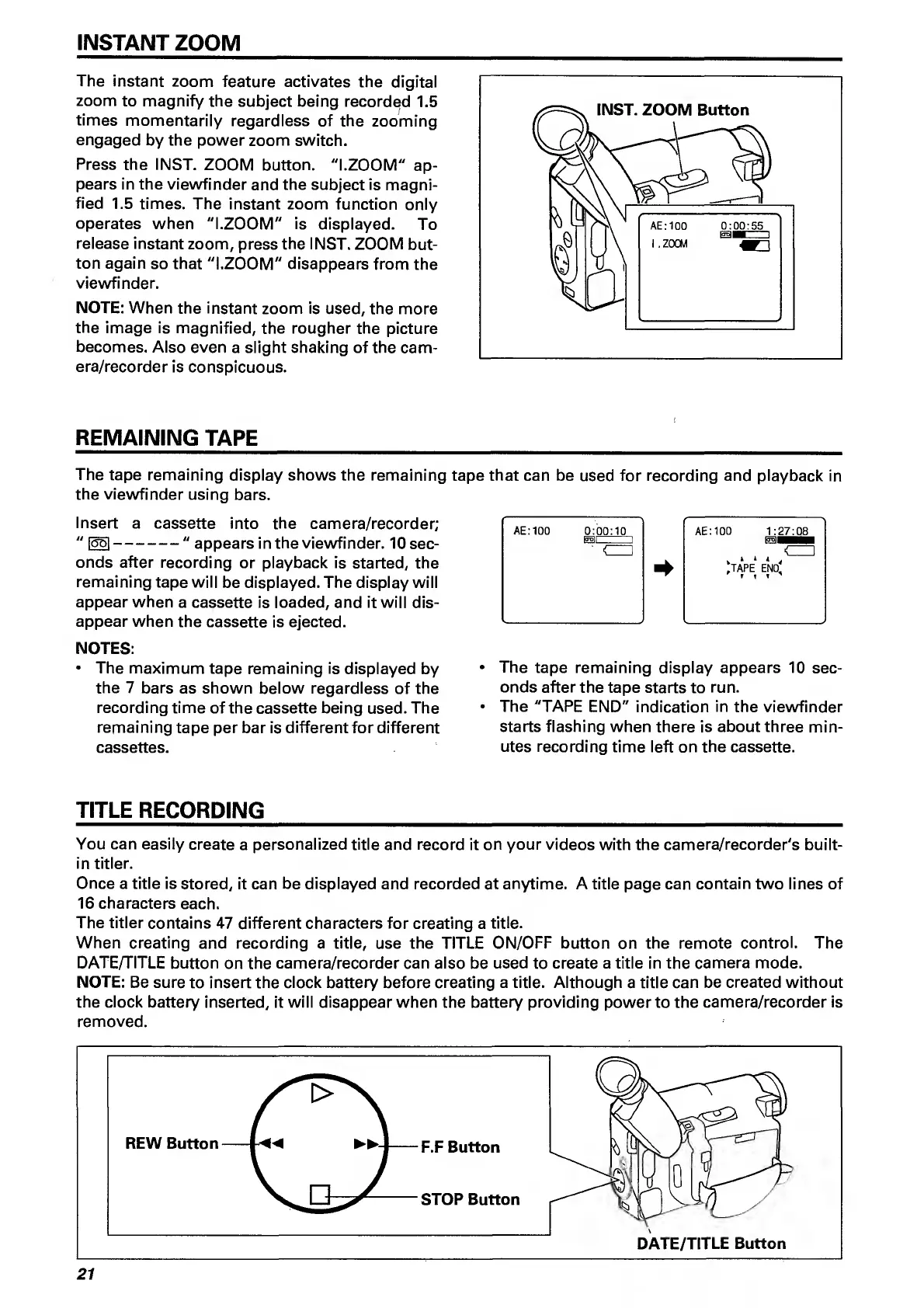
INSTANT
ZOOM
The
instant
zoom
feature
activates
the
digital
zoom
to
magnify
the
subject
being
recorded
1.5
times
momentarily
regardless
of
the
zooming
engaged
by
the
power
zoom
switch.
Press
the
INST.
ZOOM
button.
"l.ZOOM"
ap¬
pears
in
the
viewfinder
and
the
subject
is
magni¬
fied
1.5
times.
The
instant
zoom
function
only
operates
when
"l.ZOOM"
is
displayed.
To
release
instant
zoom,
press
the
INST.
ZOOM
but¬
ton
again
so
that
"l.ZOOM"
disappears
from
the
viewfinder.
NOTE:
When
the
instant
zoom
is
used,
the
more
the
image
is
magnified,
the
rougher
the
picture
becomes.
Also
even
a
slight
shaking
of
the
cam¬
era/recorder
is
conspicuous.
REMAINING
TAPE
The
tape
remaining
display
shows
the
remaining
tape
that
can
be
used
for
recording
and
playback
in
the
viewfinder
using
bars.
Insert
a
cassette
into
the
camera/recorder;
"
1551-"
appears
in
the
viewfinder.
10
sec¬
onds
after
recording
or
playback
is
started,
the
remaining
tape
will
be
displayed.
The
display
will
appear
when
a
cassette
is
loaded,
and
it
will
dis¬
appear
when
the
cassette
is
ejected.
NOTES:
The
maximum
tape
remaining
is
displayed
by
the
7
bars
as
shown
below
regardless
of
the
recording
time
of
the
cassette
being
used.
The
rerhaining
tape
per
bar
is
different
for
different
cassettes.
TITLE
RECORDING
_
You
can
easily
create
a
personalized
title
and
record
it
on
your
videos
with
the
camera/recorder's
built-
in
titler.
Once
a
title
is
stored,
it
can
be
displayed
and
recorded
at
anytime.
A
title
page
can
contain
two
lines
of
16
characters
each.
The
titler
contains
47
different
characters
for
creating
a
title.
When
creating
and
recording
a
title,
use
the
TITLE
ON/OFF
button
on
the
remote
control.
The
DATE/TITLE
button
on
the
camera/recorder
can
also
be
used
to
create
a
title
in
the
camera
mode.
NOTE:
Be
sure
to
insert
the
clock
battery
before
creating
a
title.
Although
a
title
can
be
created
without
the
clock
battery
inserted,
it
will
disappear
when
the
battery
providing
power
to
the
camera/recorder
is
removed.
DATE/TITLE
Button
AE.'IOO
0:00:10
AE:100
1:27:08
_[
ciu
,
,
,
<_1
"tape
end.
The
tape
remaining
display
appears
10
sec¬
onds
after
the
tape
starts
to
run.
The
"TAPE
END"
indication
in
the
viewfinder
starts
flashing
when
there
is
about
three
min¬
utes
recording
time
left
on
the
cassette.
21

Related product manuals