EasyManua.ls Logo

Hitachi VM-E110E - Page 5

Hitachi VM-E110E
40 pages
Print Icon
To Next Page IconTo Next Page
To Previous Page IconTo Previous Page
Loading...
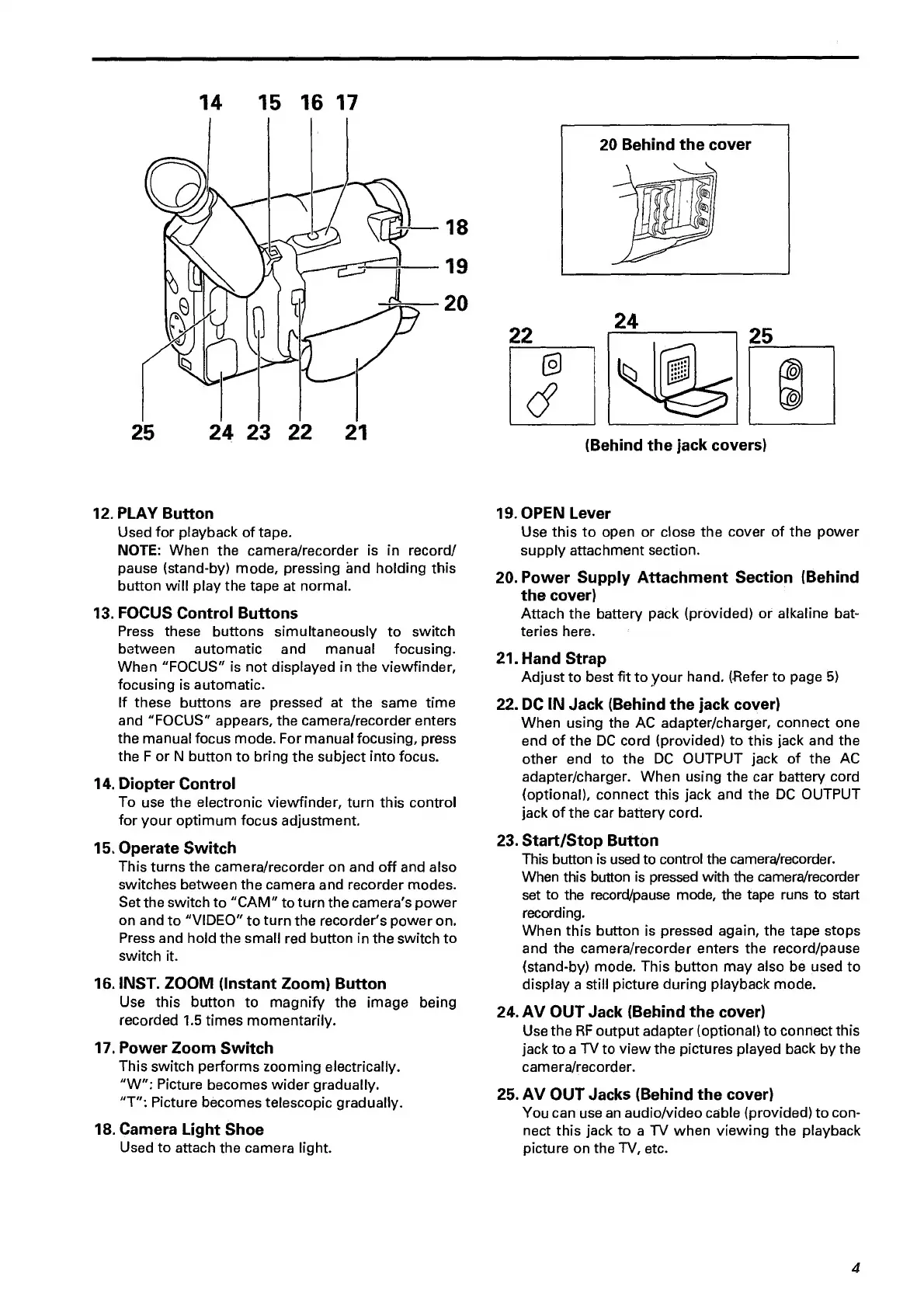
14
15
16
17
25
24
23
22
21
12.
PLAY
Button
Used
for
playback
of
tape.
NOTE:
When
the
camera/reeorder
is
in
record/
pause
(stand-by)
mode,
pressing
and
holding
this
button
will
play
the
tape
at
normal.
13.
FOCUS
Control
Buttons
Press
these
buttons
simultaneously
to
switch
between
automatic
and
manual
focusing.
When
"FOCUS"
is
not
displayed
in
the
viewfinder,
focusing
is
automatic.
If
these
buttons
are
pressed
at
the
same
time
and
"FOCUS"
appears,
the
camera/recorder
enters
the
manual
focus
mode.
For
manual
focusing,
press
the
F
or
N
button
to
bring
the
subject
into
focus.
14.
Diopter
Control
To
use
the
electronic
viewfinder,
turn
this
control
for
your
optimum
focus
adjustment.
15.
Operate
Switch
This
turns
the
camera/recorder
on
and
off
and
also
switches
between
the
camera
and
recorder
modes.
Set
the
switch
to
"CAM"
to
turn
the
camera's
power
on
and
to
"VIDEO"
to
turn
the
recorder's
power
on.
Press
and
hold
the
small
red
button
in
the
switch
to
switch
it.
16.
INST.
ZOOM
(Instant
Zoom)
Button
Use
this
button
to
magnify
the
image
being
recorded
1.5
times
momentarily.
17.
Power
Zoom
Switch
This
switch
performs
zooming
electrically.
"W":
Picture
becomes
wider
gradually.
"T";
Picture
becomes
telescopic
gradually.
18.
Camera
Light
Shoe
Used
to
attach
the
camera
light.
20
Behind
the
cover
(Behind
the
jack
covers)
19.
OPEN
Lever
Use
this
to
open
or
close
the
cover
of
the
power
supply
attachment
section.
20.
Power
Supply
Attachment
Section
(Behind
the
cover)
Attach
the
battery
pack
(provided)
or
alkaline
bat¬
teries
here.
21.
Hand
Strap
Adjust
to
best
fit
to
your
hand.
(Flefer
to
page
5)
22.
DC
IN
Jack
(Behind
the
jack
cover)
When
using
the
AC
adapter/charger,
connect
one
end
of
the
DC
cord
(provided)
to
this
jack
and
the
other
end
to
the
DC
OUTPUT
jack
of
the
AC
adapter/charger.
When
using
the
car
battery
cord
(optional),
connect
this
jack
and
the
DC
OUTPUT
jack
of
the
car
battery
cord.
23.
Start/Stop
Button
This
button
is
used
to
control
the
camera/recorder.
When
this
button
is
pressed
with
the
camera/recorder
set
to
the
record/pause
mode,
the
tape
runs
to
start
recording.
When
this
button
is
pressed
again,
the
tape
stops
and
the
camera/recorder
enters
the
record/pause
(stand-by)
mode.
This
button
may
also
be
used
to
display
a
still
picture
during
playback
mode.
24.
AV
OUT
Jack
(Behind
the
cover)
Use
the
RF
output
adapter
(optional)
to
connect
this
jack
to
a
TV
to
view
the
pictures
played
back
by
the
camera/recorder.
25.
AV
OUT
Jacks
(Behind
the
cover)
You
can
use
an
audio/video
cable
(provided)
to
con¬
nect
this
jack
to
a
TV
when
viewing
the
playback
picture
on
the
TV,
etc.
4

Related product manuals