EasyManua.ls Logo

Hitachi VM-E110E - Page 6

Hitachi VM-E110E
40 pages
Print Icon
To Next Page IconTo Next Page
To Previous Page IconTo Previous Page
Loading...
CONTROLS
AND
FUNCTIONS
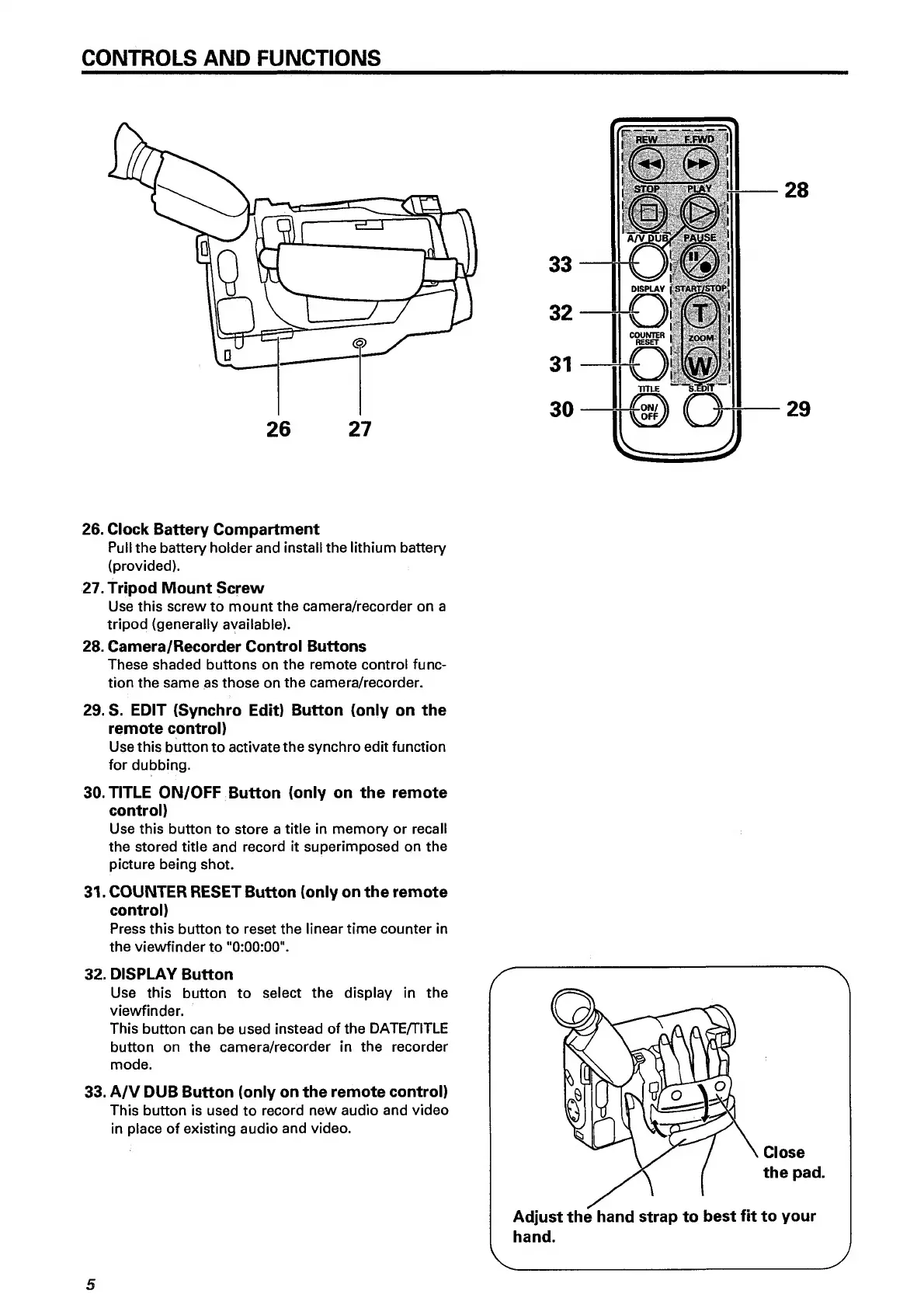
26.
Clock
Battery
Compartment
Pull
the
battery
holder
and
install
the
lithium
battery
(provided).
27.
Tripod
Mount
Screw
Use
this
screw
to
mount
the
camera/recorder
on
a
tripod
(generally
available).
28.
Camera/Recorder
Control
Buttons
These
shaded
buttons
on
the
remote
control
func¬
tion
the
same
as
those
on
the
camera/recorder.
29.
S.
EDIT
(Synchro
Edit)
Button
(only
on
the
remote
control)
Use
this
button
to
activate
the
synchro
edit
function
for
dubbing.
30.
TITLE
ON/OFF
Button
(only
on
the
remote
control)
Use
this
button
to
store
a
title
in
memory
or
recall
the
stored
title
and
record
it
superimposed
on
the
picture
being
shot.
31.
COUNTER
RESET
Button
(only
on
the
remote
control)
Press
this
button
to
reset
the
linear
time
counter
in
the
viewfinder
to
"0:00:00".
32.
DISPLAY
Button
Use
this
button
to
select
the
display
in
the
viewfinder.
This
button
can
be
used
instead
of
the
DATE/TITLE
button
on
the
camera/recorder
in
the
recorder
mode.
33.
A/V
DUB
Button
(only
on
the
remote
control)
This
button
is
used
to
record
new
audio
and
video
in
place
of
existing
audio
and
video.
5

Related product manuals