EasyManua.ls Logo

Hitachi VM-E110E - Page 15

Hitachi VM-E110E
40 pages
Print Icon
To Next Page IconTo Next Page
To Previous Page IconTo Previous Page
Loading...
CHARGING
THE
BATTERY
_
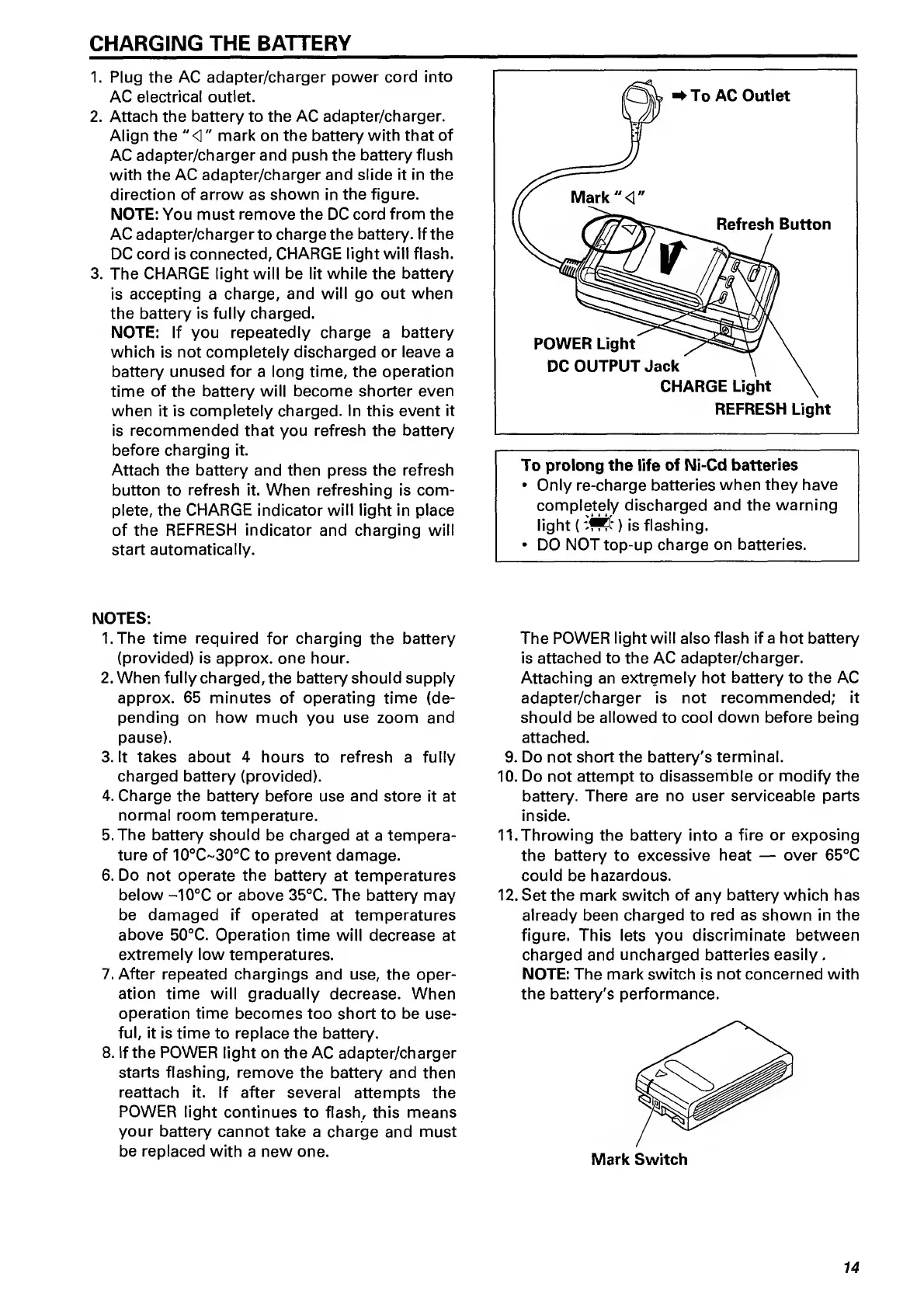
1.
Plug
the
AC
adapter/charger
power
cord
into
AC
electrical
outlet.
2.
Attach
the
battery
to
the
AC
adapter/charger.
Align
the
"
<]"
mark
on
the
battery
with
that
of
AC
adapter/charger
and
push
the
battery
flush
with
the
AC
adapter/charger
and
slide
it
in
the
direction
of
arrow
as
shown
in
the
figure.
NOTE:
You
must
remove
the
DC
cord
from
the
AC
adapter/charger
to
charge
the
battery.
If
the
DC
cord
is
connected,
CHARGE
light
will
flash.
3.
The
CHARGE
light
will
be
lit
while
the
battery
is
accepting
a
charge,
and
will
go
out
when
the
battery
is
fully
charged.
NOTE:
If
you
repeatedly
charge
a
battery
which
is
not
completely
discharged
or
leave
a
battery
unused
for
a
long
time,
the
operation
time
of
the
battery
will
become
shorter
even
when
it
is
completely
charged.
In
this
event
it
is
recommended
that
you
refresh
the
battery
before
charging
it.
Attach
the
battery
and
then
press
the
refresh
button
to
refresh
it.
When
refreshing
is
com¬
plete,
the
CHARGE
indicator
will
light
in
place
of
the
REFRESH
indicator
and
charging
will
start
automatically.
NOTES:
1.
T
he
time
required
for
charging
the
battery
(provided)
is
approx,
one
hour.
2.
When
fully
charged,
the
battery
should
supply
approx.
65
minutes
of
operating
time
(de¬
pending
on
how
much
you
use
zoom
and
pause).
3.
It
takes
about
4
hours
to
refresh
a
fully
charged
battery
(provided).
4.
Charge
the
battery
before
use
and
store
it
at
normal
room
temperature.
5.
The
battery
should
be
charged
at
a
tempera¬
ture
of
10°C~30“C
to
prevent
damage.
6.
Do
not
operate
the
battery
at
temperatures
below
-10°C
or
above
35°C.
The
battery
may
be
damaged
if
operated
at
temperatures
above
50°C.
Operation
time
will
decrease
at
extremely
low
temperatures.
7.
After
repeated
chargings
and
use,
the
oper¬
ation
time
will
gradually
decrease.
When
operation
time
becomes
too
short
to
be
use¬
ful,
it
is
time
to
replace
the
battery.
8.
If
the
POWER
light
on
the
AC
adapter/charger
starts
flashing,
remove
the
battery
and
then
reattach
it.
If
after
several
attempts
the
POWER
light
continues
to
flash,
this
means
your
battery
cannot
take
a
charge
and
must
be
replaced
with
a
new
one.
To
prolong
the
life
of
Ni-Cd
batteries
Only
re-charge
batteries
when
they
have
completely
discharged
and
the
warning
light
()
is
flashing.
DO
NOT
top-up
charge
on
batteries.
The
POWER
light
will
also
flash
if
a
hot
battery
is
attached
to
the
AC
adapter/charger.
Attaching
an
extremely
hot
battery
to
the
AC
adapter/charger
is
not
recommended;
it
should
be
allowed
to
cool
down
before
being
attached.
9.
D
o
not
short
the
battery's
terminal.
10.
Do
not
attempt
to
disassemble
or
modify
the
battery.
There
are
no
user
serviceable
parts
inside.
11.
Throwing
the
battery
into
a
fire
or
exposing
the
battery
to
excessive
heat
over
65°C
could
be
hazardous.
12.
Set
the
mark
switch
of
any
battery
which
has
already
been
charged
to
red
as
shown
in
the
figure.
This
lets
you
discriminate
between
charged
and
uncharged
batteries
easily
.
NOTE:
The
mark
switch
is
not
concerned
with
the
battery's
performance.
14

Related product manuals