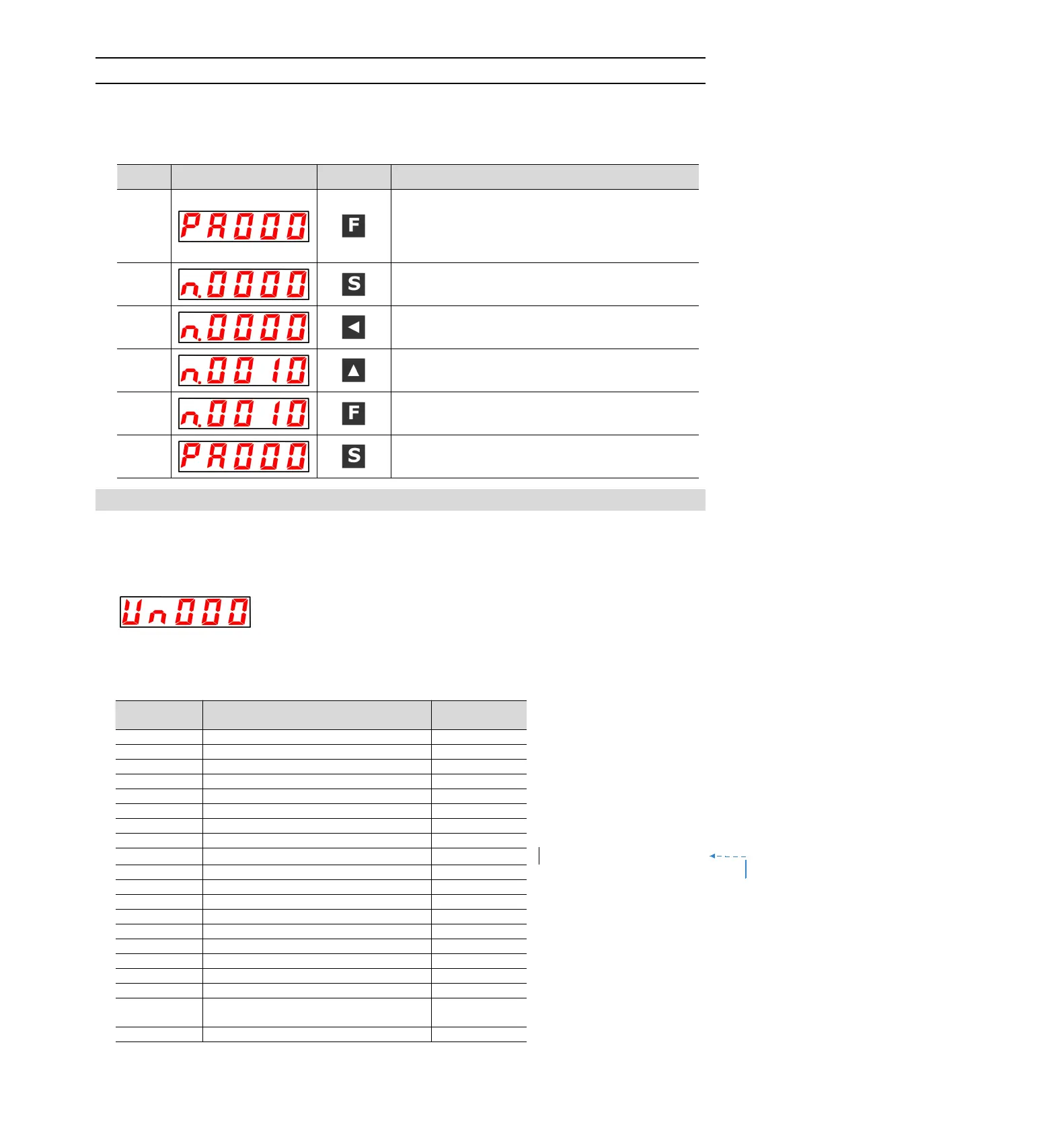
8.2.2 Setting Method of "Function Selection Type"
The function selection type sets various functions by selecting from the functions assigned to each digit of the
display number of the panel operator.
The following describes the setting method of the function selection type, taking the control mode selection
(Pn000.1) of the function selection basic switch (PA000) from speed control to position control as an example.
Press the F key to select the parameter mode. If the
parameter number does not show Pn000, press the UP or
DOWN key to show "Pn000".
In case of dual-axis drive, long press F key will be used for
more than 3 seconds, and Axis A and Axis B will be switched
alternately.
Press S key to display the current set value of Pn000.
Press the left key to move the flashing digits. (You can change
the number of digits displayed by blinking. )
Press the UP key once to change the setting value to
"n.0010".
(Change speed control to position control.)
After pressing the F key, the value display will flash. In this
way, the control mode becomes position control.
Press S key to return to the display of "Pn000".
8.3 The operation of the monitor display (Un) in the panel operator
A function of monitoring (displaying) the command value set in the servo drive, the state of input and output
signals, and the internal state of the servo drive.
Displays the number beginning with UA on the panel operator.
Display Example (Motor Speed)
The following describes the basic operation of monitoring display and the discrimination method of display as
a special monitoring number.
■ List of Monitoring and Display Functions
Monitoring of the output signal
Input Reference pulse speed
DB resistor power consumption
Input reference pulse counter
Absolute encoder Multiturn Data
Position within 1 coil of absolute value
encoder


 To Next Page