deviation caused by speed limit when
servo is on
executed by the speed limit value (Pn529 or Pn584) when the servo is ON. When a
position command is input in this state, the limit is not released and the set value of the
warning value (Pn520) for excessive position deviation is exceeded.
Excessive deviation between motor
and load positions
In full closed loop control, the deviation between motor and load position is too large.
Location data is too large
The position feedback data exceeds 1879048192.
MECHATROLINK Internal
Synchronization Exception 1
MECHATROLINK communication and servo drive synchronization are abnormal.
MECHATROLINK transmission cycle
setting error
The transmission period of MECHATROLINK communication is set incorrectly.
The address setting of
MECHATROLINK station is abnormal
The address of MECHATROLINK Station is set incorrectly.
MECHATROLINK synchronization
exception
Synchronization exception occurred in MECHATROLINK communication.
MECHATROLINK synchronization
failed
Synchronization failure occurred in MECHATROLINK communication.
MECHATROLINK communication
failure (receiving error)
MECHATROLINK Communication failure occurs continuously during communication.
MECHATROLINK transmission cycle
is abnormal
Abnormal transmission period occurred in MECHATROLINK communication.
MECHATROLINK did not receive
synchronization frames
Unreceived synchronization frames occur continuously in MECHATROLINK
communication.
Command execution timed out
MECHATROLINK command timeout error occurred.
When the main loop power supply is ON, the low voltage state of one of the three phases
lasts for more than 1 second.
* This Alarm will not be saved in the Alarm record. Only on the panel display.
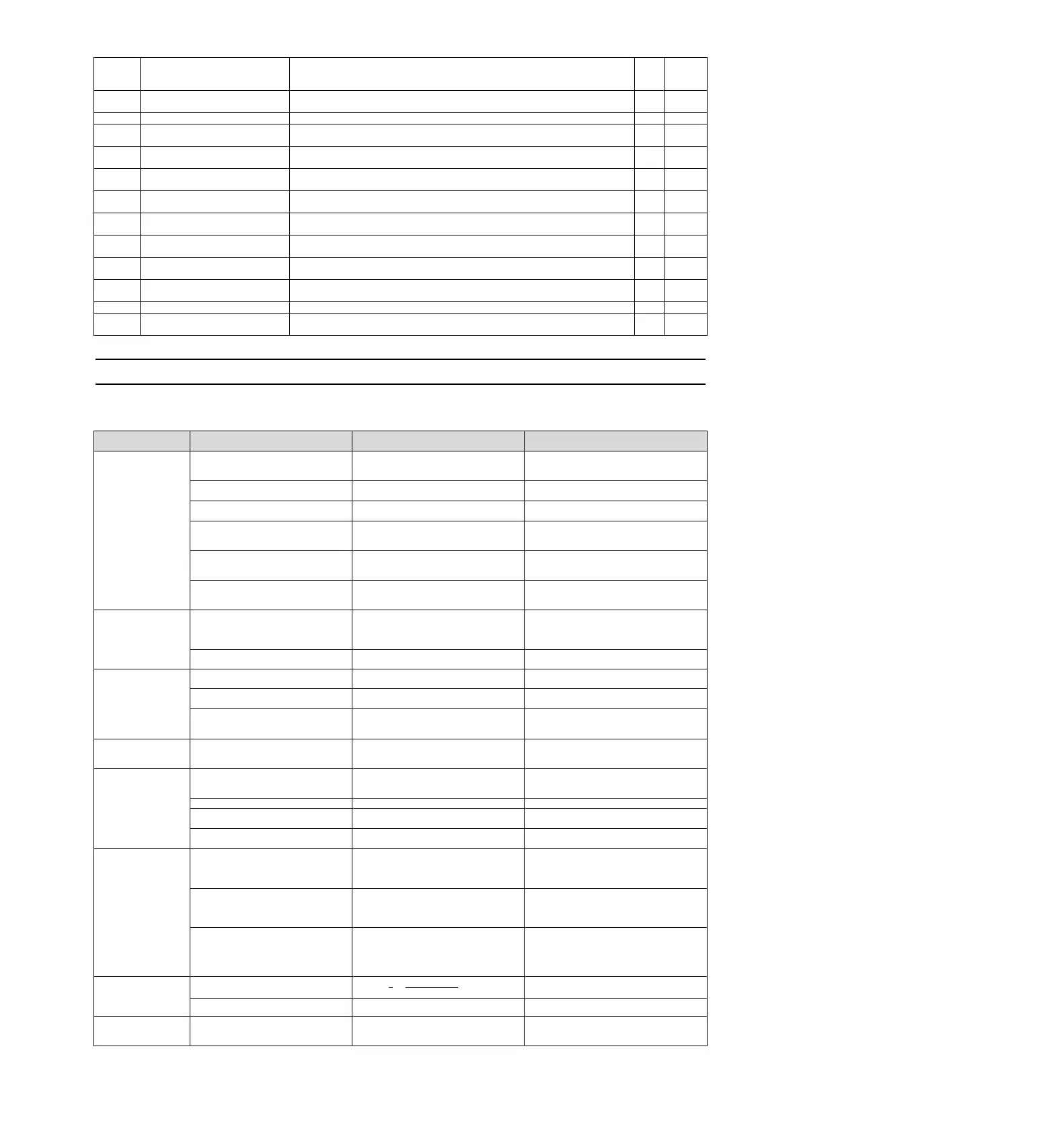
9.2.2 Cause of Alarm and Treatment Measures
The following table lists the cause of the alarm and the treatment measures. If the fault cannot be cleared after
processing according to the following table, please contact our agency or the nearest branch.
A.020:
Parameter and check
exceptions
The data of internal
parameters of servo
drive is abnormal.
The supply voltage drops
instantaneously.
Measure the supply voltage.
Set the power supply voltage within the
specification range, and perform initialization
of the parameter setting value.
Power off when writing parameters
Confirm the time of power failure.
Re-enter parameters after initialization of
parameter settings.
The number of writes to the parameter
exceeded the maximum
Confirm whether parameter changes are
frequently made from the upper device.
Replace the servo drive. Change the
parameter writing method.
Misoperation occurs due to interference
from AC power supply, grounding, static
electricity, etc.
Connect to the servo drive power supply
again. When the alarm still occurs, it may
be disturbed.
Take measures to prevent mutual interference.
Due to gas, water droplets or cutting oil,
etc., the components inside the servo
drive have failed.
Confirm the setting environment.
Connect to the servo drive power supply
again. When the alarm still occurs, it may
be a fault.
A.021:
Parameter format
exception
(The data of internal
parameters of servo
drive is abnormal.)
The software version of the write
parameter is updated as compared to
the software version of the servo drive
where the alarm occurred.
Read the product information and confirm
whether the software versions are the
same. If the versions are different, an alarm
may occur.
Write the parameters of other servo drives
with the same software version and model,
and then switch on the power supply.
A.022:
System parameters and
check exceptions
(The data of internal
parameters of servo
drive is abnormal)
The supply voltage drops
instantaneously.
Measure the power supply voltage
The power supply was turned off in the
process of setting the auxiliary function.
Confirm the time of power failure.
Connect to the servo drive power supply
again. When the alarm still occurs, it may
be a fault.
A.030:
Main circuit detection
unit failure
A.040:
Parameter setting
exception
(beyond the set range)
Servo capacity does not match servo
motor capacity
Confirm the capacity of servo drive and
servo motor
Quantity and combination.
Capacity of servo drive and servo motor
Match each other.
Outside the parameter setting range
Confirm the setting range of the changed
parameters.
Set the changed parameters to values within
the set range.
The electronic gear ratio setting value is
outside the set range
Verify that the electronic gear ratio is
0.001<(Pn20E/Pn210)< 64000.
Set the electronic gear ratio to
0.001< (Pn20E/Pn210) < 64000.
A.042:
Parameter combination
exception
Since the electronic gear ratio (Pn20E
/Pn210) or servo motor is changed, the
running speed of the program JOG does
not conform to the set range.
Confirm whether the detection condition
formula
*1
is true.
Reduce the value of the electronic gear ratio
(Pn20E/Pn210).
Since the program JOG moving speed
(Pn533) has been changed, the running
speed of the program JOG does not
conform to the set range.
Confirm whether the detection condition
formula
*1
is true.
Increase the value of Pn533.
Due to the change of electronic gear
ratio (Pn20E/Pn210) or servo motor, the
moving speed of advanced automatic
adjustment does not conform to the set
range.
Confirm whether the detection condition
formula
*2
is true.
Reduce the value of the electronic gear ratio
(Pn20E/Pn210).
A.050:
Combination error
(outside the combinable
motor capacity range)
Servo drive capacity does not match
servo motor capacity
Confirm
1
4
≤≤
Motorcapacity
Servodrivecapacity
4
Capacity of servo drive and servo motor
Match each other.
A.051:
The product does not
support Alarms
The motor parameter file is not written
into the encoder (only when serial
conversion unit is not used)
Verify that the motor parameter file is
written into the encoder.
Write the motor parameter file into the
encoder.


 To Next Page