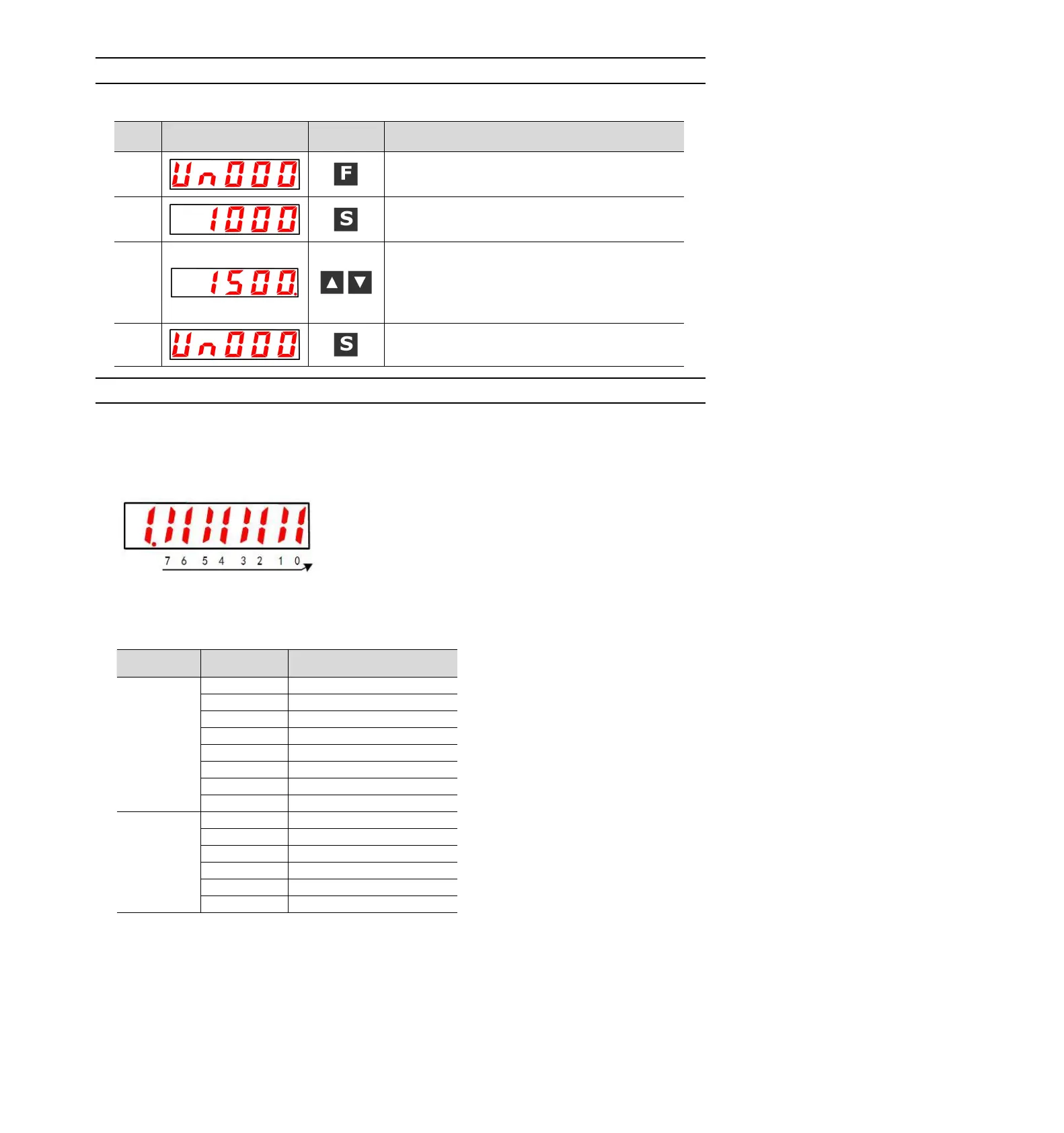
8.3.1 Basic operation of monitoring display
The following description will take Un000 (motor rotation speed) as an example.
Press the F key to select the auxiliary function. If the
parameter number does not show UA000, press the
UP or DOWN key to show "UA000".
Press S key to display the current motor speed.
When there is no red dot in the lower right corner of
the dual-axis drive, the A-axis data is displayed.
When there is a red dot in the lower right corner of
the dual-axis drive, the B-axis data will be displayed.
Press the UP or DOWN key to switch the A axis and
the B axis alternately.
Press the S key to return to the display of step 1.
8.3.2 Monitoring of input and output signals (Un005/ Un006)
Use Un005/ Un006 to display the assigned signal status in the segment (LED) of the panel operator.
◆ Display discrimination method
< segment (led) >
The input signal OFF corresponding to the LED number is displayed: the upper segment lights up
The input signal ON corresponding to the LED number is displayed: the lower segment lights up
The distribution table is as follows.


 To Next Page