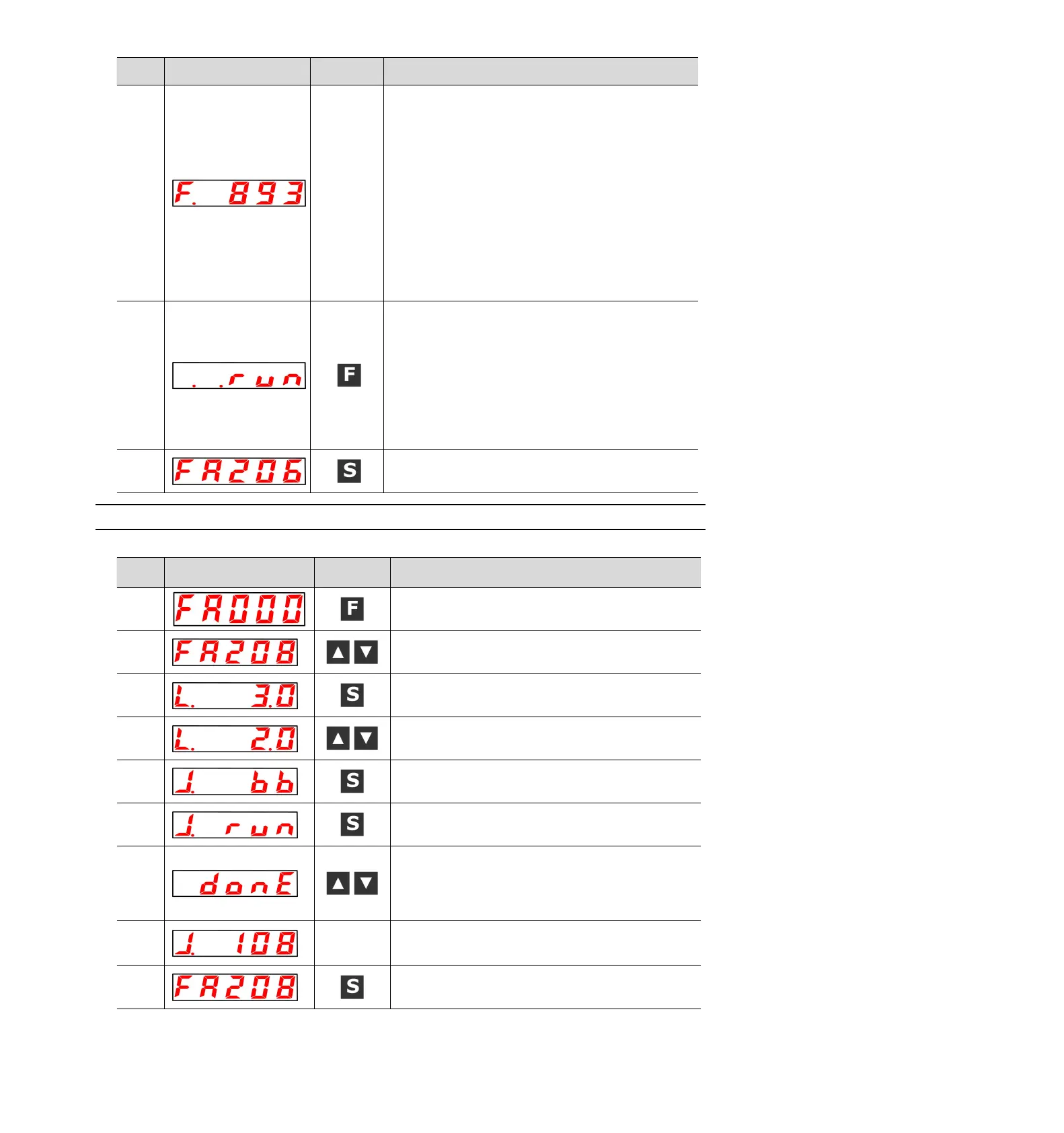
After the detection process is normally completed, the "E_FFt"
display stops blinking and shows the detected resonance
frequency. If the check-out fails, "F----" is displayed.
When setting the check-out result, you must proceed to step 9.
If only the resonance frequency is confirmed without setting the
detection result, press the S key to return to step 2.
<Important>
Even if the detection ends normally, if the running time exceeds
2 seconds, the detection accuracy may be insufficient. If the
command amplitude is increased to slightly greater than "15"
and then executed again, the detection accuracy may be
improved. However, after the command amplitude is increased,
the vibration and noise generated by the machine will become
larger in a short time. Please gradually increase the amplitude
value and make changes while observing the situation when
changing the command amplitude.
Press F key and it will be automatically set as the best notch
filter corresponding to the detected resonant frequency. After the
notch filter is normally set, "donE" flashes and returns to the left
display. When the 1st notch filter frequency has been set, the
2nd notch filter frequency (Pn40C) will be automatically set in
(PN 408.0 = 1).Press F again to return to step 5.
(Note) 1. When the notch filters of section 1 and section 2 have
been set, it is not possible to set the notch filter at
(Pn408= n.□1□1).
2. When the notch filter frequency detected by this
function is not used, Pn408.0= 00 is set.
Press the S key again to return to the display of "FA206".
8.4.17 Load Inertia/Mass Detection (FA208)
Please refer to the following contents besides the operation steps
Press the F key to select the auxiliary function.
UP or DOWN key display "FA208".
Press S key, and the display content is as shown in the left
figure. Enter the load inertia/mass pushing distance setting.
Press the UP or DOWN key to set the moving distance.
Unit: coil (rotating motor) mm (linear motor)
Press and hold the S key to enter the operation preparation
state.
Press S key to enter servo ON state. At this time, if you want to
turn OFF the servo, press S key. Return to step 5.
Press the UP or DOWN key in the servo ON state, and the
servo motor will rotate forward and reverse several times
within the set moving distance (within 10mm in the case of
linear servo motor). The running time is about 8 seconds.
During operation, the display on the left will flash.
The flicker is stopped and the detected load inertia/mass
percentage is displayed after the detection process is normally
completed. If the check-out fails, "J.----" is displayed.
Press the S key again to return to the display of "FA208".


 To Next Page