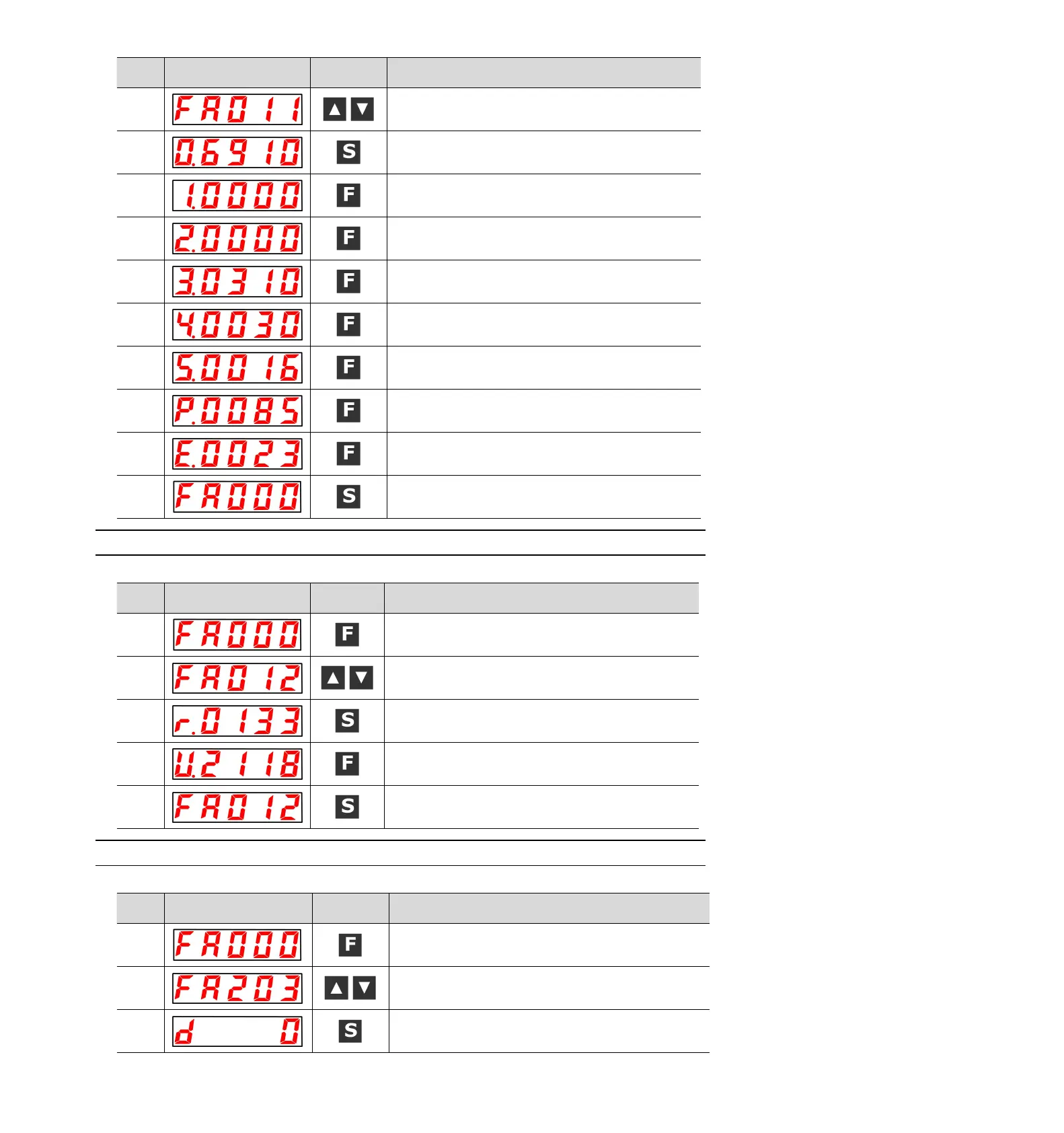
UP or DOWN key display "FA011".
Press the S key to display the current motor code. The display
content will be shown in the left figure.
Press F key to display the current servo internal parameter 1.
Press F key to display the current servo internal parameter 2.
Press F key to display the current servo internal parameter 3.
Press F key to display the current servo internal parameter 4.
Press F key to display the current servo internal parameter 5.
Press F key, the current motor capacity is 850W,and the unit is
10W.
Press F key, the encoder resolution.
Press the S key again to return to the display of "FA011".
8.4.14 Display software version (FA012)
Please refer to the following contents besides the operation steps
Press the F key to select the auxiliary function.
UP or DOWN key display "FA012".
Press S to display the servo-driven software version, as shown
in the left figure.
Press the F key to display the FPGA version.
Press the S key again to return to the display of "FA012".
8.4.15 Single parameter adjustment (FA203)
Please refer to the following contents besides the operation steps
Press the F key to select the auxiliary function.
UP or DOWN key display "FA203".
Press S key, and the display content is shown in the left figure.


 To Next Page