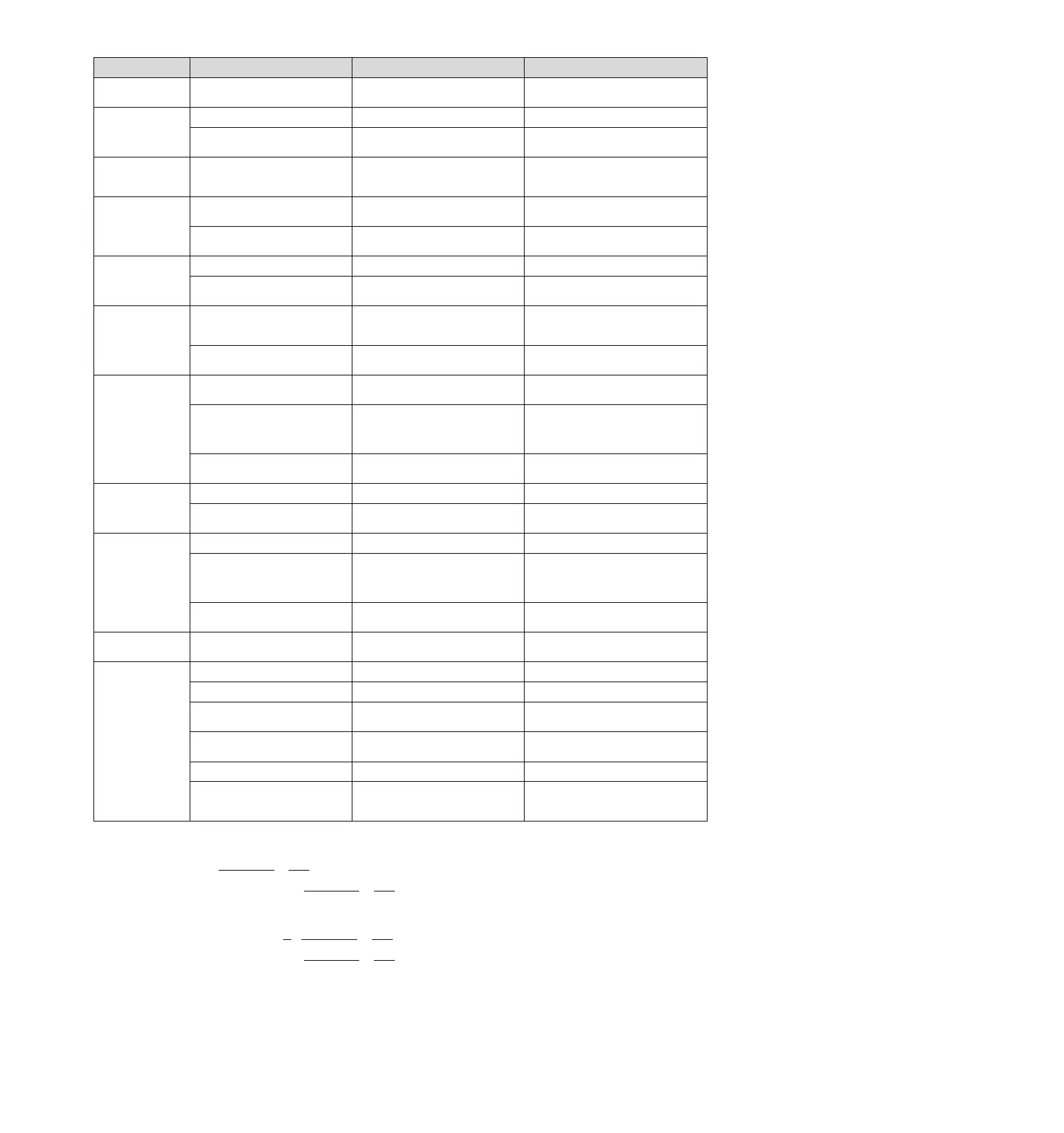
A.d30
Location data is too
large
Location data exceeds ±1879048192
Confirm the input command pulse counter.
Revise operating specifications.
A.E02:
MECHATROLINK
Internal synchronization
exception 1
The transmission period of
MECHATROLINK has changed
The reason for the transmission cycle
variation of the upper device is eliminated.
Connect to the servo drive power supply
again. When an alarm still occurs, replace the
servo drive.
A.E40:
MECHATROLINK
Transmission cycle
setting failure
MECHATROLINK transmission cycle
setting is out of specification range
Confirm the transmission cycle setting of
MECHATROLINK.
Set the transmission period of
MECHATROLINK to the correct value.
A.E42:
MECHATROLINK
Station address setting
exception
The station address is outside the set
range
Confirm whether the rotary switches (S1,
S2) are within the range of 03 ~ EF.
Confirm the station address setting of the
upper device and set the rotary switches (S1,
S2) to the correct values (03-EF).
The same address exists in the
communication network
Confirm whether the same address exists
in the communication network.
Confirm the station address setting of the
upper device and set the rotary switches (S1,
S2) to the correct values (03-EF).
A.E50*3:
MECHATROLINK
Synchronization
exception
WDT data update of upper device is
abnormal
Confirm WDT data update of the upper
device.
Correctly update WDT data of upper device.
Connect to the servo drive power supply
again. When an alarm still occurs, replace the
servo drive.
A.E51:
MECHATROLINK
Synchronization failed
When synchronous communication
starts, the WDT data of the upper device
is updated abnormally and synchronous
communication cannot be started
Confirm WDT data update of the upper
device.
Correctly update WDT data of upper device.
Connect to the servo drive power supply
again. When an alarm still occurs, replace the
servo drive.
A.E60*3:
MECHATROLINK
Abnormal of
communication
(Receiving error)
MECHATROLINK wiring is incorrect
Confirm the wiring of MECHATROLINK.
Connect MECHATROLINK communication
cable properly. Connect the termination
resistor correctly.
MECHATROLINK received data
incorrectly due to mutual interference.
Take measures to prevent mutual interference.
(Adjust the wiring of MECHATROLINK
communication cable or FG. E.g. adding
ferrite cores to the MECHATROLINK
communication cable, etc.)
Connect to the servo drive power supply
again. When an alarm still occurs, replace the
servo drive.
A.E61:
MECHATROLINK
Abnormal transmission
period (Synchronization
Interval Abnormal)
The transmission period of
MECHATROLINK has changed
Confirm the transmission cycle setting of
MECHATROLINK.
The reason for the transmission cycle
variation of the upper device is eliminated.
Connect to the servo drive power supply
again. When an alarm still occurs, replace the
servo drive.
A.E63:
MECHATROLINK
Synchronization frame
not received
MECHATROLINK wiring is incorrect
Confirm the wiring of MECHATROLINK.
Connect MECHATROLINK communication
cable properly.
MECHATROLINK received data
incorrectly due to mutual interference
Take measures to prevent mutual interference.
(Adjust the wiring of MECHATROLINK
communication cable or FG. E.g. adding
ferrite cores to the MECHATROLINK
communication cable, etc.)
Connect to the servo drive power supply
again. When an alarm still occurs, replace the
servo drive.
A.Ed1:
Command execution
timed out
MECHATROLINK command timeout
error occurred.
Confirm the monitor status when executing
the command.
Set to not execute SV_ON and SENS_ON
commands during motor operation.
A.F10:
Power cord phase loss
(When the main circuit
power supply is ON, the
low voltage state of one
of R, S and T phases
lasts for more than 1
second)
Poor connection of three-phase wires
Confirm the wiring of power supply.
Confirm whether there is any problem with the
power supply wiring.
Three-phase power supply imbalance
Measure the voltage of each phase of the
three-phase power supply.
Correct the imbalance of power supply
(change phase).
Single-phase AC power input (Pn00B =
n. 1 ) is not set and single-phase
power is input
Confirm power supply and parameter
settings.
Set correct power input and parameters.
Connect to the servo drive power supply
again. When an alarm still occurs, replace the
servo drive.
Poor connection or poor connection of
motor wiring
Confirm whether there is any problem with the
motor wiring.
Connect to the servo drive power supply
again. When an alarm still occurs, it is
possible that the servo unit has failed.
Replace the servo drive.
*1. Detection condition formula
When either of the following two conditional expressions holds, an alarm will be detected.
Pn533 [min
-1
] ×
Encoderresolution
6×10
5
≤
Pn20E
Pn210
Maximum speed of motor [min
-1
] ×
Encoderresolution
around3.66×10
12
≤
Pn20E
Pn210
*2. Detection condition formula
When either of the following two conditional expressions holds, an alarm will be detected.
Rated speed of motor [min
-1
] ×
1
3
×
Encoderresolution
6×10
5
≤
Pn20E
Pn210
Maximum speed of motor [min
-1
] ×
Encoderresolution
around3.66×10
12
≥
Pn20E
Pn210


 To Next Page