102
3. Put the mounting brackets into the box.
Removing the cable management brackets
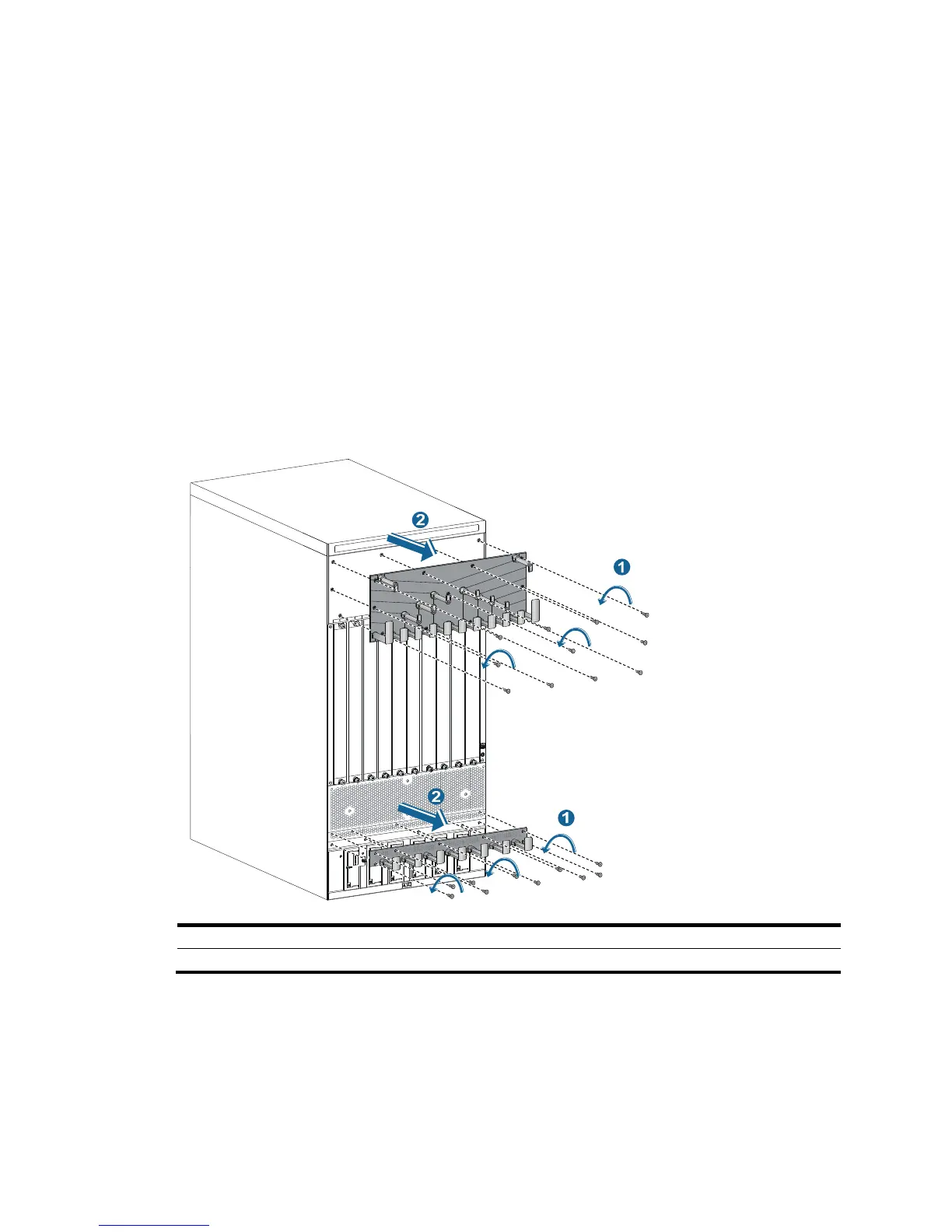
The 10508-V has two cable management brackets—the one on the chassis bottom routes power cords,
and the one on the chassis top routes signal cables.
The 10504, 10508, and 10512 provide a cable management bracket at the chassis bottom to route
power cords. The procedure for removing the cable management bracket is similar to that of the
10508-V.
To remove the cable management brackets:
1. Prepare the packing bag of the cable management brackets. Make sure the bag is clean, dry, and
not damaged.
2. Use a Phillips screwdriver to loosen the screws that attach the cable management brackets to the
chassis, and then remove the cable management brackets.
3. Put the cable management brackets into the bag.
Figure 61 Removing the cable management brackets from the 10508-V
(1) Loosen the screws that attach the cable management brackets to the chassis.
(2) Remove the cable mana
Repackaging the switch chassis
1. As shown in Figure 62, align the screw holes on the two sides of the chassis bottom to the L-type
brackets on the pallet base of the wooden carton.
2. Screw in the screws shipped with your switch and fasten.



 To Next Page