Shenzhen Hpmont Technology Co., Ltd. Chapter 7 Troubleshooting and Maintenance
HD3N Series User Manual V1.1 - 103 -
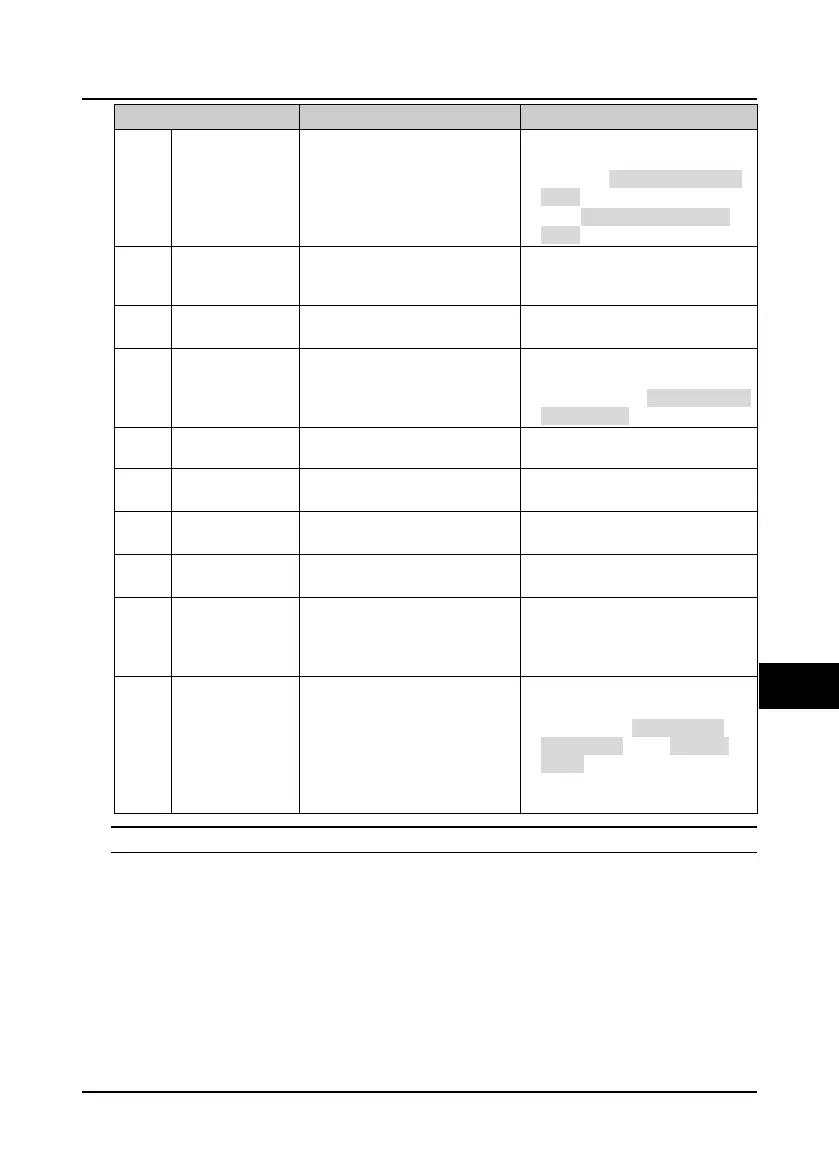
Fault Fault reasons Counter-measures
E0020
Motor overheat
• Motor overheat
• The setting of motor parameter is
incorrect
• Reduce the load; Repair or replace the
motor
• Increase the Acc / Dec time (F03.01 -
F03.08)
• Set the motor parameter (F08.00 -
F08.04)
E0021
Read / Write fault of
control board
EEPROM
• Memory circuit fault of control
board EEPROM
• Contact the supplier for repairing
E0022
Read / Write fault of
keypad EEPROM
• Memory circuit fault of keypad
EEPROM
• Replace the keypad
Contact the supplier for repairing
E0023
Faulty setting of
parameters
• The power rating between motor
and inverter is too different
• Improper setting of motor
parameters
• Select an inverter with suitable power
rating
• Set correct value of motor parameters
(F08.00 - F08.04)
E0024
Fault of external
equipment
• Fault terminal of external
equipment operates
• Check external equipment
E0025
PID setting loss
• Analogue reference signal < F20.12
• Analogue input circuit fault
• Check the connection
• Seek technical support
E0026
PID feedback loss
• Analogue setting < F20.14
Analogue input circuit fault
• Check the connection
Seek technical support
E0027
PID feedback out of
limit
• Analogue setting signal > F20.16
• Analogue input circuit fault
• Check the connection
• Seek technical support
E0028
SCI communication
timeout
• Connection fault of
Communication cable
• Disconnected or not well
connected
• Check the connection
E0029
SCI communication
error
• Connection fault of communication
cable
• Disconnected or not well
connected
• Communication setting error
• Communication data error
• Check the connection
• Check the connection
• Correctly set the communication
format (F17.00) and the baud rate
(F17.01)
• Send the data according to MODBUS
protocol
Note: E0022 does not affect the normal use of HD3N.


 To Next Page
 Loading...