Chapter 6 Function Introduction Shenzhen Hpmont Technology Co., Ltd.
- 46 - HD3N Series User Manual V1.1
6.1 Group d: Display Parameter
Group d is status display parameter.
6.1.1 d00: Status Display Parameter
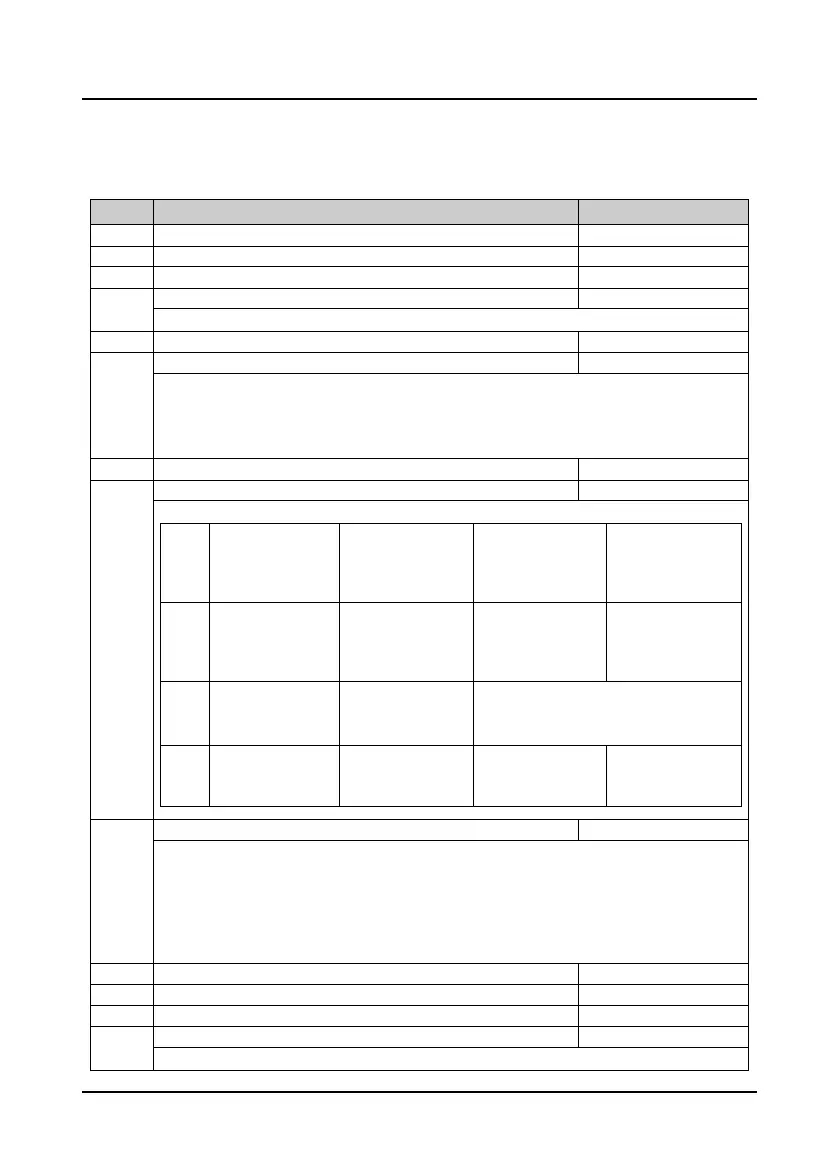
Ref. code Function Description Setting Range [Default]
d00.01 Software version of HD3N [Actual value]
Non-standard software version of HD3N
d00.05 Software version of keypad [Actual value]
Valid only when LED keypad adopted.
Displays present motor and control mode.
Unit: Unused Ten: Control mode
• 0: V/f control without PG.
• 2: Vector control without PG.
Rated current of HD3N (A)
d00.10 Inverter status [Actual value]
Displays the inverter status, as following:
Thous
ands
Bit15: Unused
Bit14: Hardware
current restriction
0: Do not restrict
1: Restrict
Bit13: Software
current restriction
0: Do not restrict
1: Restrict
Bit12: Stall
overvoltage
0: Invalid
1: Valid
Hundr
eds
Bit11: Control mode
0: Speed control
1: Torque control
Bit10: Speed
limitation
0: Below limitation
1: Above limitation
Bit9: Unused
Bit8: Auto-tuning
0: Not in auto-tuning
1: In suto-tuning
Ten s
Bit7: DC brake
0: Invalid
1: Valid
Bit6: Unused
Bit5&Bit4: Acc. / Dec./Constant
00: Constant
11: Constant
01: Acc
10: Dec
Units
Bit3: Zero speed
0: Invalid
1: Valid
Bit2: Forward/Reverse
0: Forward
1: Reverse
Bit1: Run/Stop
0: Stop
1: Run
Bit0: Inverter fault
0: Faulty
1: Normal
d00.11 Main setting frequency channel [Actual value]
0: Keypad.
1: Terminal.
2: Communication.
3: Analogue.
4: Terminal pulse.
6 - 7: AI1 - AI2.
10: Potentionmeter on keypad.
11: PID.
12: Multi-speed.
13: PLC.
14: Wobble.
d00.12 Main setting frequency (Hz) [Actual value]
Aux setting frequency (Hz)
d00.14 Setting frequency (Hz) [Actual value]
Setting frequency (after Acc. / Dec.) (Hz)
Display the setting frequency after Acc. / Dec..


 To Next Page
 Loading...