Shenzhen Hpmont Technology Co., Ltd. Chapter 6 Function Introduction
HD3N Series User Manual V1.1 - 73 -
6.2.13 F15: Digital I/O Terminal Parameters
Ref. code Function Description Setting Range [Default]
F15.03 DI4 function 0 - 88 [0]
0: Unused. It disables the terminal function. HD3N ignores any signal input via this terminal.
• The unused terminal is recommended to be set as 0 to avoid wrong connection or action.
1: Inverter enabled.
• When enabled, HD3N is enabled to run.
• When disabled, HD3N is disabled to run and will be in auto stop status.
• If no terminal selects this function, it defaults that HD3N is enabled.
2,3: FWD / REV.
• FWD / REV is valid only in terminal control mode.
• Refer to F15.16.
4 Three-wire running mode.
• Refer to F15.16.
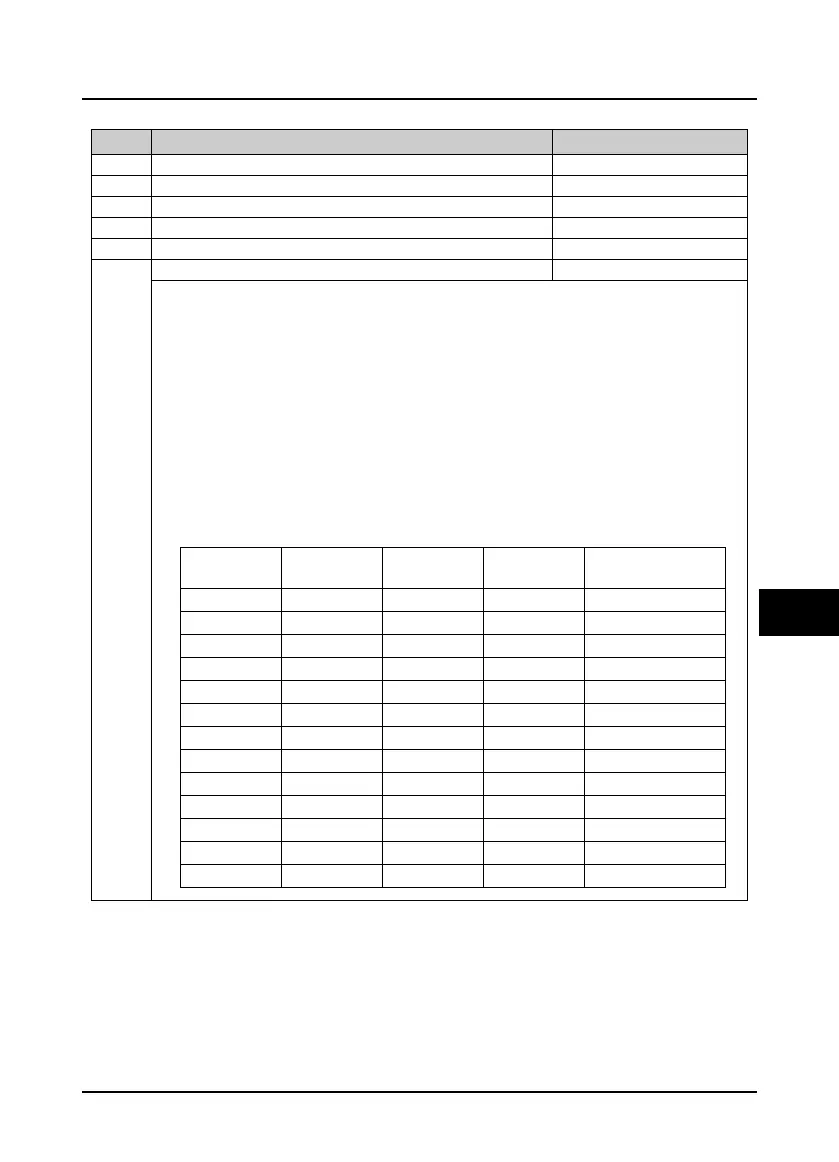
5 - 7,87: Frequency setting source selection 1 - 4.
• Achieve 2
n
frequency setting channel via terminals logic combination, as follow table.
Channel 4
(No. 87)
Channel 3
(No. 7)
Channel 2
(No. 6)
Channel 1
(No. 5)
Setting channel
0 0 0 0
Not change
0 0 0 1
Keypad digital
0 0 1 0
Terminal digital
0 0 1 1
Communication digital
0 1 0 0
Analogue
0 1 0 1
High speed pulse
0 1 1 X
Not change
1 0 0 0
Keypad digital
1 0 0 1
Terminal digital
1 0 1 0
Communication digital
1 0 1 1
AI1
1 1 0 0
AI2
1 1 1 1
Potentionmeter


 To Next Page
 Loading...