Chapter 6 Function Introduction Shenzhen Hpmont Technology Co., Ltd.
- 74 - HD3N Series User Manual V1.1
Ref. code Function Description Setting Range [Default]
8: Switch to analogue.
• When valid, frequency setting channel is switched to to analogue.
• Priority of frequency setting channel:
button switching function (F00.12 = 1) > Switch from frequency to analogue (DI = 8) > Switch to
normal running mode (DI = 30) > PLC > Wobble > Multi-speed (DI = 13 - 16) > frequency setting
channel terminal 1 - 3 (DI = 5 - 7) > channel set by F00.10.
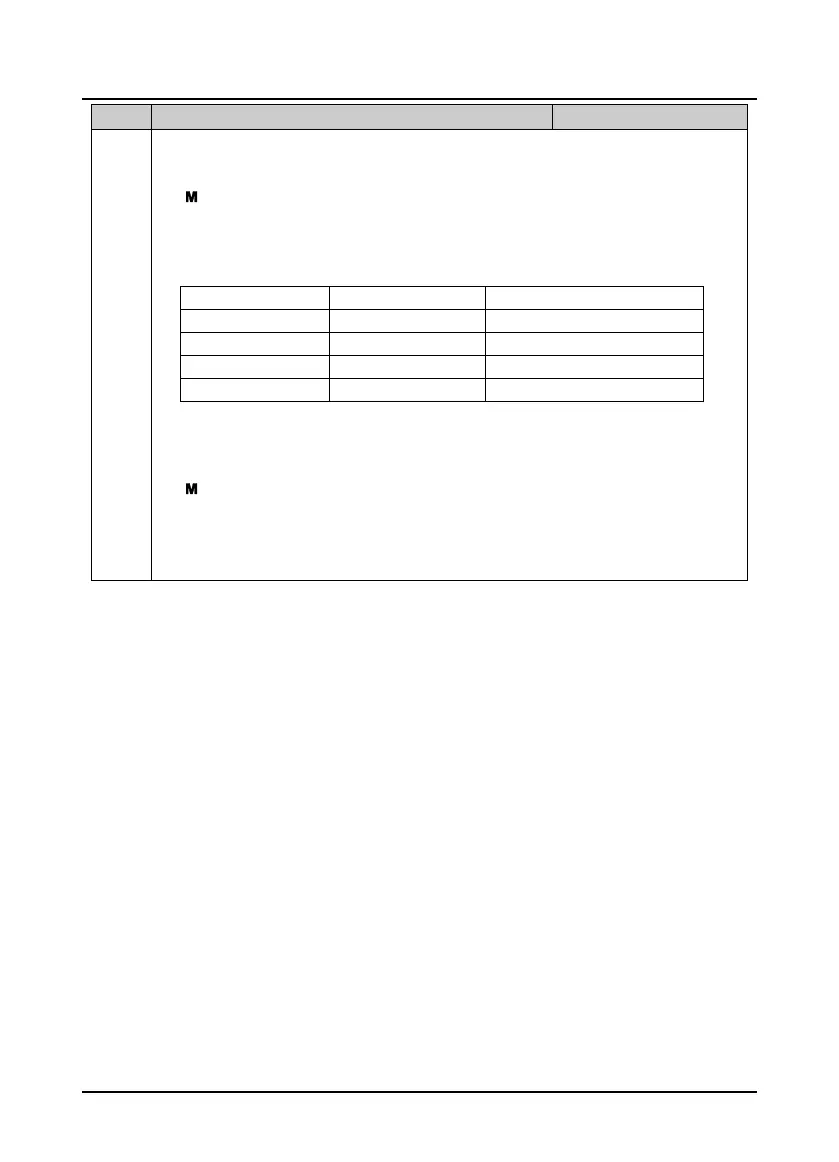
9,10: Running command switching 1, 2.
• Achieve 4 commands:
Channel 2 (No. 10) Channel 1 (No. 9)
Command
0 0
Not change
0 1
Keypad
1 0
Terminal
1 1
SCI
• The running commands can be switched during running,but not effective until stop state.
11: Command switch to terminal.
• When valid, running channel is switched to terminal.
• Priority of running command channel:
switching function (F00.12 = 1) > switching to terminal (DI = 11) > Running command switching 1,
2 (DI = 9,10) > running command set by F00.11.
• Valid only when HD3N stops.
12: External command for stop.
When valid, HD3N stops according to F02.13. Effective for all of the running command channels.


 To Next Page
 Loading...