HSD
5801H0056 ______________________________________________________________ 129/181
8 REPLACING COMPONENTS
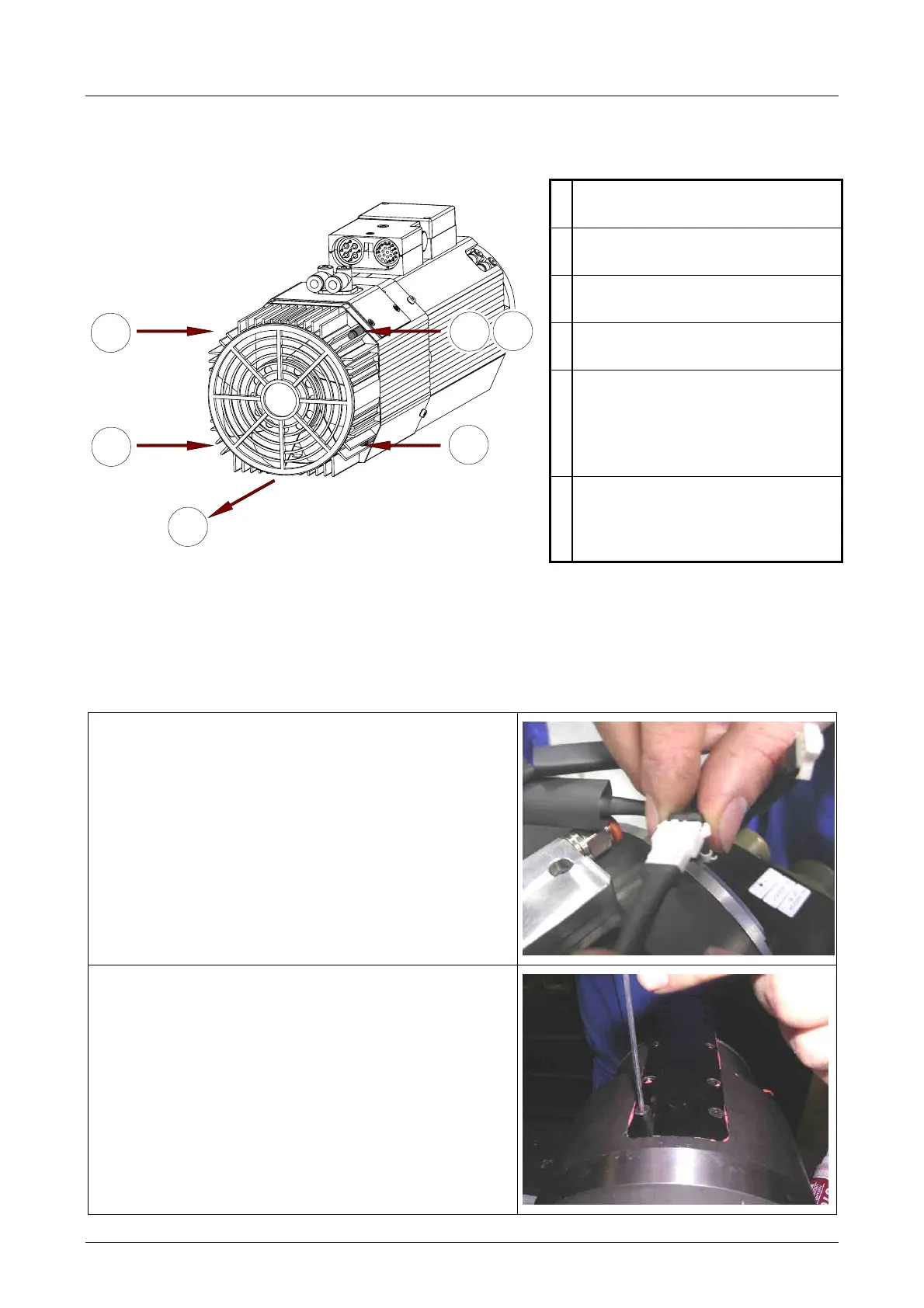
8.1 REPLACING THE ELECTRIC FAN
1
Remove the four fixing screws of
the electric fan unit.
2
Move the electric fan unit in an
axial direction.
3
Disconnect the electrical
connector of the electric fan.
4
Connect the electrical connector
of the new electric fan.
5
Insert the earth cable of the new
electric fan in the appropriate
space (5), so that it is blocked by
the screw in the next point (6).
6
Fix the new electric fan with the
four screws, paying attention to
the earth connection.
2
1
1
1
1
5
8.2 REPLACING THE SHAFT KIT FOR MODELS ES884, ES888
8.2.1 Disassembly procedure
1.
Cut the heat-shrinking sheath and disconnect
the sensor connectors
2.
Remove the ten screws that block the cover of
the mounting plate bracket



 To Next Page