16
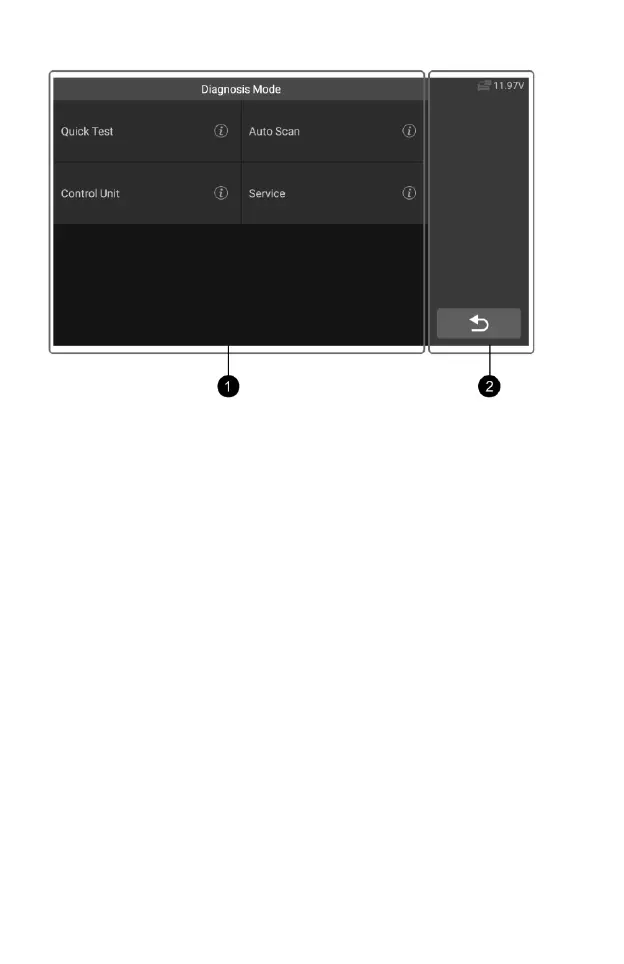
Figure 4-10 Sample Diagnosis mode Screen 1
The diagnostic screens typically include two sections.
1. Main Section
2. Button area
Main Section
The main section displays the diagnostic mode of the vehicle, depending on
the vehicle type; or it may vary depending on the operation stage, displaying
vehicle identification selection, main menu, test data, messages, instructions
and other diagnostic information.
Button area
The Status Information Bar at the right of the Main Section displays the
following items:
1) Back button – Returns to the CR Genius Job Menu.
2) Voltage Icon – displays the vehicle’s voltage status.
4.3.2 Screen Messages
Screen messages appear when additional input is needed before
proceeding. There are three main types of on-screen messages: Confirmation,
Warning, and Error.
Confirmation Messages
This type of messages usually displays as an “Information” screen that
informs you when you are about to perform an action that cannot be reversed or
when an action has been initiated and your confirmation is needed to continue.
When a user-response is not required to continue, the message displays










 To Next Page