65
6 Upgrade
The Update application allows you to download the latest released software.
The updates can improve the CR Genius applications’ capabilities, typically by
adding new tests, new models, or enhanced applications.
The tablet automatically searches for available updates for the CR Genius
software when it is connected to the internet. Any updates that are found can be
downloaded and installed on the device. This section describes installing an
update to the CR Genius System.
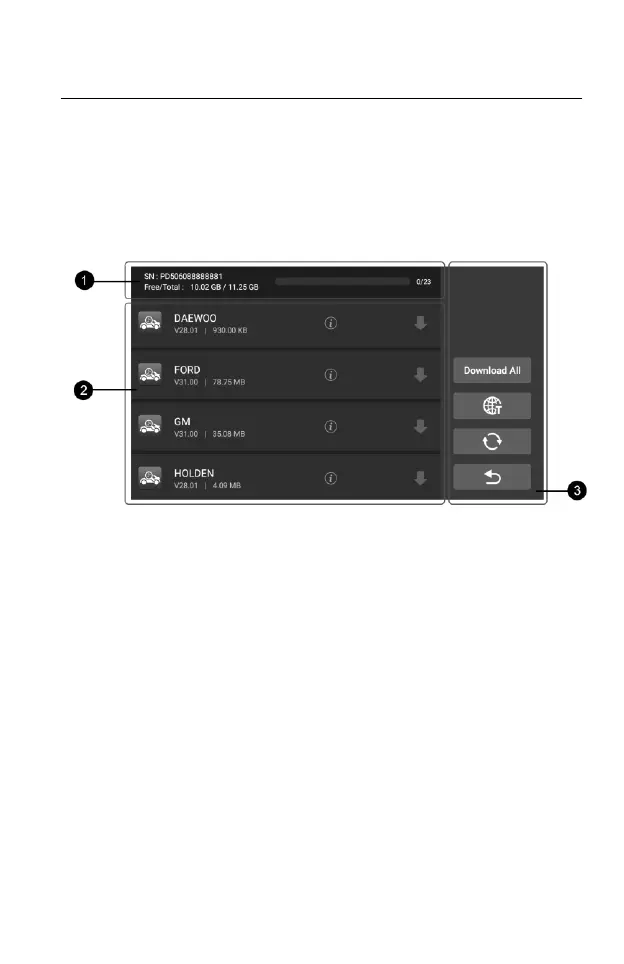
Figure 6-1 Sample Update Screen – for CR Genius
① Status Bar
Left Side – displays the CR Genius device model information and
serial number.
Right Side – displays an update progress bar and indicates the
number of updates.
② Main Section
Left Column –displays diagnostic function icons and service function
icons as well as software name, software version and size;
Middle Column –Tap the
○
i button to open the information screen
to view detailed information. Tap the
○
x button to close it;
Right Column –control software update. Depending on the status of
the software download, different title buttons will be displayed.
a) Tap the download icon to update the item you want to update.
b) Tap Pause to suspend the software update.










 To Next Page