1
PANEL DESCRIPTION
3
BASIC MANUAL
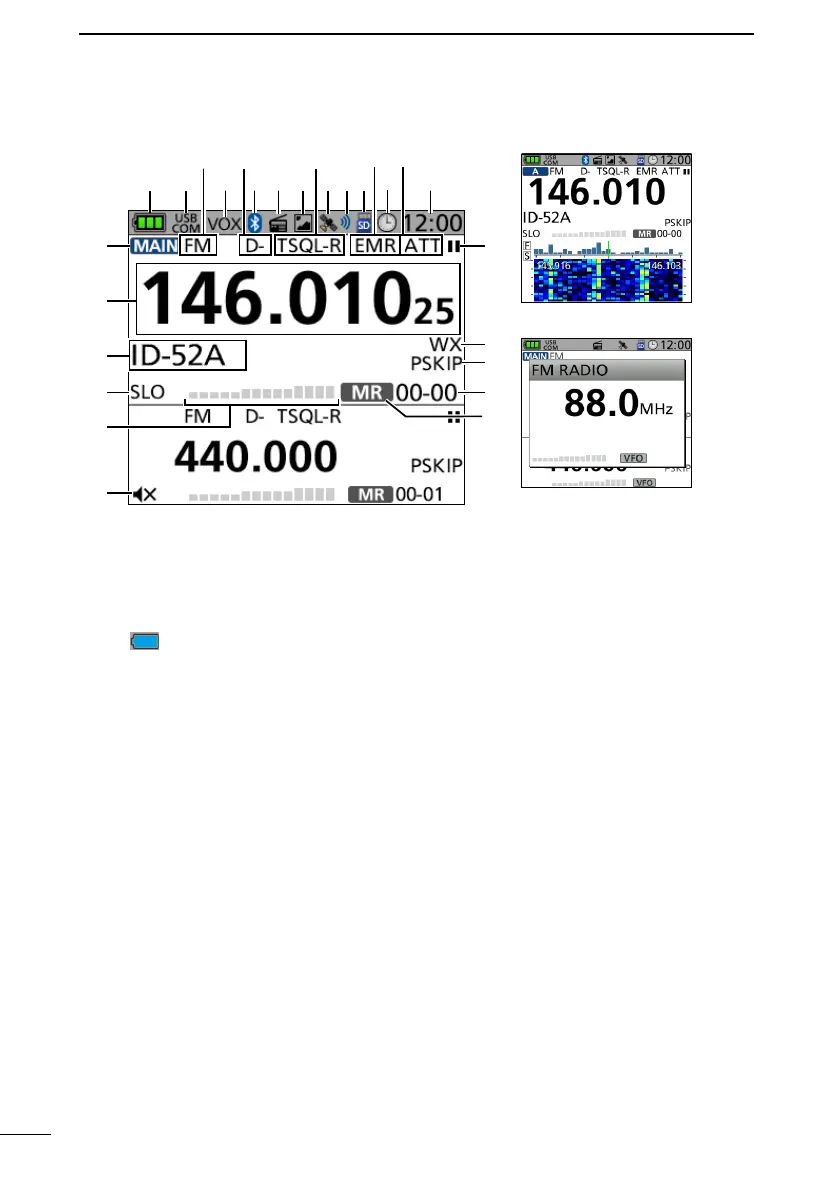
■ Function display
1BATTERY ICON
Displays the current capacity of the
attached battery pack. (p. 6)
L “ ” is displayed when the optional
battery case is attached.
2USB CONNECTION INDICATOR
Displayed when a USB device is
connected through a USB cable, and
“USB Connect” is set to “Serialport.”
([MENU] > SET > Function > USB
Connect)
3OPERATING MODE ICONS
Displays the selected operating mode.
(p. 15)
4VOX ICON
Displayed when the VOX function is
ON.
5DUPLEX ICONS
• D+: Displayed during plus duplex
operation.
• D–: Displayed during minus duplex
operation.
6Bluetooth
®
ICON
Displayed when a Bluetooth device is
connected. (p. 32)
7FM RADIO ICON
Displayed when the FM radio is ON.
(p. 20)
8PICTURE SHARE ICON
Displayed when the Share Pictures
function is ON.
9TONE ICONS
Displayed when the tone or digital
squelch function is ON.
GPS ICON
Displays the status of the GPS receiver.
(p. 10)
GPS ALARM ICON
Displayed when the GPS Alarm
function is ON.
microSD ICON (p. 8)
• Displayed when a microSD card is
inserted.
• Blinks while accessing the microSD
card.
Dual band display
FM RADIO window
(Tuning mode)
Single band display
1 2
3
4
5
678
9



 To Next Page