2
8
1
7
4
10
15
18
2
8
13
5
11
16
3
9
14
6
12
17
BASIC MANUAL
■ Saving the setting data onto a microSD card
You can save the Memory channels, MENU screen item settings, repeater lists, and so
on, onto a microSD card.
Saving settings onto a card enables you to easily restore the transceiver to its previous
settings, even if you perform an All Reset.
D Formatting a microSD card
IMPORTANT!
Formatting a card erases all its data. Before formatting any used card, back up its data
onto another device.
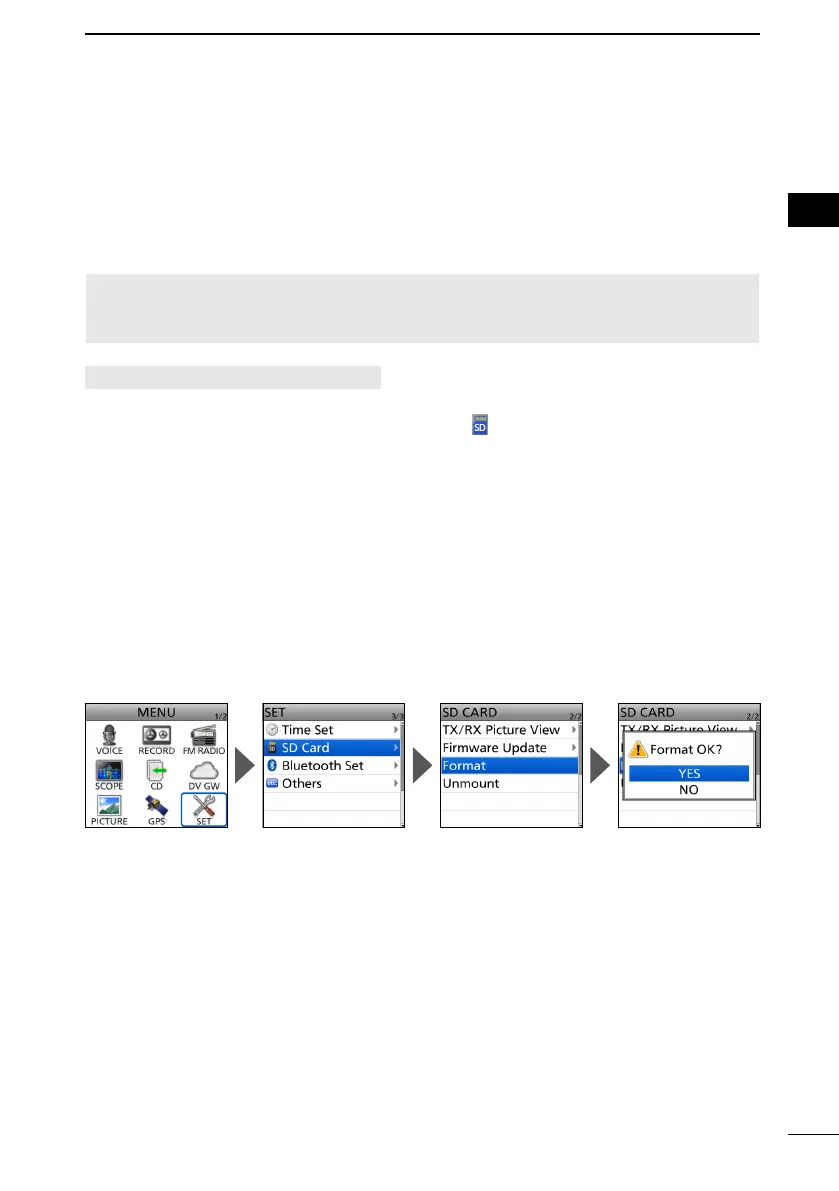
[MENU] > SET > SD Card > Format
Turn ON the transceiver.
• If a microSD card is inserted, the microSD icon “ ” is displayed.
• While accessing, the icon blinks.
2.
Select “SD Card” in the “SET” menu.
4. Select “Format.”
•
5. Select “Yes.”
• The formatting starts, and the display shows the formatting progress.
• After the formatting ends, returns to the SD CARD screen.
L
are displayed, turn OFF the functions or ignore the messages and select “YES.”
L To exit the MENU screen, push [MENU].



 To Next Page