D-STAR OPERATION
59
D-STAR GUIDE
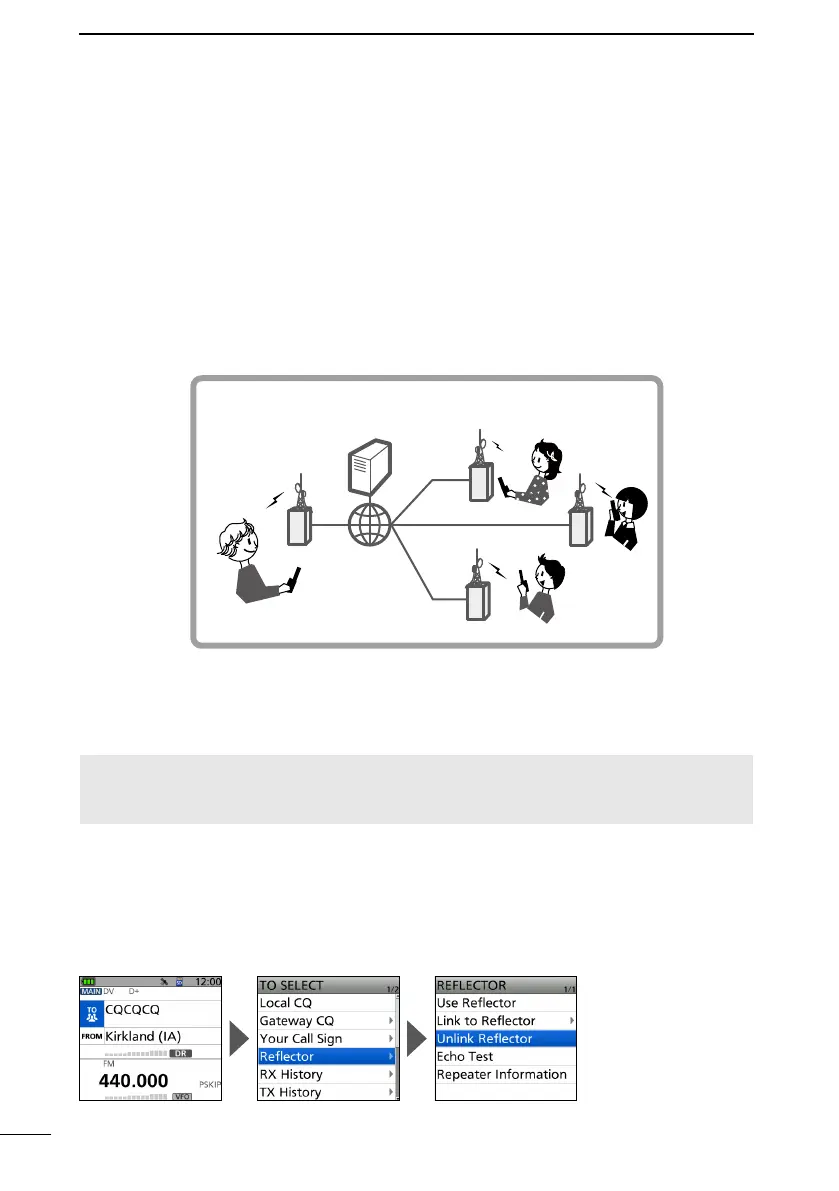
■ About reectors
D What is a reector?
A reector is a special server connected to the Internet and running a version of the
D-Plus software. If the D-Plus software is installed on your Access repeater, it provides
various functions including gateway and reector linking capabilities (It is known as the
D-STAR reector system). The D-STAR reector system enables a number of D-STAR
repeaters anywhere to link to a reector. This means that when you transmit through a
D-STAR repeater linked to a reector, your voice can be heard on other repeaters linked
to the reector, and you can hear other stations that are connected to the reector.
D Unlinking a reector
Before trying to link to another reector, BE SURE to unlink the reector that is currently
connected to the repeater.
NOTE: If a reector is already connected, ask on the air whether or not you can change
reectors and wait for responses. BE SURE to reconnect back to the same reector
when you nish your conversation.
1. Push D-pad() to select “TO,” and then push [ENT].
2. Select “Reflector.”
3. Select “Unlink Reflector.”
• Returns to the DR screen, and “Unlink Reector” and “U” are displayed in “TO.”
4. Hold down [PTT] to unlink the reflector.
• The TX/RX indicator lights red.
CAN
AUS
USA
UK
D-STAR reector system
Reector
Access
repeater



 To Next Page