5
BASIC MANUAL
2
INITIAL SETUP
Before starting using the transceiver, follow these steps for the initial setup.
STEP 1
Attaching the battery pack and charging the battery. (pp. 5, 6)
STEP 2
Inserting a microSD card. (p. 7)
STEP 3
Turning ON the transceiver. (p. 7)
STEP 4
Adjusting the audio level. (p. 7)
STEP 5
Saving your initial setting onto a microSD card. (p. 8)
STEP 6
STEP 7
* Entering your Call sign (MY) into the transceiver. (p. 45)
STEP 8
► You have completed the steps!!
* You can skip the steps if you do not plan to operate D-STAR right now.
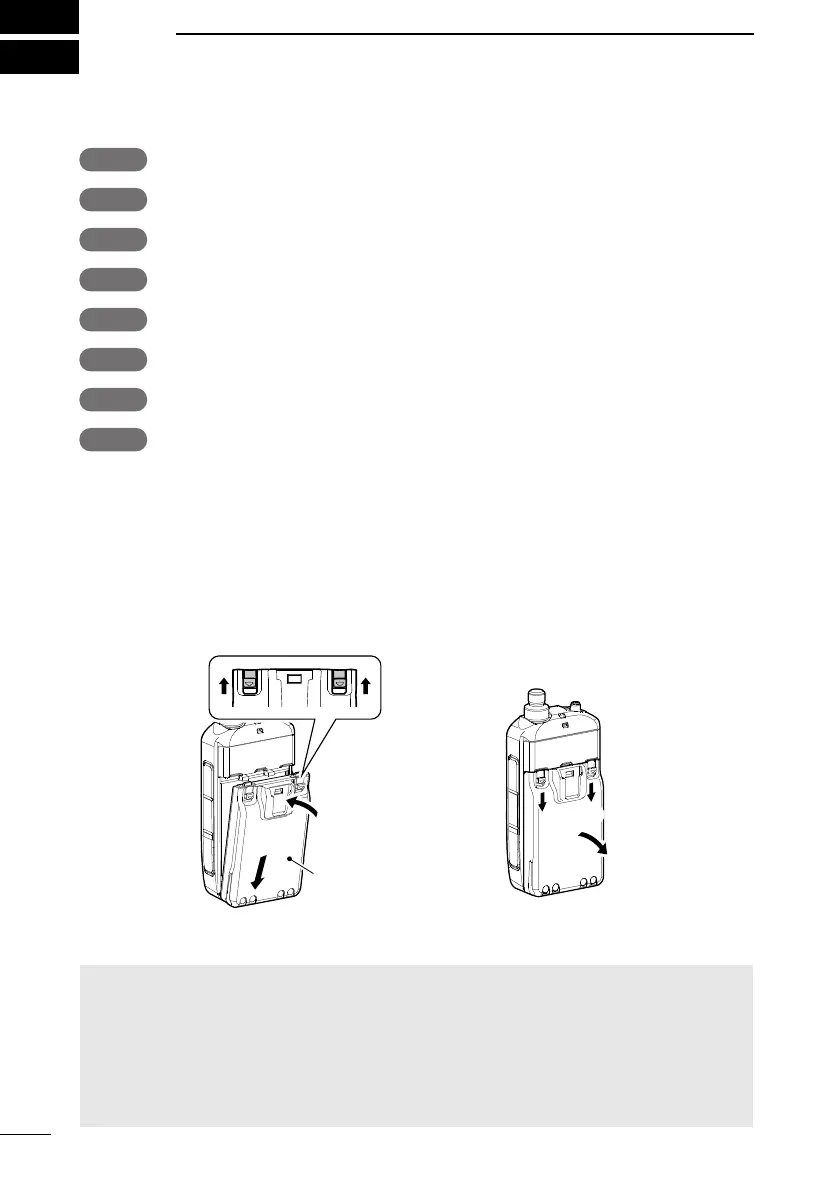
■ Attaching the Battery pack
Attach or detach the battery pack or battery case, as illustrated below.
L When attaching, slide the battery pack and hold it down until the both latches are locked.
1
1
2
1
Battery pack or
battery case
L Illustrations are when using the battery pack.
NOTE:
•
battery pack or case from the transceiver when not using it for a long time. Otherwise, the
attached battery pack or case will become exhausted, and will need to be recharged or
replaced.
•
selections High, Mid, and Low2.
To attach To detach



 To Next Page