Bluetooth
®
OPERATION
8
32
1
7
4
10
15
18
2
8
13
5
11
16
3
9
14
6
12
17
BASIC MANUAL
TIP:
Auto Connect function
The transceiver automatically connects to a paired Bluetooth device.
([MENU] > SET > Bluetooth Set > Auto Connect)
Re-searching Bluetooth device
“No Device Found” is displayed if the transceiver could not
nd a Bluetooth device.
1. Push [QUICK].
2. Select “Re-search.”
■ Connecting to a Bluetooth
®
headset
You can connect an optional Bluetooth headset to the transceiver.
Step 1. Selecting the pairing mode of the headset.
See the instruction manual of the headset to select the pairing mode.
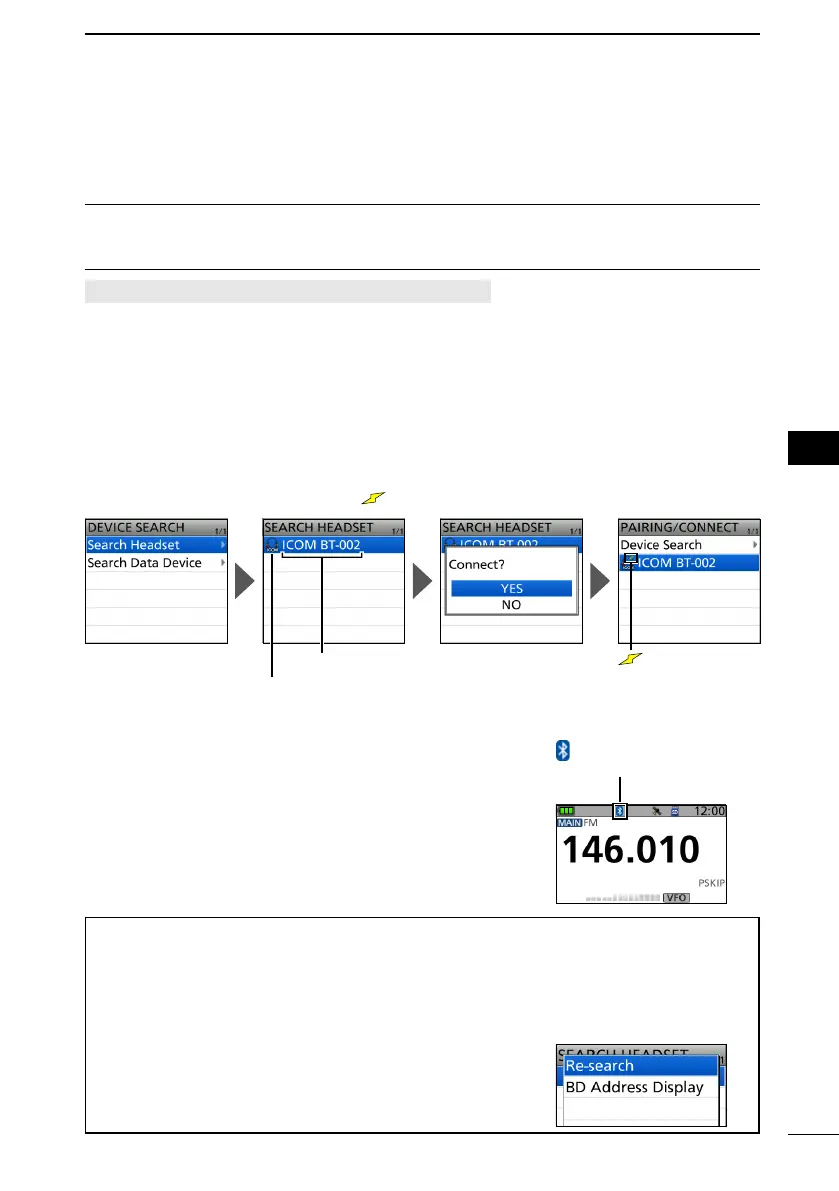
Step 2. Searching for the headset (Transceiver)
[MENU] > SET > Bluetooth Set > Pairing/Connect
1. Push [MENU].
2. Select “Bluetooth Set” in the “SET” menu.
3. Select “Pairing/Connect.”
4. Select “Device Search.”
5. Select “Search Headset.”
• Displays the usable headsets in the pairing list.
6. Select a headset to pair.
• The conrmation dialog is displayed.
7. Select “YES.”
• After connecting to the headset, is displayed in the pairing list.
is displayed
while connected.
Headset icon
(“ICOM” indicates the Icom headset.)
Device name
8. To exit the MENU screen, push [MENU].
L While connected to a Bluetooth device, the Bluetooth
icon is displayed on the Standby screen.
L When “AF Output” is set to “Headset Only” and the
Bluetooth connection is accidentally disconnected, a
dialog is displayed to select whether or not to output
the audio from the transceiver’s speaker.
is displayed while
connected.



 To Next Page