D-STAR OPERATION
60
D-STAR GUIDE
1
7
4
10
15
18
2
8
13
5
11
16
3
9
14
6
12
17
D Linking to a reector
If your repeater is not currently linked to a reector, or if you want to change it to another
reector, follow the steps below. Before linking to another reector, BE SURE to unlink
the current reector. (p. 59)
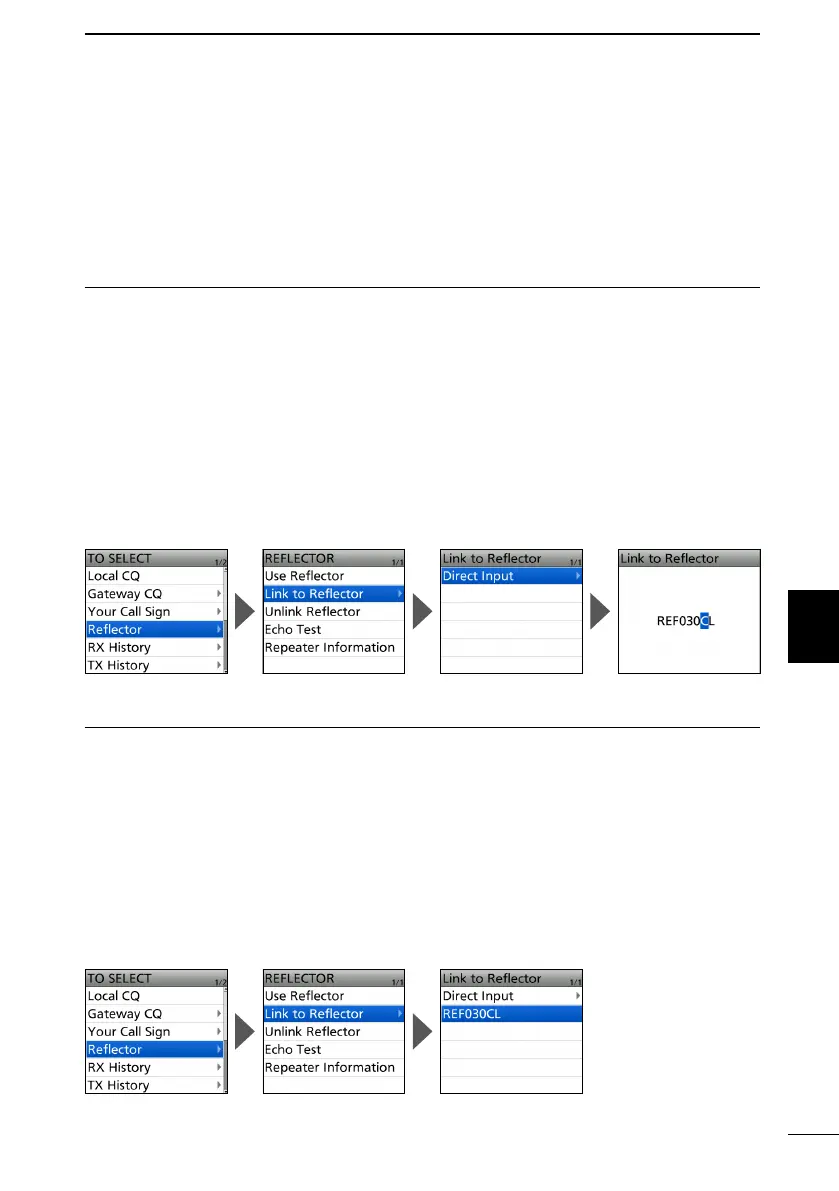
Direct inputting a reector
Example: Directly enter “REF030CL.”
1. Push D-pad() to select “TO,” and then push [ENT].
2. Select “Reflector.”
3. Select “Link to Reflector.”
4. Select “Direct Input.”
5. Push D-pad() to move the cursor, and rotate [DIAL] to select the reflector type,
reflector number, or module letter.
6. Push [ENT].
• Returns to the DR screen, and “Link to Reector” and entered reector are displayed in
“TO.”
7. Hold down [PTT] to link to the reflector.
• The TX/RX indicator lights red.
Using the TX History
The TX History saves up to 5 reectors that your Access repeater linked before.
Example: Select the “REF030CL” in the TX History.
1. Push D-pad() to select “TO,” and then push [ENT].
2. Select “Reflector.”
3. Select “Link to Reflector.”
4. Select the reflector that you want to link to.
• Returns to the DR screen, and “Link to Reector” and “REF030CL” are displayed in
“TO.”
5. Hold down [PTT] to link to the reflector.
• The TX/RX indicator lights red.



 To Next Page