RECORDING A QSO ONTO A microSD CARD
6
28
1
7
4
10
15
18
2
8
13
5
11
16
3
9
14
6
12
17
BASIC MANUAL
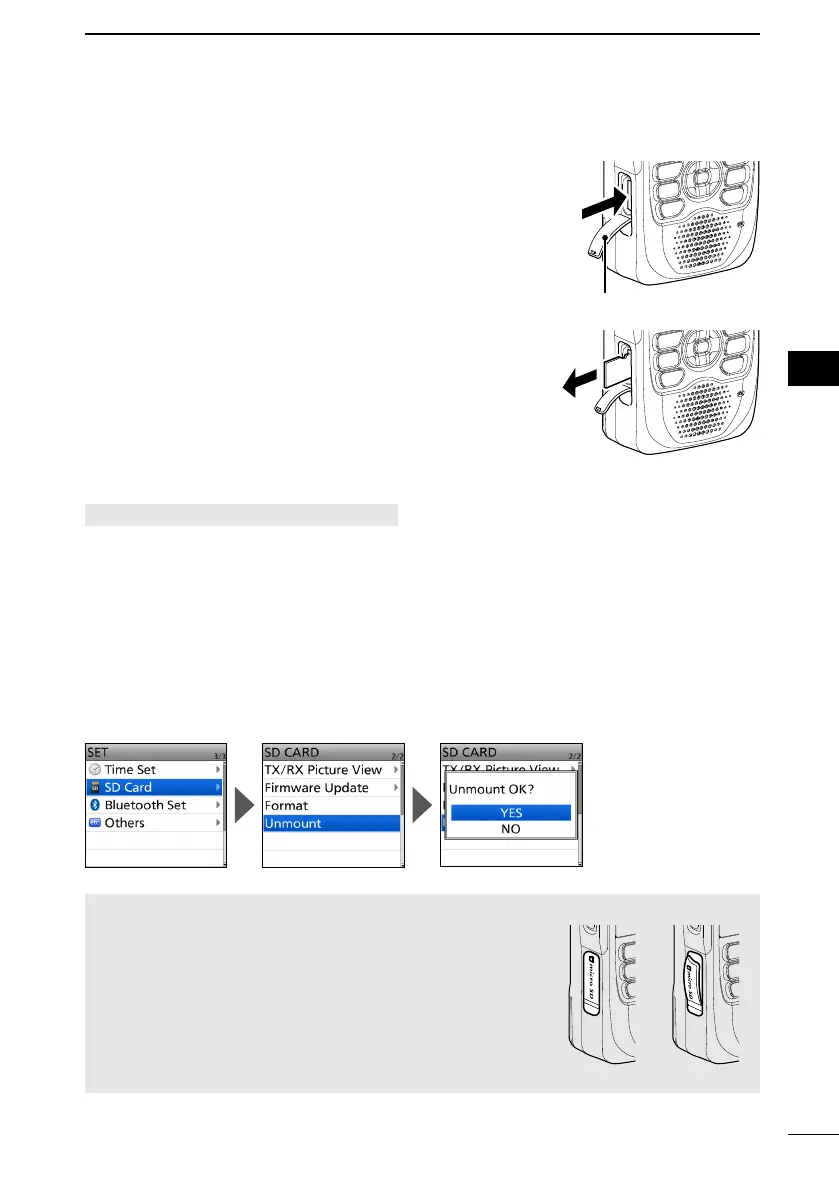
■ Removing the microSD card
D Removing while the transceiver is OFF
1. Turn OFF the transceiver.
2. Open the [microSD] slot cover.
3. Push in the microSD card until a ‘click’ sounds, and
then carefully pull it out.
L DO NOT touch the terminals.
4. Completely close the [microSD] slot cover.
D Removing while the transceiver is ON
[MENU] > SET > SD Card > Unmount
1. Push [MENU].
2. Select “SD Card” in the “SET” menu.
3. Select “Unmount.”
• The conrmation dialog is displayed.
4. Select “YES.”
• When the unmounting is completed, “Unmount is completed.” is briey displayed, then
the display automatically returns to the SD CARD screen.
5. Push in the microSD card until a ‘click’ sounds, and then carefully pull it out.
L See “Removing while the transceiver is OFF” for details.
6. Completely close the [microSD] slot cover.
NOTE: After removing the microSD card, completely
close the [microSD] slot cover as shown to the right.
Close the slot cover rmly
YES NO
Push in
Pull out
Slot cover



 To Next Page