6
RECORDING A QSO ONTO A microSD CARD
27
BASIC MANUAL
■ Playing a recorded audio
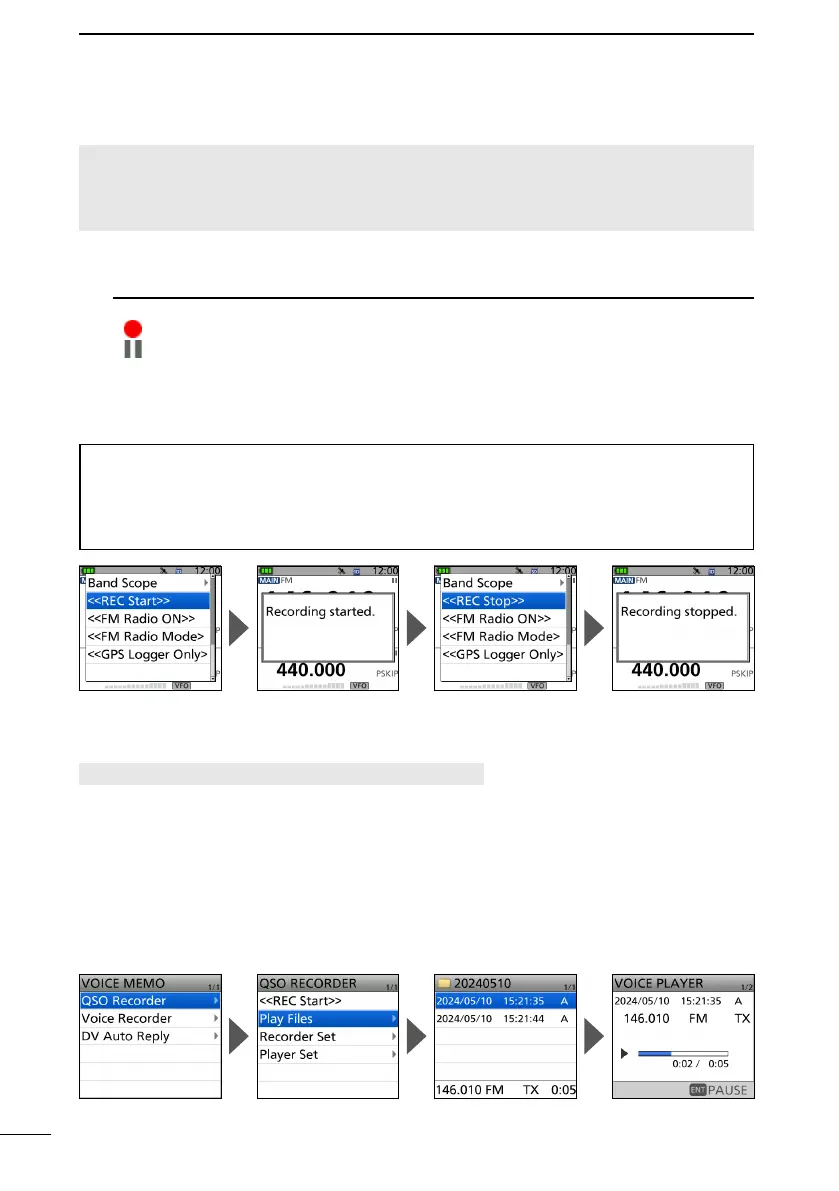
[MENU] > RECORD > QSO Recorder > Play Files
1. Push [MENU].
2. Select “QSO Recorder” in the “RECORD” menu.
3. Select “Play Files.”
4. Select the folder that contains the file you want to play.
L The folder is named YYYYMMDD (Y: year, M: month, D: day).
5. Select the file that you want to play.
• The VOICE PLAYER screen is displayed and starts playing.
L To pause, push [ENT]. To restart, push [ENT] again.
L To exit the MENU screen, push [MENU].
■ Recording a QSO audio
NOTE:
• Once a voice recording starts, the Recording function will be continuously turned ON until
you stop recording, even if you turn OFF the transceiver.
• FM Radio audio cannot be recorded.
1. Push [QUICK].
2. Select “<<REC Start>>.”
• “Recording started” is displayed.
L Information
• is displayed while recording.
• is displayed while the recording is paused.
• Recording continues until you stop recording, or the card becomes full.
3. Push [QUICK].
4. Select “<<REC Stop>>.”
• “Recording stopped” is briey displayed, and voice recording stops.
TIP: As the default setting
• The recording is paused while the squelch is closed, and resumes when a signal is
received. ([MENU] > RECORD > QSO Recorder > Recorder Set > RX REC Condition)
• The recording automatically starts when you start to transmit, even if the Recording function
is turned OFF. ([MENU] > RECORD > QSO Recorder > Recorder Set > PTT Auto REC)



 To Next Page