D-STAR OPERATION
64
D-STAR GUIDE
1
7
4
10
15
18
2
8
13
5
11
16
3
9
14
6
12
17
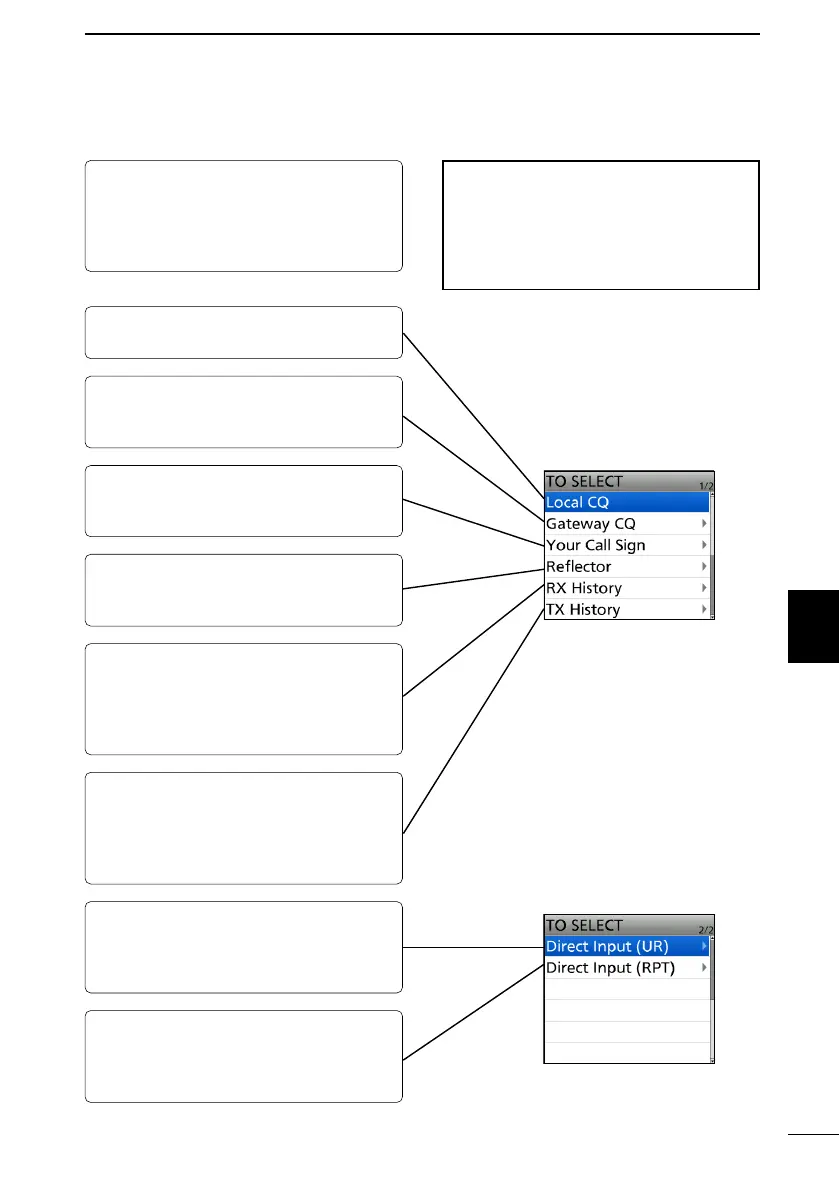
■ “TO” (Destination) setting
By rotating [DIAL]:
Select a repeater or Your Call Sign that
is displayed by rotating [DIAL] on the
DR screen. (This operation is disabled
when “CQCQCQ” is set.)
TIP: After you receive the individual
station or repeater’s signal, the call sign
can be captured by holding down the
Call Sign Capture key ([RX→CS]), and
you can quickly and easily reply to a
call.
To make a Local Area CQ call:
Set “CQCQCQ” in “TO” (Destination).
To make a call to a specic station:
Select the station call sign in the Your
Call Sign.
To select from RX History:
When you receive a call, the caller
station data is saved in RX History.
You can select the destination from the
record.
To directly enter the destination
station call sign:
Directly enter the destination station’s
call sign.
To make a Gateway CQ call:
Select a repeater from the repeater list,
if you want to make a Gateway call.
To make a call through a reector:
Select a reector that is connected to
the repeater you want to call through.
To select from TX History:
When you make a call, the destination
repeater or called station data is saved
in TX History. You can select the
destination from the record.
To directly enter the destination
repeater call sign:
Directly enter the destination repeater’s
call sign.



 To Next Page